SECTION 7 - ENDMARKER SERVICE
page 7-9
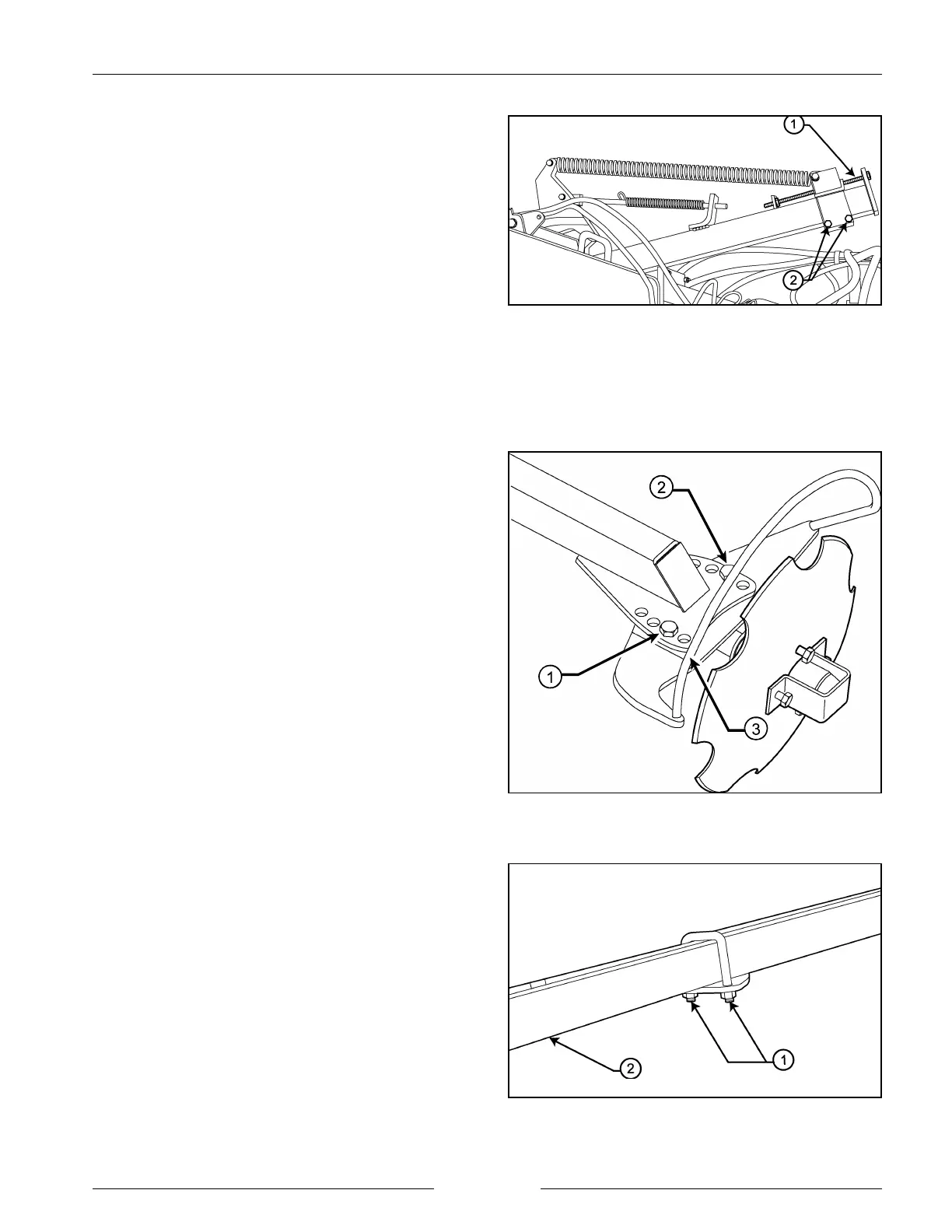
Adjust Frame Springs
202247M1
Adjusting Disc Angle
400106M1
Adjusting Marker Arm Length
498216M1
5. Marker weight bias spring.
The marker bias spring should be adjusted to give
efficient weight on the disc to give a good mark in the
field and to have tension on the spring when the
marker is folded in.
- Loosen the adjustment bolts (2) and then adjust the
bolt (1). Lengthening the spring will put less force
on the disc. Shortening the spring will place
greater force on the disc.
- If there is insufficient weight on the marker to stop
the disc from bouncing excessively in the field, use
the horizontal pivot adjustment bolts to increase
the spring force.
6. Adjusting disc angle.
The angle of marking disc can be adjusted to be more
or less aggressive depending on the field condition.
Harder ground or thicker stubble may require a greater
angle to make the mark more visible.
To adjust the disc angle:
- Loosen the front 5/8" bolt (1) and remove the back
bolt (2).
- Rotate the guard and disc (3) to the desired angle.
- Replace and re-tighten the bolts.
NOTE: The front bolt should be located in the second
hole from the end of the extension arm to
rotate properly.
NOTE: The marker disc should not be positioned
inward or parallel to the seed tool centerline.
7. Adjusting marker length.
The length of the endmarker should be set to mark a
distance from the outermost opener that is the same as
the distance from the center of the implement to that
opener.
To adjust the marker length:
- Loosen the nuts (1) on the u-bolt on the secondary
boom.
- Slide the extension arm (2) in or out as required.


 To Next Page