RFP: FibeAir 2000 Considerations Chapter 10
FA4800 User Manual Release 1.9.40 10-9
• If you mix FibeAir 2000 and FA4800 units in a collocated site, you must use RFP B or E
• Selection of the RFP influences the capacity, latency and TDM quality
• RFP influences capacity and latency. Jitter buffer configuration can be used to set the
TDM quality (see Chapter 5, TDM Services selection)
• Using the Link Budget Calculator, you can see the affect of the RFP on the Ethernet
throughput.
RFP: FibeAir 2000 Considerations
• The performance of FibeAir 2000 radios that operate with RFPs B or E can be seen in
the Link Budget Calculator.
• For FibeAir 2000 100 series: If the HSS Master works in asymmetric Tx/Rx ratio, then
all other collocated FibeAir 2000 units must operate in the same Tx/Rx ratio. In this
case the ratio will be fixed and not automatic-adaptive.
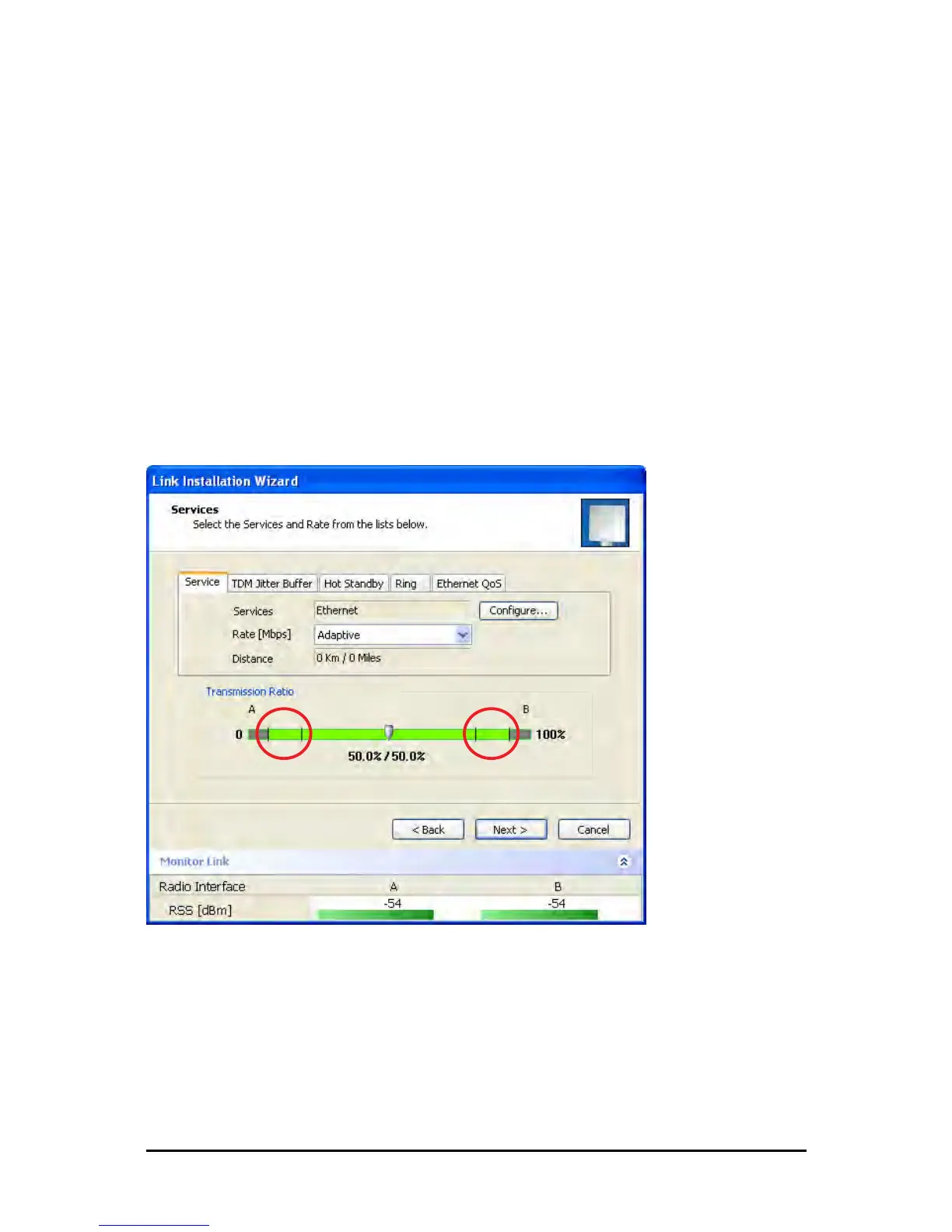
• Installation/Configuration considerations: If you are using FibeAir 2000 100 master
and FibeAir 2000 clients, the Services and Rates dialog will look like this:
Figure 10-11: Services and Rates - FibeAir 2000 100 master, FibeAir 2000 clients
• The circled areas should not be used. Using those areas, you may loose the collocated
link with the longest distance between sites. If you do move the slider into a circled
area, you will receive a popup warning:



 To Next Page