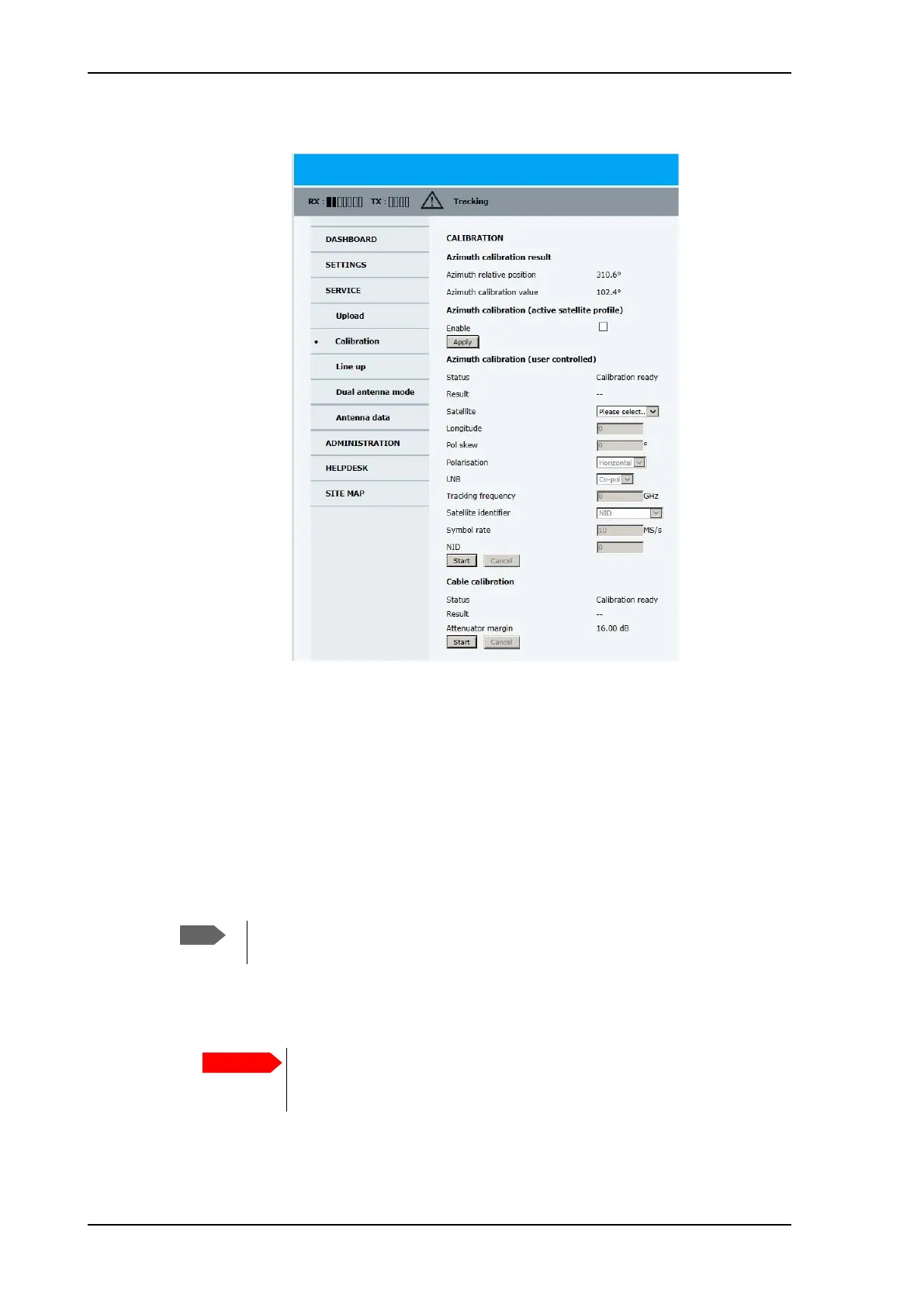
Calibration
6-8 Chapter 6: Configuration 98-150471-A02
4. Click SERVICE > Calibration.
5. Select Enable in the section Azimuth calibration (active satellite profile).
6. Click Apply.
7. Switch on the modem.
Azimuth calibration (user controlled)
To make a user-controlled azimuth calibration, do as follows:
1. On the page SERVICE > Calibration, in the Satellite drop down list select User
defined.
2. Type in the longitude and polarisation skew of the satellite. The polarisation skew is
provided by the satellite operator, it is typically 0 degrees. For satellite data see DVB-S
satellites on page E-1, www.lyngsat.com.
3. Select the polarisation of a transponder and type in its frequency and symbol rate.
Figure 6-7: Web interface: SERVICE, Calibration
Check that the satellite transponder is visible from the location of the installation
and that it is at an elevation angle between 10 and 70 degrees.
The calibration function is not able to verify the correctness or precision
of the supplied longitude. It is therefore important to supply the correct
longitude including the first decimal.
SAILOR900HP.book Page 8 Monday, July 18, 2016 12:44 PM










 To Next Page