Calibration
98-150471-A02 Chapter 6: Configuration 6-9
4. Select which satellite identifier to use for identification of the signal.
5. Click Start and wait typically 5 minutes for the calibration to finish. A progress bar is
shown during calibration and a message is displayed when the calibration has
completed. In case of failure, see the table in the following section for a description of
error codes during calibration.
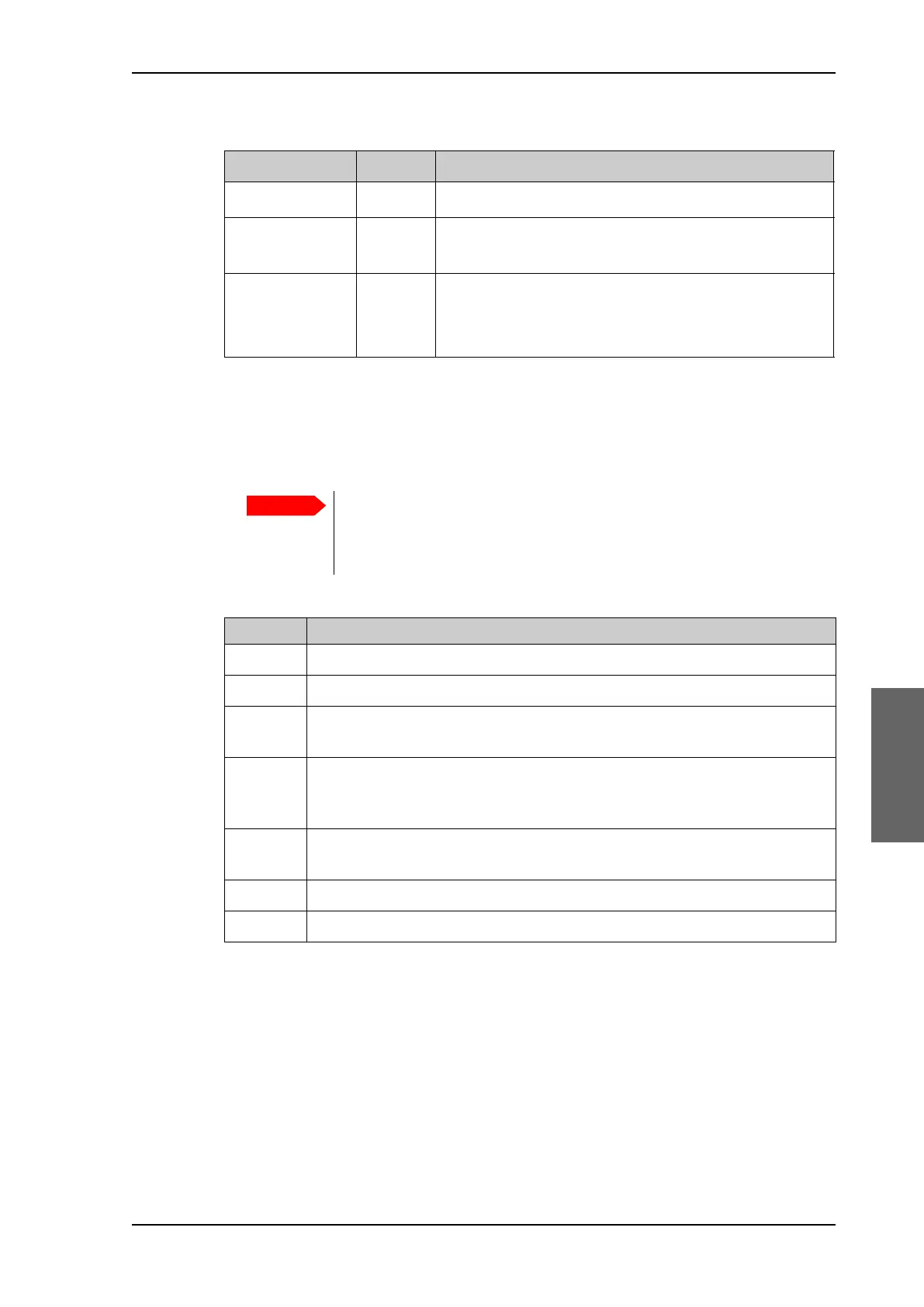
The following table shows the error codes that might be displayed during a calibration.
Azimuth calibration with a service profile
1. Click SERVICE > Calibration.
2. Select the service profile in the drop down list Satellite. All profiles with the VSAT
modem Service & Calibration are displayed in the list. If there is no profile in the list
see To set up a service profile for calibration on page 6-10.
Satellite identifier NID value Description
NID 0 Satellite identifier is not used.
NID 1–65535 Supplied NID is matched against Network ID broadcast
by the satellite.
Orbital position n.a. Supplied longitude is matched with orbital position
broadcast by satellite.
Not all service providers broadcast the orbital position.
Table 6-4: Satellite identifier and NID values
It is strongly recommended to verify the result of a calibration performed
with user defined data. This can be done by making a new calibration on a
different satellite and verify that the resulting Azimuth calibration value
differs less than one degree.
Error code Explanation
1 The elevation of the selected satellite is too low. Select another satellite.
2 The elevation of the selected satellite is too high. Select another satellite.
4 The calibration values could not be saved. Possibly due to defective
hardware.
5 The antenna could not point with sufficient precision. Check that the
antenna is mounted in a stable way. Other possible causes might be electrical
or mechanical faults.
6 No signal received. Check that there is free line of sight. Try again or try with
another satellite.
7 RF setup error, e.g. missing or invalid RX frequency.
8 Invalid satellite, e.g. satellite not visible.
Table 6-5: Possible error codes during calibration
SAILOR900HP.book Page 9 Monday, July 18, 2016 12:44 PM










 To Next Page