Configuration with the web interface
98-150471-A02 Chapter 6: Configuration 6-27
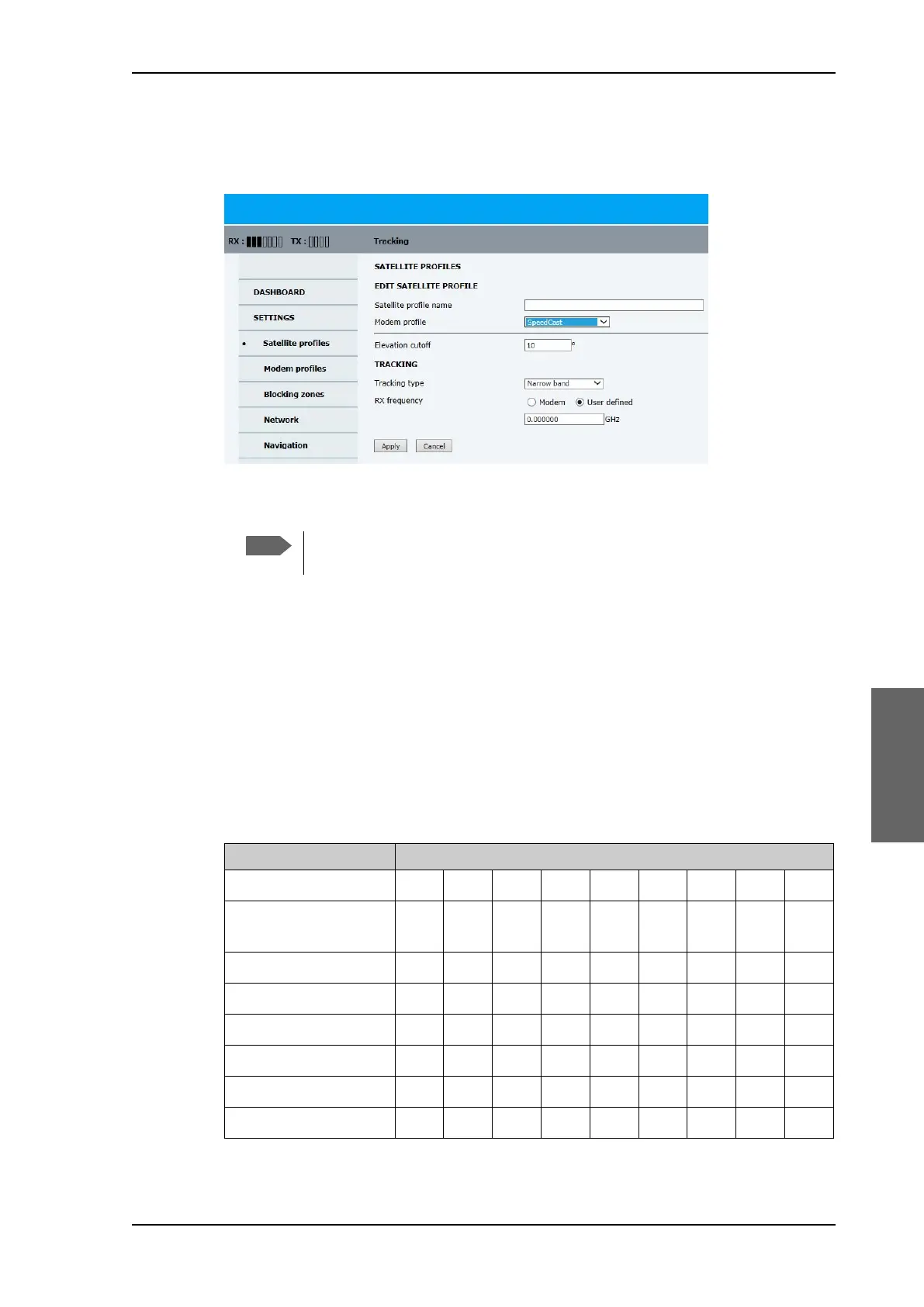
To add or edit a satellite profile, do as follows:
1. Go to SETTINGS or Satellite profiles and click Edit or New entry.
2. Enter or edit the Satellite profile name.
3. Select a modem profile. The page automatically displays the parameters available for the
selected modem profile.
For instruction how to add a VSAT modem profile see Modem profiles on page 6-23.
4. Enter the data for the satellite that you want to use. For satellite data see DVB-S
satellites on page E-1 or www.lyngsat.com.
5. Polarisation skew: See documents from VSAT provider.
6. At Elevation cutoff enter the minimum elevation angle for the antenna to function in
accordance with ETSI (ETSI EN 302 340) and FCC (FCC §25.205) regulations.
• ETSI (ETSI EN 302 340): The minimum elevation angle depends on the Tx
bandwidth and the nominal power of the VSAT modem, see the table below.
Figure 6-20: Web interface: SETTINGS, Satellite profiles — new entry (example)
Tip: Assign a name containing the location where the Satellite profile is to be
used (e.g. Gulf of Mexico or North Sea) and, if possible, the provider.
Bandwidth Nominal modem power
Modem Power [dBm] -16 -14 -12 -10 -8 -6 -4 -2 0
Eirp@14.25 GHz
[dBm]
a
a. Eirp = Fixed system gain 48 dB + antenna gain @ 14.25 GHz 41.1 dB + modem power.
69.1 71.1 73.1 75.1 77.1 79.1 81.1 83.1 85.1
Bw 64kHz-1MHz 6° 7° 8° 9° 11° 13° 16° 19° 22°
Bw 2MHz 4° 5° 6° 7° 8° 10° 12° 14° 17°
Bw 4 MHz 3°4°5°6°7°8°9°11°13°
Bw 8 MHz 3°3°4°4°5°6°7°8°10°
Bw 16MHz 2°2°3°3°4°5°6°7°8°
Bw 32MHz 2°2°2°3°3°4°4°5°6°
Table 6-13: Elevation cutoff (in degrees) versus VSAT modem bandwidth and power
SAILOR900HP.book Page 27 Monday, July 18, 2016 12:44 PM










 To Next Page