Calibration
6-10 Chapter 6: Configuration 98-150471-A02
3. Click Start in the section Azimuth calibration and wait typically 5 minutes for the
calibration to finish. After finished calibration a message with the result of the
calibration is displayed.
6.2.3 To set up a service profile for calibration
If you do not want to use the automatic azimuth calibration or if you want to enter the
satellite parameters directly on the calibration page, use this calibration method. To prepare
for calibration you can set up a service profile for calibration.
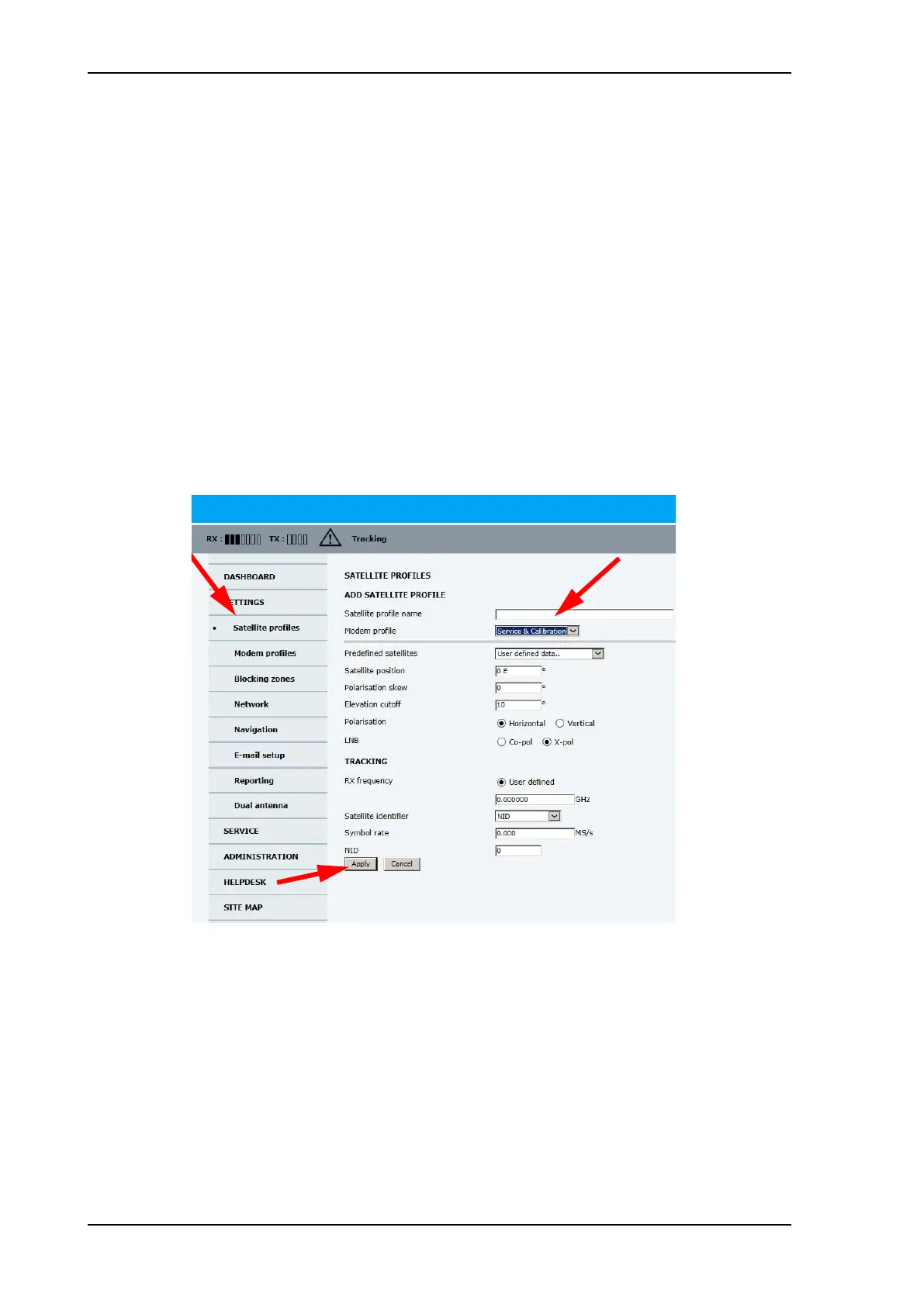
To setup a service profile do as follows:
1. Open your Internet browser and enter the IP address of the ACU. The default IP address
is http://192.168.0.1.
2. Select SETTINGS > Satellite profiles > New entry. Enter the name of the satellite
profile for calibration (a name of your own choice).
3. Select the modem profile Service & Calibration from the drop-down list.
4. Enter the data for the satellite that you want to use as a calibration reference. You can
enter the satellite data manually or select a satellite from the list of predefined satellites
(Eutelsat). For satellite information see DVB-S satellites on page E-1 or
www.lyngsat.com.
Note the following calibration requirements:
Figure 6-8: Service profile for calibration
SAILOR900HP.book Page 10 Monday, July 18, 2016 12:44 PM










 To Next Page