The climate control panel allows you to control the
heating, ventilating, defrosting, and air conditioning
(A/C) functions. The cab climate control panel has
three knobs to control the functions of the cab tem-
perature system; see
Fig. 4.33:
•
fan knob with recirculation button
•
temperature control knob with A/C button
•
mode control knob (with bunk-override button
on sleeper cab only)
The fan knob controls the fan speed, and forces
fresh or recirculated air through the air outlets. To
increase airflow, turn the knob clockwise to a higher
number. To decrease airflow, turn the knob counter-
clockwise to a lower number.
Recirculation mode limits the amount of outside air
that enters the cab. Press the recirculation button to
prevent dusty or smoky air from entering the cab.
NOTE: To prevent the buildup of odors and/or
oxygen depletion inside the cab, the system
switches from full recirculation mode to partial
recirculation mode after 20 minutes.
The temperature control knob is used to select the
desired temperature. Turn the knob clockwise to the
red area for warm air. Turn the knob counterclock-
wise to the blue area for cool air.
The A/C cools and dehumidifies the air inside the
cab. Press the A/C button, located in the center of
the temperature control knob, to turn the A/C on and
off.
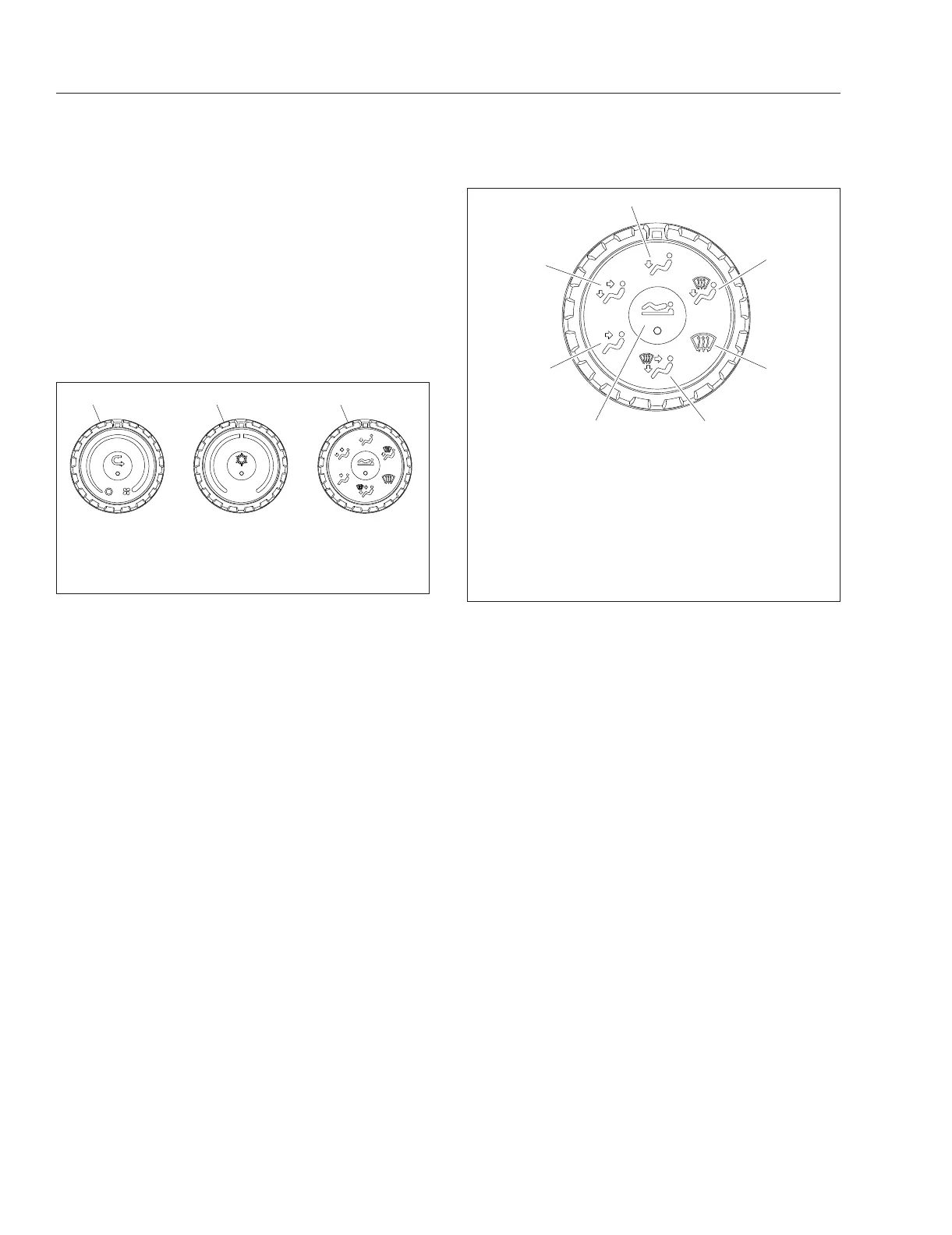
The mode control knob allows the control of air flow
through the face outlets, the floor outlets, the defrost
(windshield) outlets, or a combination of these out-
lets. See
Fig. 4.34.
Bunk-Override Button
The bunk-override button is located in the center of
the cab air-selection knob (sleeper-cabs only). See
Fig. 4.34. The bunk override button allows the driver
to make the sleeper temperature and fan settings the
same as the cab’s.
Press the bunk override button to copy the current
cab HVAC temperature and fan settings to the
sleeper HVAC. An amber indicator will illuminate
when bunk override mode is activated. When in over-
ride mode, the sleeper climate control panel auto-
matically conforms to the fan speed and temperature
settings on the cab climate panel at the time the
override mode is activated. Further changes of the
cab climate control settings will not alter the settings
of the sleeper climate control panel.
The override mode is disabled when the fan knob or
temperature control knob on the sleeper climate con-
trol panel is manually set to a different setting. The
override mode is also disabled when the bunk over-
ride button is pressed to the off position.
09/09/2016 f611324
1 2 3
1. Fan Knob
2. Temperature Control Knob
3. Mode Control Knob
Fig. 4.33, Cab Climate Controls
01/15/2016 f611327
1
2
3
4
5
6
7
NOTE: There are intermediate modes between each
knob position.
1. Face Mode
2. Bi-Level Mode
3. Floor Mode
4. Floor/Defrost Mode
5. Defrost Mode
6. All Mode
7. Bunk Override Button (on sleeper-cabs only)
Fig. 4.34, Mode Control Knob With Bunk Override
Button
Driver Controls
4.17



 To Next Page