•
Tire Pressure Monitoring System
•
Axles
•
Maintenance System
•
Diagnostics
•
Active Driver Alerts
Tire Pressure Monitoring System
(TPMS)
The tire pressure monitoring system displays tire
pressure, temperature, and sensor status. Maintain-
ing correct tire pressure increases fuel economy.
Sustained high tire temperature can cause a tire to
deteriorate, leading to tread separation and blowouts.
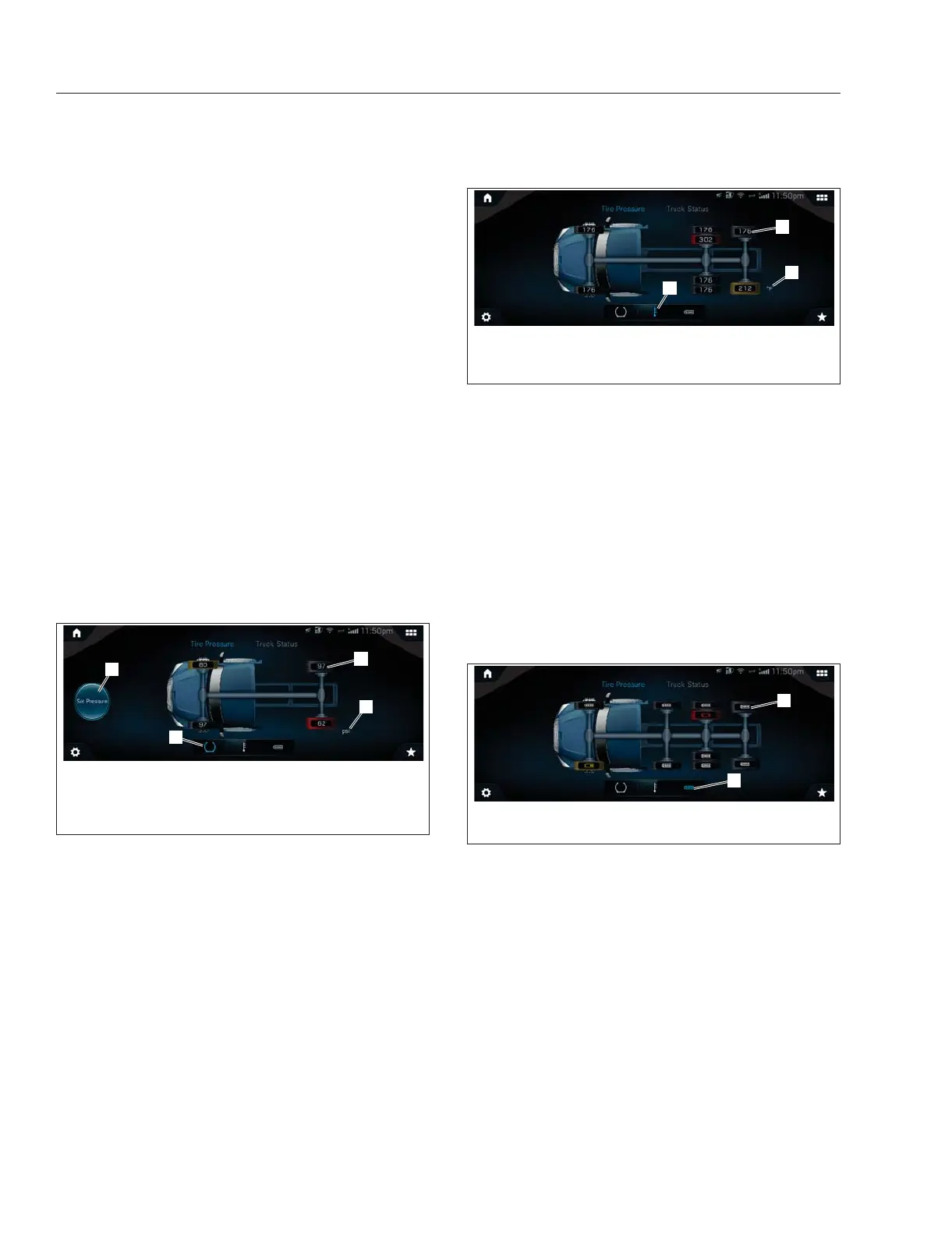
Tire Pressure has three submenu options: tire pres-
sure, tire temperature, and sensor status. Selecting
the tire icon image will display a vehicle image on
the screen showing the tire pressure for each tire.
Tire pressure can be displayed in psi or bar units.
The unit of measure is displayed behind the rear left
tire on the vehicle image. See
Fig. 3.62. Units of
measure are set under Settings.
Tires on the truck image will change color if tire pres-
sure is too high or too low based on factory settings.
Red indicates a condition that may pose a threat to
the control of the vehicle. Amber indicates a condi-
tion that may result in damage. See
Fig. 3.63,
The option to Set Pressure is available on the tire
pressure screen. Selecting this option allows you to
change default settings.
Selecting the temperature icon will show an image of
the vehicle on the screen showing the temperature of
each tire. Tire temperature can be displayed in Fahr-
enheit or Celsius. The unit of measure is displayed
behind the rear left tire on the vehicle image. Units of
measure are set under Settings.
Tires on the truck image will change color if tire tem-
perature is too high. Red indicates a condition that
may pose a threat to the vehicle. Amber indicates a
condition that may result in damage.
Selecting the battery icon will show the battery
strength of each tire sensor.
If a sensor’s battery life is low, both the tire and the
sensor icon on the truck image will change color to
amber. If sensor battery status is critically low they
will become red. See
Fig. 3.64.
Axles
This menu provides access to the axle locks status
screen showing engaged locks.
For more information see
Chapter 19 Drive Axles.
Maintenance System
NOTE: the wrench icon indicates a need for
maintenance, not something broken that needs
to be fixed.
f61176008/07/2019
1
2
3
4
1. Set Pressure button
2. Tire Pressure Value
3. Units of Measurement
4. Submenu Screen
Indicator
Fig. 3.62, TPMS: Tire Pressure - ICC5
f61176108/07/2019
1
2
3
1. Tire Temperature
2. Unit of Measurement
3. Screen Indicator
Fig. 3.63, TPMS: Tire Temperature- ICC5
f61176208/07/2019
1
2
1. Sensor Battery Icon 2. Screen Indicator
Fig. 3.64, TPMS: Sensor Status - ICC5
Instruments
3.37



 To Next Page