ICUC time and alarm clock settings are found under
User Settings. See "Driver Display: ICUC" in this
chapter for details.
The correct time and date is required for the follow-
ing ICU functions to work:
•
Alarm clock
•
Maintenance
•
Prognostics
Software Updates
A software update consists of three steps:
1.
Downloading the software.
2.
Installing the software.
3.
Activating the software by restarting the system.
A popup message will appear when an update is
available. In addition, the software update option in
the diagnostics menu will be active.
The vehicle must be in neutral gear, the parking
brake set, and the engine off before a software up-
date can start. Once started, a software update can-
not be cancelled.
During the software update process, progress mes-
sages will be provided. See
Fig. 3.5 for typical ICUC
software update screens.
f61136406/13/2016
1
4
2
3
6
5
7 8 9
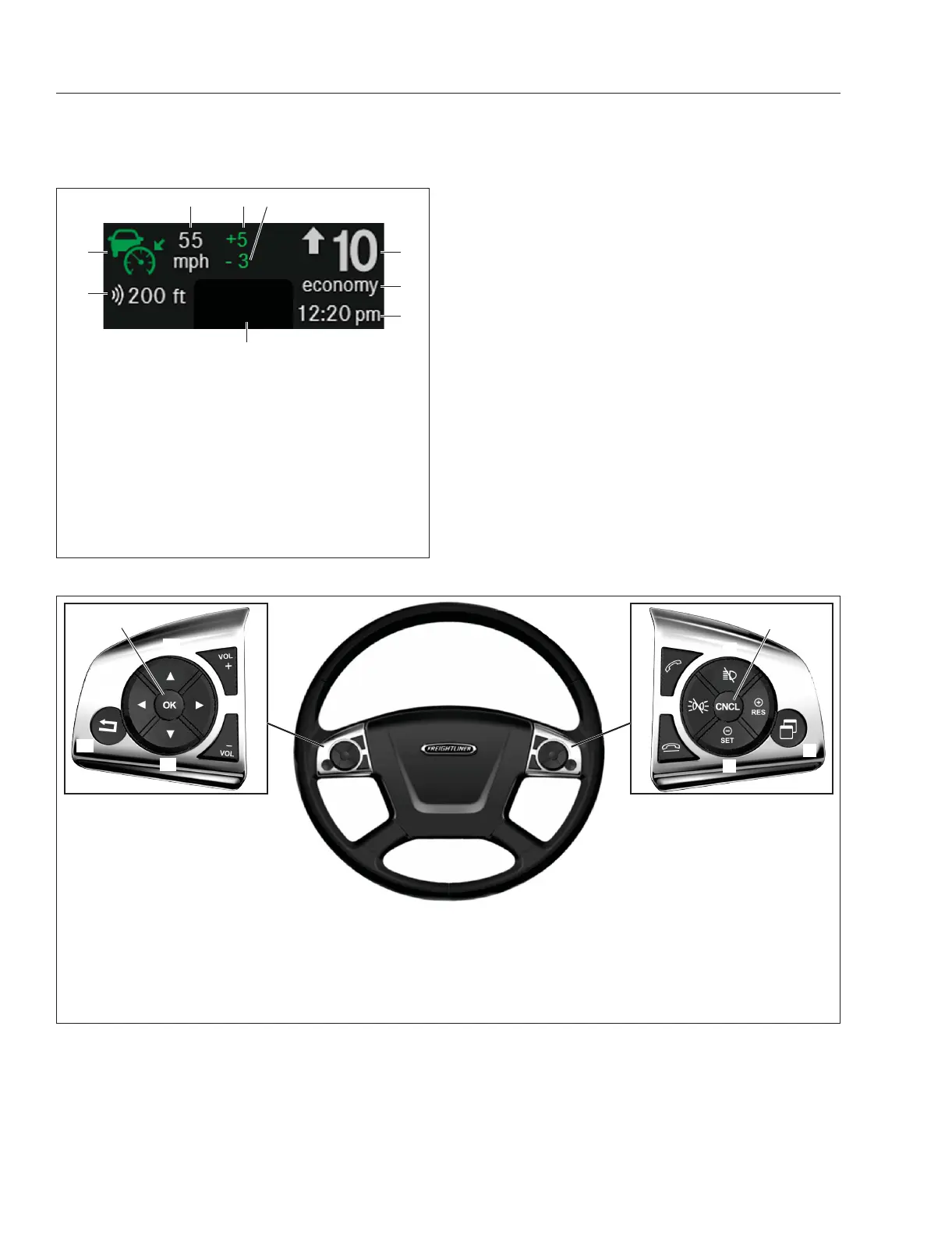
1. Gear Indicator
2. Gear Mode
3. Clock
4. Soft Telltales
5. Adaptive Cruise Control and Tracked Vehicle
Distance
6. Cruise Control Symbol (adaptive cruise control
shown)
7. Cruise Control Set Speed
8. Cruise Control Overspeed
9. Cruise Control Underspeed
Fig. 3.3, ICUC Static Display
f611352a09/28/2016
11
15
9
12
16
10
14
13
8
7
1
2
3
4
6
5
1. Cruise Accelerate/Resume
2. Quick Access System Settings
3. Cruise Decelerate/Set
4. Phone Hang-Up/Reject
5. Marker Interrupt
**
6. Phone Pick-Up
7. Headlamp Interrupt
**
8. Cruise Cancel
9. Volume Increment Up
10. Menu Right
11. Volume Increment Down
12. Menu Down
13. Back Button
14. Menu Left
15. Menu Accept (OK)
16. Menu Up
**
Not available in all markets
Fig. 3.4, ICUC Steering-Wheel-Mounted Switches
Instruments
3.3



 To Next Page