Windows
Power windows are standard on New Cascadia
™
ve-
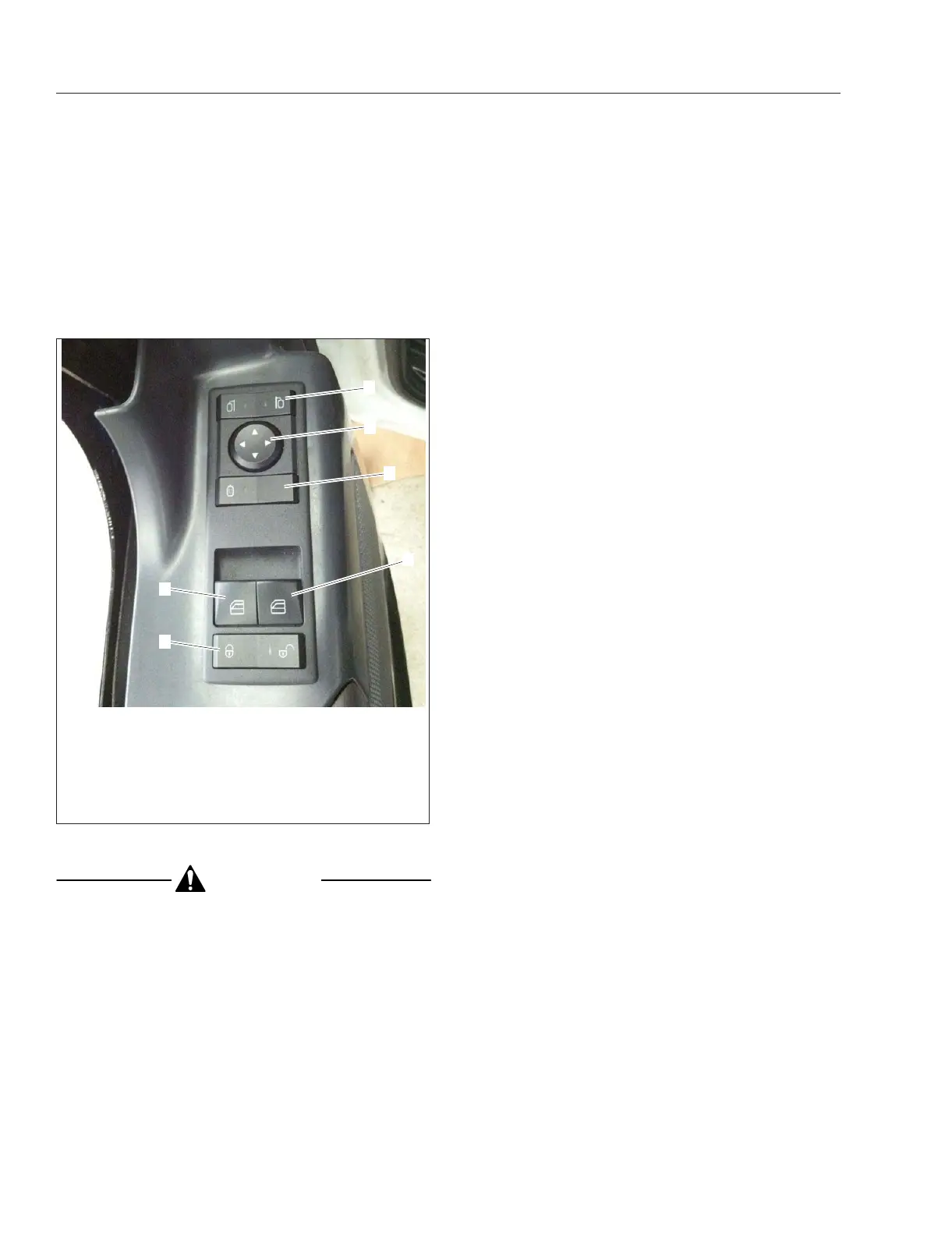
hicles. The driver’s door has two switches mounted
in the top of the door, that control the driver and pas-
senger windows separately. See
Fig. 10.1. The pas-
senger door has a switch mounted in the top of the
door that controls the passenger-side power window.
CAUTION
There is no anti-pinch protection when the win-
dow is almost closed. Be sure to clear all objects
from the window before closing.
The window switches have three positions: lower
window, neutral, and raise window. Press forward on
the switch to lower the window. Hold the switch down
in the forward position for approximately one second
to activate the express function; the window will con-
tinue to roll down after the switch is released. Press
the switch in the rearward position (bump) to raise
the window.
Mirrors
The standard outside mirrors are mounted on the
door frame. The power mirrors are controlled with a
left-hand or right-hand mirror selector switch, and a
directional switch. Select the left (driver) mirror, or
the right (passenger) mirror using the selector switch.
The mirror can then be adjusted by pressing the di-
rectional switch arrow for the direction the mirror
should be adjusted.
The outside door mirrors can be heated to keep
them clear of fog, frost, and ice. To heat the mirrors,
press the outboard part of the mirror heat switch on
the door. See
Fig. 10.1. When the mirror heat switch
is on, an amber indicator light illuminates inside the
switch. If the vehicle has Optimized Idle, mirror heat-
ing will not operate with the key in accessory mode,
or if the Optimized Idle feature turns mirror heating
off to reduce stress on the batteries. Refer to
Chap-
ter 13
for more information.
Cab Amenities
New Cascadia vehicles are available with many op-
tional features. The following are some of those
options.
Cup Holders
Three cup holders and a map pocket are molded into
the center dash. See
Fig. 10.2. A removable ash cup
is located in one of the cup holders.
Lighting
See Chapter 4 for detailed information regarding
lighting controls.
Power Outlets
Two power outlets that supply 12V power for acces-
sories are located on the dash switch panel. Option-
ally, three power outlets, or two power outlets and a
cigarette lighter, are offered.
Radio and CB
The radio is mounted in the center dash panel. The
CB is typically installed in the overhead console. An
optional hot mount may be installed on top of the
dash for fleet CB radios.
02/23/2016 f611331
1
2
3
4
5
6
1. Mirror Selector Switch
2. Mirror Directional Switch
3. Mirror Heat Switch
4. Passenger-Side Window Switch
5. Driver-Side Window Switch
6. Door Lock Switch
Fig. 10.1, Door Switches (driver-side shown)
Cab and Sleeper Features
10.1



 To Next Page