•
180 to 200°F (82 to 93°C) for Dana Spicer®
drive axles
Under heavy loads, such as when climbing steep
grades, temperatures that exceed the normal oil tem-
perature range for a short period are not unusual. If
the temperature returns to normal when the load de-
creases, there is no problem.
Application Air Pressure Gauge
The application air pressure gauge (Fig. 3.24) regis-
ters the air pressure being used to apply the brakes.
The gauge will not register air pressure until the foot
brake pedal is depressed or the trailer hand brake is
applied.
DEF and Diesel Particulate Filter
Monitoring
See Chapter 14 Emissions and Fuel Efficiency for
details of Diesel Particulate Filter and DEF level
monitoring.
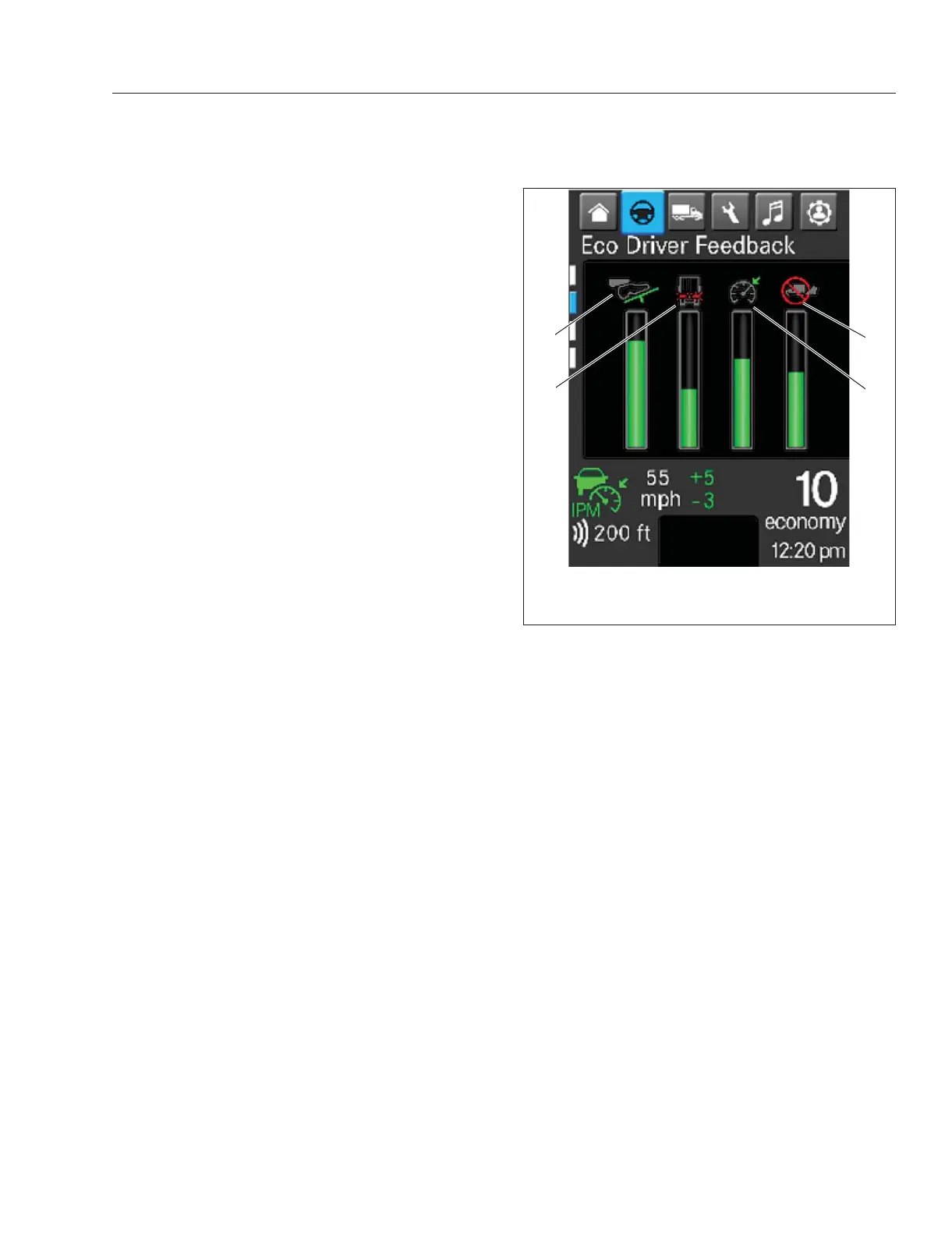
Eco Driver Feedback
Eco Driver Feedback encourages a driver to make
economical driving a habit with the goal of saving
fuel and reducing wear.
Eco Driver Feedback gauges, located under the
Drive Time Systems menu, display a driver’s perfor-
mance in four categories: gentle braking, smooth ac-
celeration, cruise control usage, and time spent
idling.
The ICU bar graphs display driver performance since
the start of the vehicle. Performance values are
newly calculated with each vehicle start. See
Fig. 3.25.
Examples of driving behavior that increases or de-
creases the amount of green in each column are as
follows:
•
Time in cruise control increases the Cruise
Control Usage value.
•
Failure to engage cruise control after the Use
Cruise Control popup appears decreases the
Cruise Control Usage value
•
Pumping the accelerator pedal decreases the
Smooth Acceleration value.
•
Keeping the speed steady with cruise control
off increases the Smooth Acceleration value.
•
Sudden braking outside of an urban environ-
ment decreases the Gentle Braking value.
•
No incidences of sudden breaking over time
increases the Gentle Braking value.
Tire Pressure Monitoring System
The Tire Pressure Monitoring System (TPMS)
screens display tire pressure, temperature, and sen-
sor battery status. See
Fig. 3.26. Maintaining correct
tire pressure increases fuel economy. Sustained high
tire temperature can cause a tire to deteriorate, lead-
ing to tread separation and blowouts.
Tire pressure can be displayed in psi or bar units.
Temperature can be displayed in °F or °C. Units of
measure are set under Settings. Sensor battery sta-
tus is displayed as a bar chart inside the outline of a
battery.
The TPMS will change the color of the tire on the
ICUC screen if the tire pressure or temperature is
either too high or too low. See
Fig. 3.26. It will also
change the color of the sensor battery icon if the
power levels are too low. Amber indicates a condition
that may result in damage. Red indicates a condition
that may pose a threat to the vehicle.
f611612b05/04/2020
1
2
3
4
1. Cruise Control Usage
2. Smooth Acceleration
3. Gentle Braking
Fig. 3.25, Eco Driver Feedback Screen - ICUC
Instruments
3.14



 To Next Page