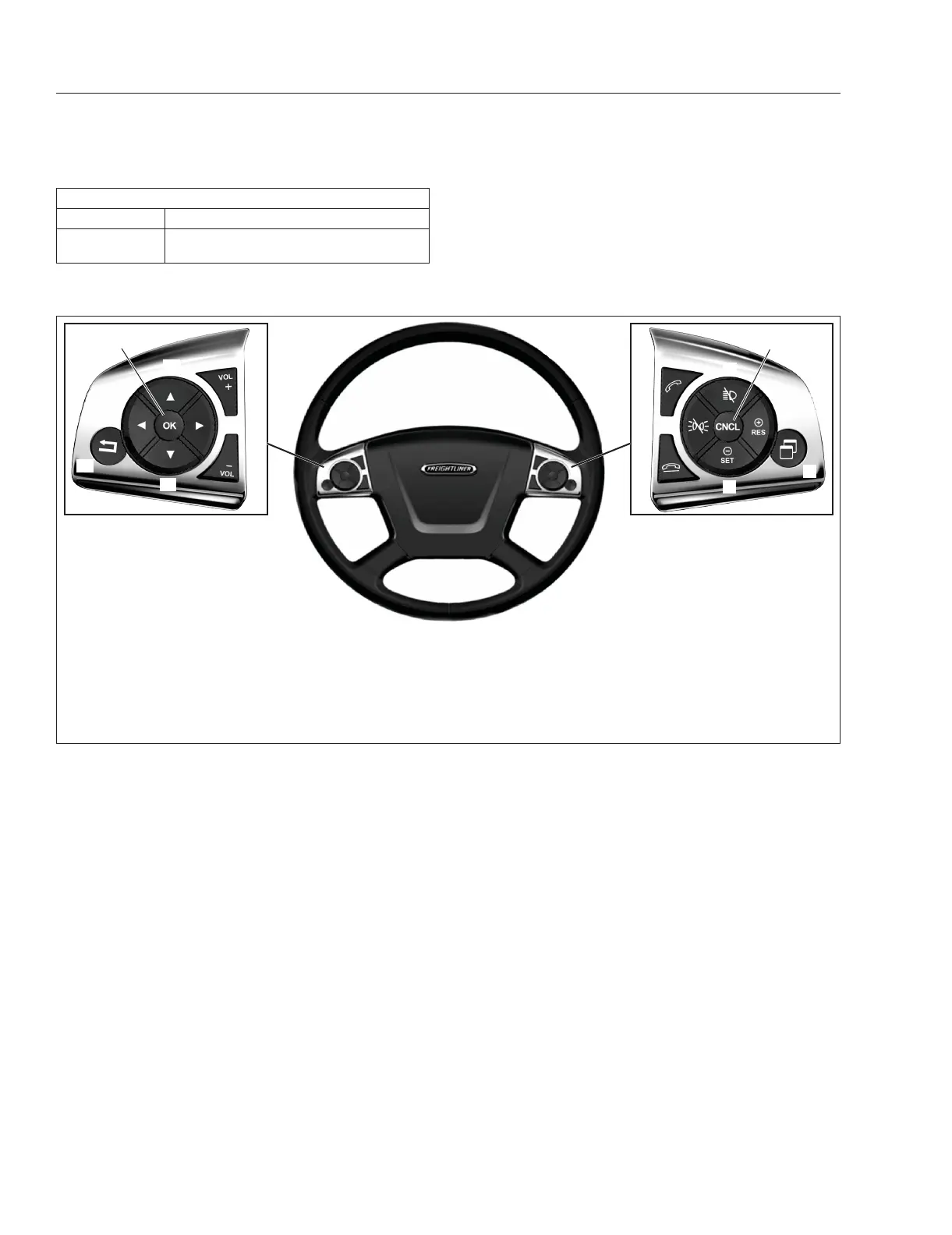
Steering Wheel Controls
Description Function
CNCL
Deactivates cruise control, but retains
the set speed in memory.
Table 5.1, Steering Wheel Controls
Functions and Activation Conditions
If ACC detects a vehicle in front driving at a speed
slower than the set cruise speed, the engine is der-
ated, the engine brakes are activated, and the ser-
vice brakes are applied, slowing the vehicle to main-
tain the minimum following distance. If the vehicle in
front is no longer detected, the vehicle will accelerate
to the set speed. The ACC will also slow the vehicle
if it exceeds the set speed (on a downhill grade, for
example).
Adaptive cruise control cannot be activated, or is au-
tomatically deactivated, if:
•
the vehicle is traveling slower than 10 mph (15
km/h);
•
the transmission is in neutral for more than 5
seconds;
•
reverse gear is selected;
•
ABS is deactivated;
•
there is a malfunction in the brake system or
the electronic management system; or
•
the distance sensor initialization is not yet com-
plete.
Activating Adaptive Cruise Control and
Setting the Speed
Activate ACC by setting the cruise speed, using the
controls on the steering wheel. See
Table 5.1 .
Drive at the desired speed, then press the –/SET
switch. Adaptive cruise control will be activated and
the set speed stored.
If the brake pedal is pressed, ACC is automatically
deactivated.
If ACC is deactivated, the stored speed can be acti-
vated again by pressing the +/RES switch. The driver
display will show the adaptive cruise control symbol
and the set speed. Adaptive cruise control will auto-
matically brake or accelerate the vehicle to maintain
the set speed.
f611352a09/28/2016
11
15
9
12
16
10
14
13
8
7
1
2
3
4
6
5
1. Cruise Accelerate/Resume
2. Quick Access System Settings
3. Cruise Decelerate/Set
4. Phone Hang-Up/Reject
5. Marker Interrupt
6. Phone Pick-Up
7. Headlamp Interrupt
8. Cruise Cancel
9. Volume Increment Up
10. Menu Right
11. Volume Increment Down
12. Menu Down
13. Back Button
14. Menu Left
15. Menu Accept (OK)
16. Menu Up
Fig. 5.4, Steering-Wheel-Mounted Switches
Detroit Assurance 4.0
5.3



 To Next Page