Standard messaging is based on the number of
miles (km) driven or time passed since the last ser-
vice.
Predictive maintenance information is calculated
based on these factors as well as engine and trans-
mission load and oil temperature.
Currently, predictive maintenance information is given
for engine oil, transmission oil, and axle oil changes.
By taking driving conditions into account, predictive
maintenance provides more accurate intervals for
fluid changes.
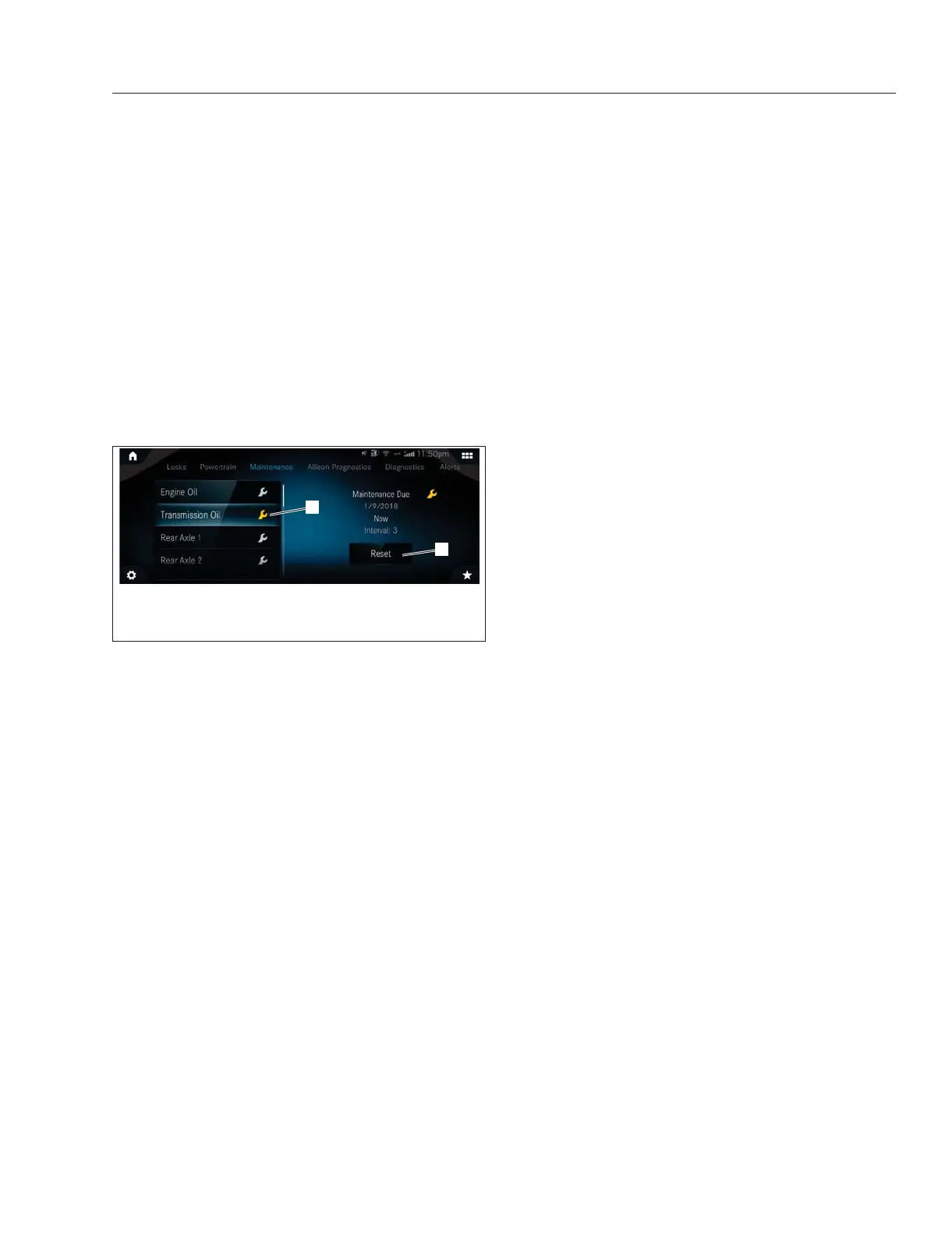
Just before the service interval ends, a message that
maintenance is due will appear. See
Fig. 3.65.
When the service interval is reached, a pop-up notice
that maintenance is due will appear with every key
cycle.
When the service interval is overdue, the color of the
wrench icon on the maintenance screen will change
from white to amber and the message will change to
Maintenance Overdue. This cautionary pop-up will
continue to appear with every key cycle.
The color of the wrench icon on the maintenance
screen will change from white to amber when a
maintenance service is overdue.
A service interval countdown can be reset by press-
ing the reset button which will cause a confirmation
pop-up message to appear. If the required mainte-
nance has been carried out, click Yes. Resetting the
maintenance system when service is performed cre-
ates accurate future service intervals.
The reset button for maintenance system screens will
not appear until the vehicle has been driven 6.2
miles and the engine has run for fifteen minutes.
Maintenance system information and service recom-
mendations can also be viewed in the
Detroit Con-
nect portal. Information on the portal is updated
every seven days.
Diagnostics
The Diagnostics screen communicates fault codes
and other diagnostic information about the vehicle.
Fault codes are color-coded to indicate the severity
of the fault. Red indicates a condition that may pose
a threat to control of the vehicle. Amber indicates a
condition that may result in damage to vehicle com-
ponents or derating of engine power. Grey indicates
a condition that may affect fuel efficiency or vehicle
handling.
Active Driver Alerts
The Active Driver Alerts screen stores the current
active alerts.
Alerts are color-coded to indicate severity. Red indi-
cates a condition that may pose a threat to control of
the vehicle. Amber indicates a condition that may
result in damage to vehicle components or derating
of engine power. Grey is used for notices.
ICC5 B-Panel Controls
In addition to the features described above, the ICC5
B-panel provides a number of digital controls and
environmental information. Under the Cab menu this
includes:
•
Digital Switches
•
Optimized Idle
•
Settings
Digital Switches
f61175908/07/2019
1
2
1. Amber Wrench Indicating Maintenance is Overdue
2. Reset Button
Fig. 3.65, Example ICC5 Maintenance Screen - ICC5
Instruments
3.38



 To Next Page