previous set speed is stored, pressing the but-
ton sets the cruise speed.
1.
To cruise at a particular speed:
1.1
Depress the accelerator pedal until the
speedometer reaches the desired speed.
NOTE: Cruise control is cancelled if the
brake or clutch pedal is depressed, or ve-
hicle speed drops below the minimum cruise
control speed.
1.2
Press the cruise decelerate/SET button to
set the desired speed.
NOTE: The speed memory is lost whenever the
ignition switch is turned to OFF.
2.
To disengage the cruise control, do one of the
following:
•
In the ICUC system, press the CNCL but-
ton in the center of the right-hand steering-
wheel-mounted switch pod. A single press
disengages the cruise control, but retains
the set speed. Press and hold to clear the
set speed (Detroit Diesel engines only).
•
In the ICC5 system, press the CNCL but-
ton at the bottom of the left-hand control
pod. A single press disengages the cruise
control, but retains the set speed. Press
and hold to clear the set speed (Detroit
Diesel engines only).
•
Depress the brake pedal.
•
Depress the clutch pedal (on a manual
transmission only).
3.
To resume a preselected cruise speed, press the
cruise accelerate/RES button. Cruise will return
to the last set speed.
NOTE: If vehicle speed drops below the mini-
mum cruise control speed, cruise control will
disengage. To resume to the preselected cruise
speed, increase vehicle speed to above mini-
mum cruise control speed and press the cruise
accelerate/RES button.
4.
To increase cruise speed, press the cruise
accelerate/RES button until the desired set
speed is displayed.
5.
To decrease cruise speed, press the cruise
decelerate/SET button until the desired set
speed is displayed.
f611531a10/25/2018
1
2
3
4
5
6
A
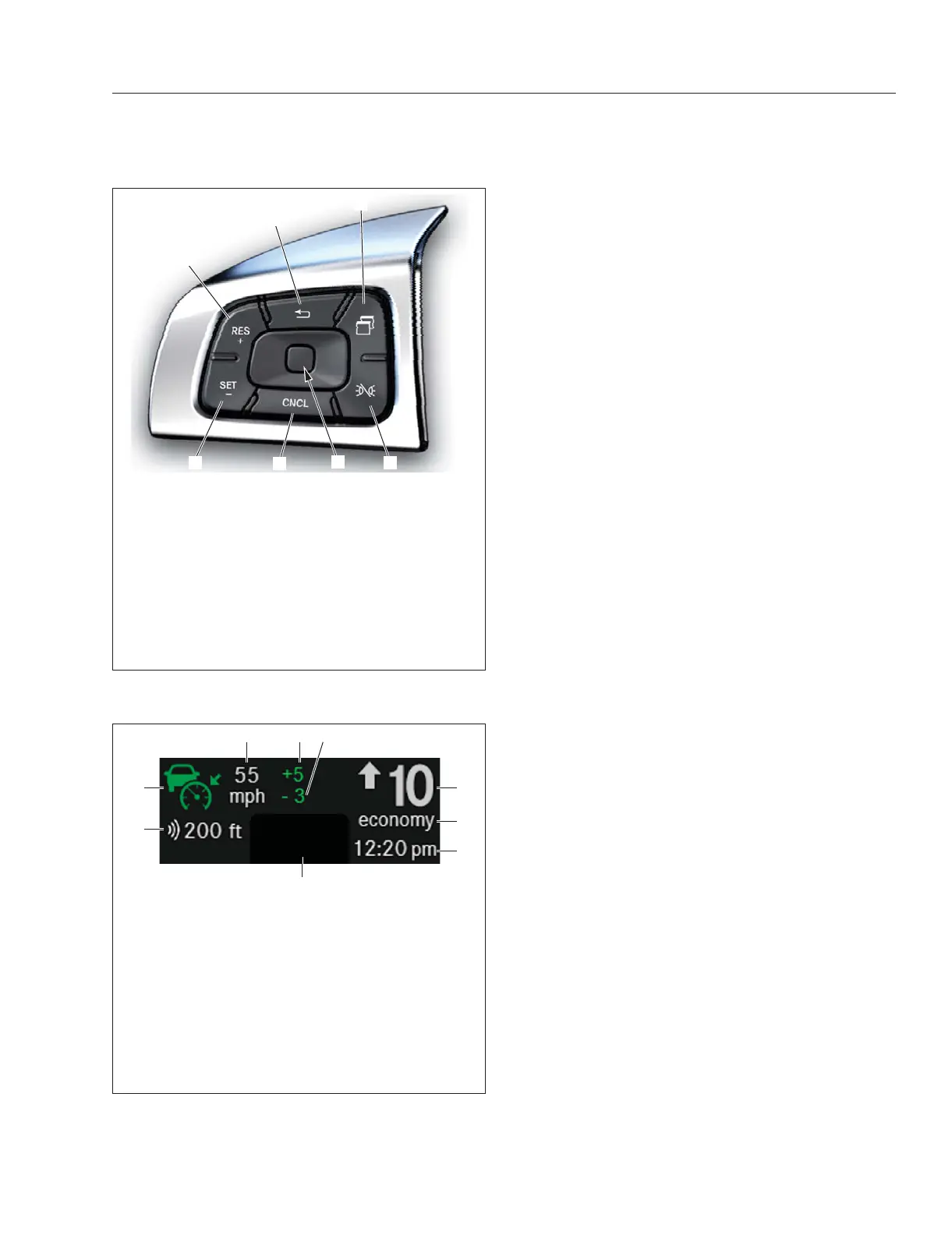
A. Menu Button—Press the button to access
instrument panel menus. When the button is
pressed, information appears on the driver display
screen.
1. Cruise Accelerate/Resume
2. Back Button
3. Quick Access System Settings
4. Marker Interrupt
5. Cruise Cancel
6. Cruise Decelerate/Set
Fig. 7.17, Steering-Wheel-Mounted Left-Hand Switch
Pod-ICC5
f61136406/13/2016
1
4
2
3
6
5
7 8 9
1. Gear Indicator
2. Gear Mode
3. Clock
4. Soft Telltales
5. Adaptive Cruise Control and Tracked Vehicle
Distance
6. Cruise Control Symbol (adaptive cruise control
shown)
7. Cruise Control Set Speed
8. Cruise Control Overspeed
9. Cruise Control Underspeed
Fig. 7.18, Static Menu - ICUC
Driver Assistance Features
7.16



 To Next Page