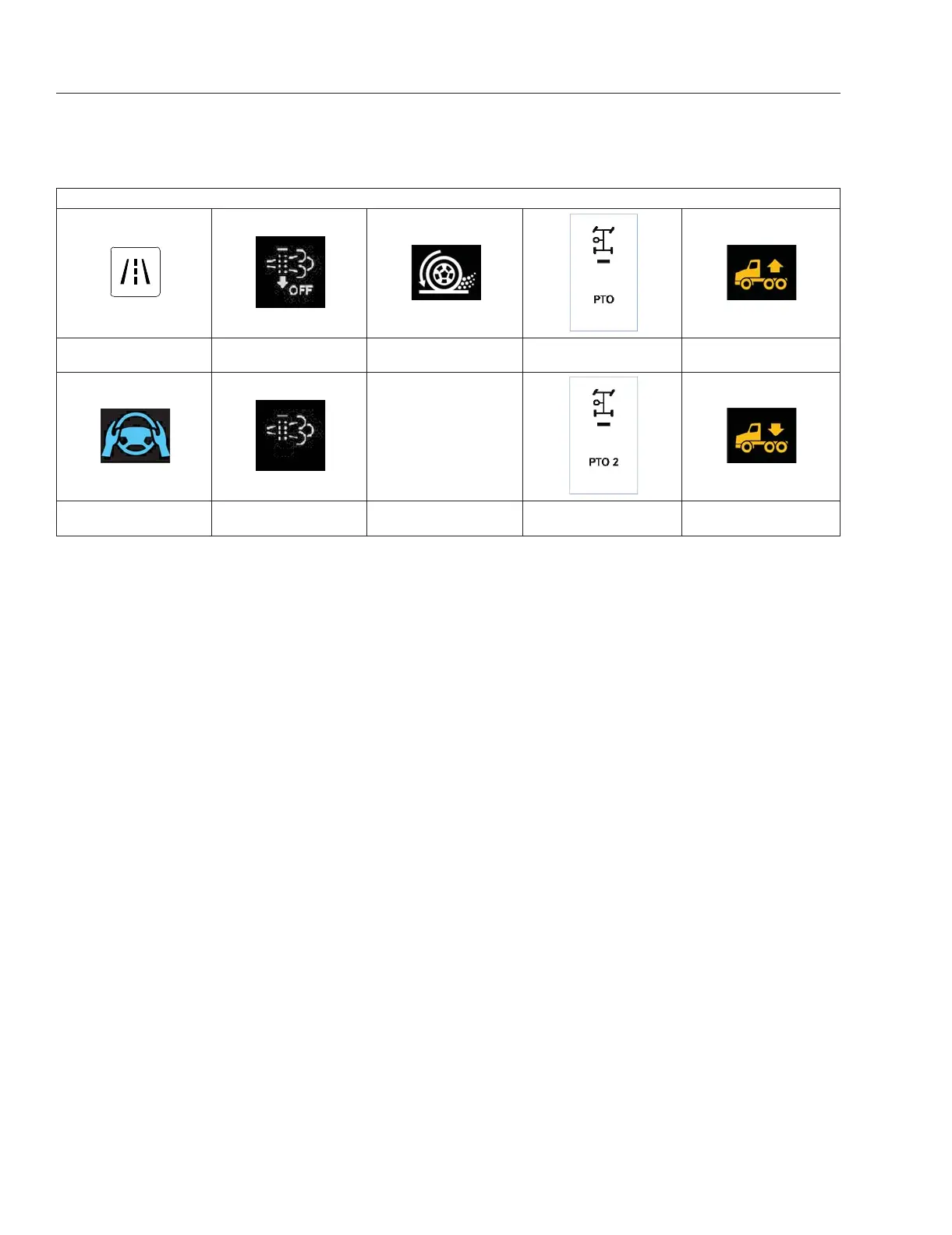
Example of Digital Switch Icons and Layout
Lane Departure
Warning
Inhibit Regeneration Active Traction Control Power Takeoff 1
Air Suspension Level
Up
Lane Keep Assist
Active
Regeneration
Activation
Power Takeoff 2
Air Suspension Level
Down
Table 3.6, Example of Digital Switch Icons and Layout
Digital switches can be used to turn different vehicle
functions on or off. An indicator at the top of the digi-
tal button shows the status of the switch with a red
line indicating On.
the arrangement of the switches depends on the fea-
tures of the vehicle. In general switches are grouped
into pairs stacked on top of each other. If a feature
only has one switch or only one switch is available it
will be displayed at the top of the two switch column.
Optimized Idle
Optimized Idle reduces idle time by automatically
stopping and restarting the engine. Besides saving
fuel, it helps keep the batteries charged while main-
taining engine and cab temperature.
The following conditions must be met for the opti-
mized idle to function:
•
Vehicle in neutral gear
•
Parking brake set
•
Hood latched
•
Sleeper fan on
Optimized idle has four unique operating modes: bat-
tery, cold startability (engine oil temperature), interior
comfort mode, keyless.
•
Battery mode: starts the engine when battery
voltage is below a certain threshold.
•
Engine oil temperature mode: starts the engine
when the engine oil temperature is below a
certain threshold.
•
Comfort mode: starts the engine to maintain
the driver’s selected interior temperature
•
Keyless mode: maintains any of the modes
above without the key in the ignition switch.
Optimized idle can be started with the engine running
or the engine off.
1.
With the key on, go to the Cab menu and select
Optimized Idle. A caution notice will popup.
2.
Read the caution and press Enable.
3.
A screen may appear to start Standby or another
mode. If this is the only option, press Enable.
4.
Otherwise a screen will appear with an Enable
with Comfort button as an option. If you want to
optimize the environment of the sleeper section,
select the Enable with Comfort button.
5.
The vehicle will go into standby mode, an under
hood alarm will briefly sound, and the engine will
crank and achieve 900 rpm. The screen will
change to the selected mode. A Disable button
will be present.
6.
The engine and fan/air conditioning will run until
it achieves the temperature requested by the
driver. The engine will then shut down.
Instruments
3.39



 To Next Page