If the SGA trailer monitoring is turned off or in an
error state the representative grey or white indicator
lamp will appear on the instrument panel display
screen. See the third and fifth icon in
Table 6.3.
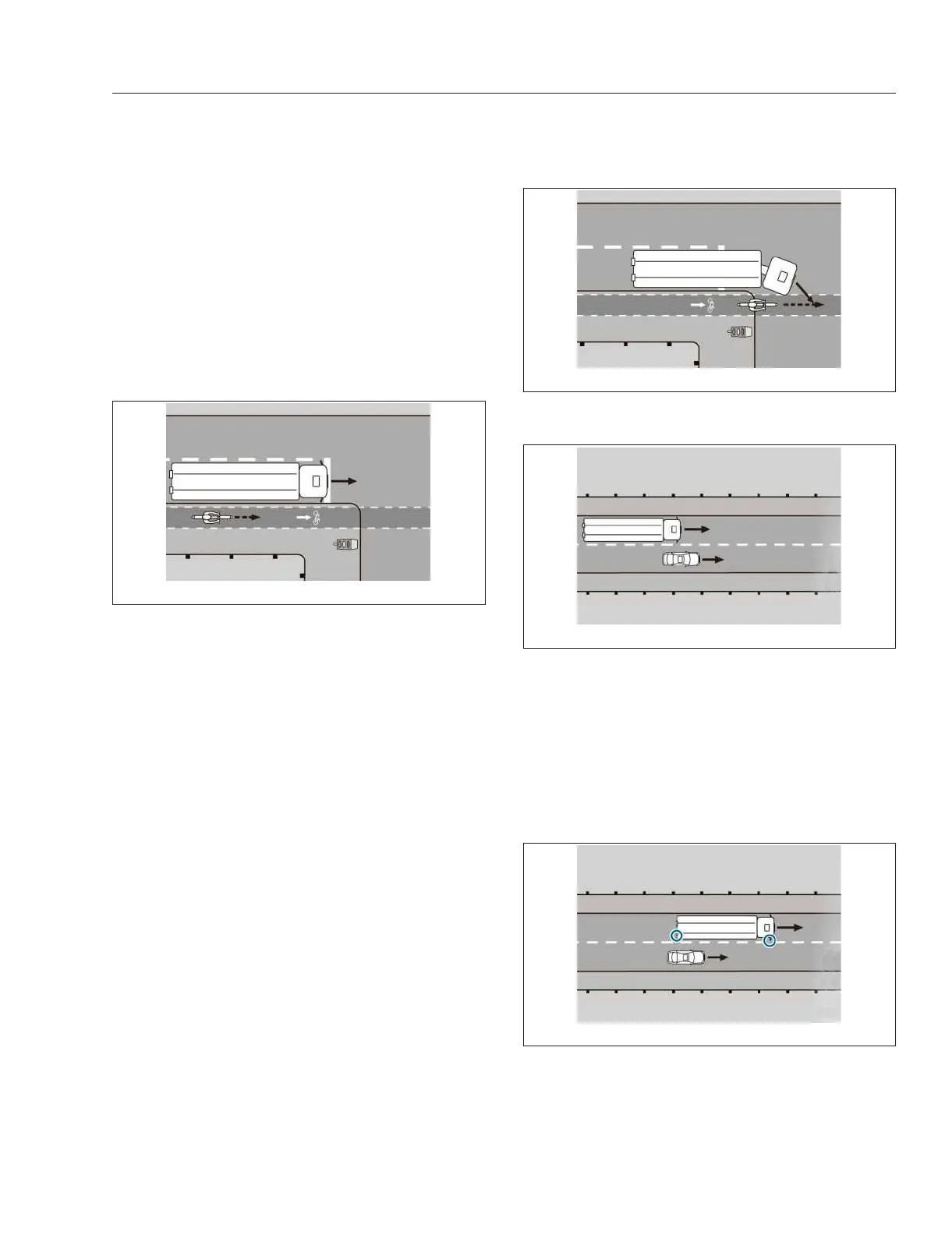
Warning When Turning Right
If there is a moving object in the SGA monitoring
range, as shown in Fig. 6.12, a triangular yellow
warning lamp lights up in the A-pillar and the instru-
ment panel display screen will display an amber
Caution, Side Guard Assist Trailer indicator.
Side Guard Assist recognizes when the driver signals
or steers to the right and there is a risk of collision.
See
Fig. 6.13. In this case the red warning lamp in
the A-pillar will flash for approximately two seconds
and a warning tone will sound. After two seconds, as
long as there is a risk of a collision, the red warning
lamp will stay on. In addition, the Warning, Side
Guard Assist Trailer indicator will display in red on
the instrument panel display screen.
If the vehicle is equipped with an ICC5 driver display
screen, the side of the screen behind the Warning,
Side Guard Assist Trailer indicator will change to red.
Warning When Changing Lanes
If there is a moving object in the SGA monitoring
range when changing lanes, as shown in
Fig. 6.14,a
yellow warning lamp lights up in the A-pillar, and an
amber Caution, Side Guard Assist Trailer indicator
lights up on the instrument panel display screen.
When changing lanes and a moving object is located
in the danger zone, as shown in
Fig. 6.15, there is a
risk of collision. If the driver signals or steers to the
right, a red warning lamp in the A-pillar flashes for
approximately two seconds and a warning tone
sounds. After two seconds, as long as there is a risk
of a collision, the red warning lamp will stay on. In
addition, the Warning, Side Guard Assist Trailer indi-
cator will display in red on the instrument panel dis-
play screen.
If the vehicle is equipped with an ICC5 driver display
screen, the side of the screen behind the Warning,
Side Guard Assist Trailer indicator will change to red.
f61153310/11/2018
Fig. 6.12, A Moving Object in the SGA Monitoring
Range
f61153410/11/2018
Fig. 6.13, A Moving Object in the SGA Monitoring
Range When Turning Right
f61153510/11/2018
Fig. 6.14, A Moving Object in the SGA Monitoring
Range When Changing Lanes
f61153610/11/2018
Fig. 6.15, A Moving Object in the Danger Zone When
Changing Lanes
Detroit Assurance 5.0
6.12



 To Next Page