U60 Diagnostic Ultrasound System User Manual Inspection and Maintenance
- 185 -
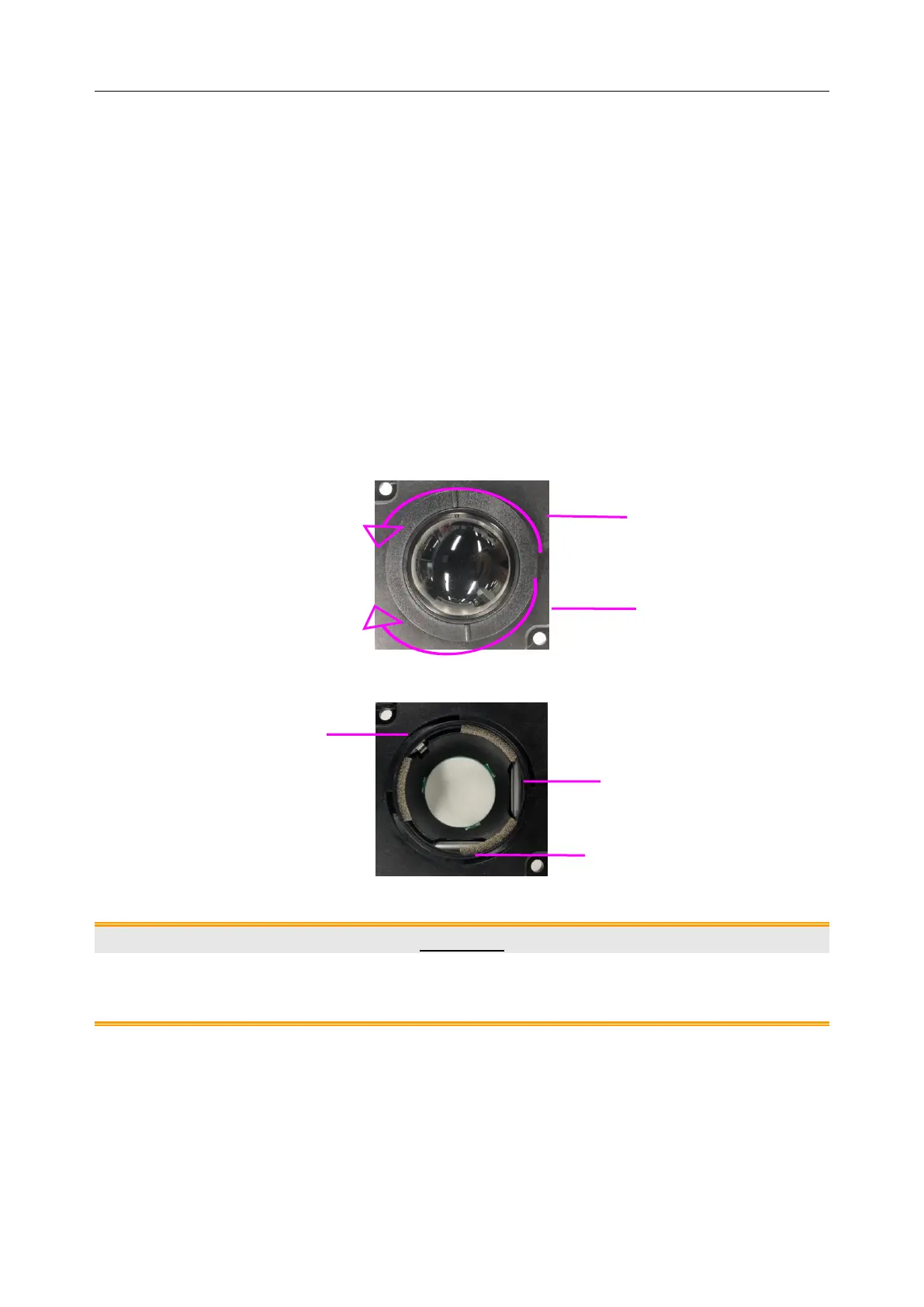
To clean the trackball:
1. Remove the front panel bezel.
2. Remove the trackball as shown in Figure 15-2.
3. Wipe the trackball, X and Y rollers, and the auxiliary idler wheel with a soft cloth dampened
with the disinfecting agent until no visible contaminants remain.
4. Wipe off the disinfecting agent with a fresh cloth or towel, dampened with tap water after
cleaning until no visible disinfecting agent remains.
5. Wipe off with a dry cloth to remove residual moisture.
6. Leave the trackball, X and Y rollers, and the auxiliary idler wheel to air dry.
7. Assemble the trackball and front panel bezel after the assembly parts completely dry.
Figure 15-2 Assembling and Disassembling Trackball
Figure 15-3 X and Y Rollers and the Auxiliary Idler Wheel
CAUTION
Do not drop or place foreign objects inside the trackball assembly or it may affect the
trackball operation and damage the system.
NOTE:
Be sure to clean the X and Y rollers and the auxiliary idler wheel.
Rotate counterclockwise to
remove the fixing ring
Rotate clockwise to mount the
fixing ring
Rotate clockwise to
mount the fixing ring



 To Next Page