U60 Diagnostic Ultrasound System User Manual System Control
- 41 -
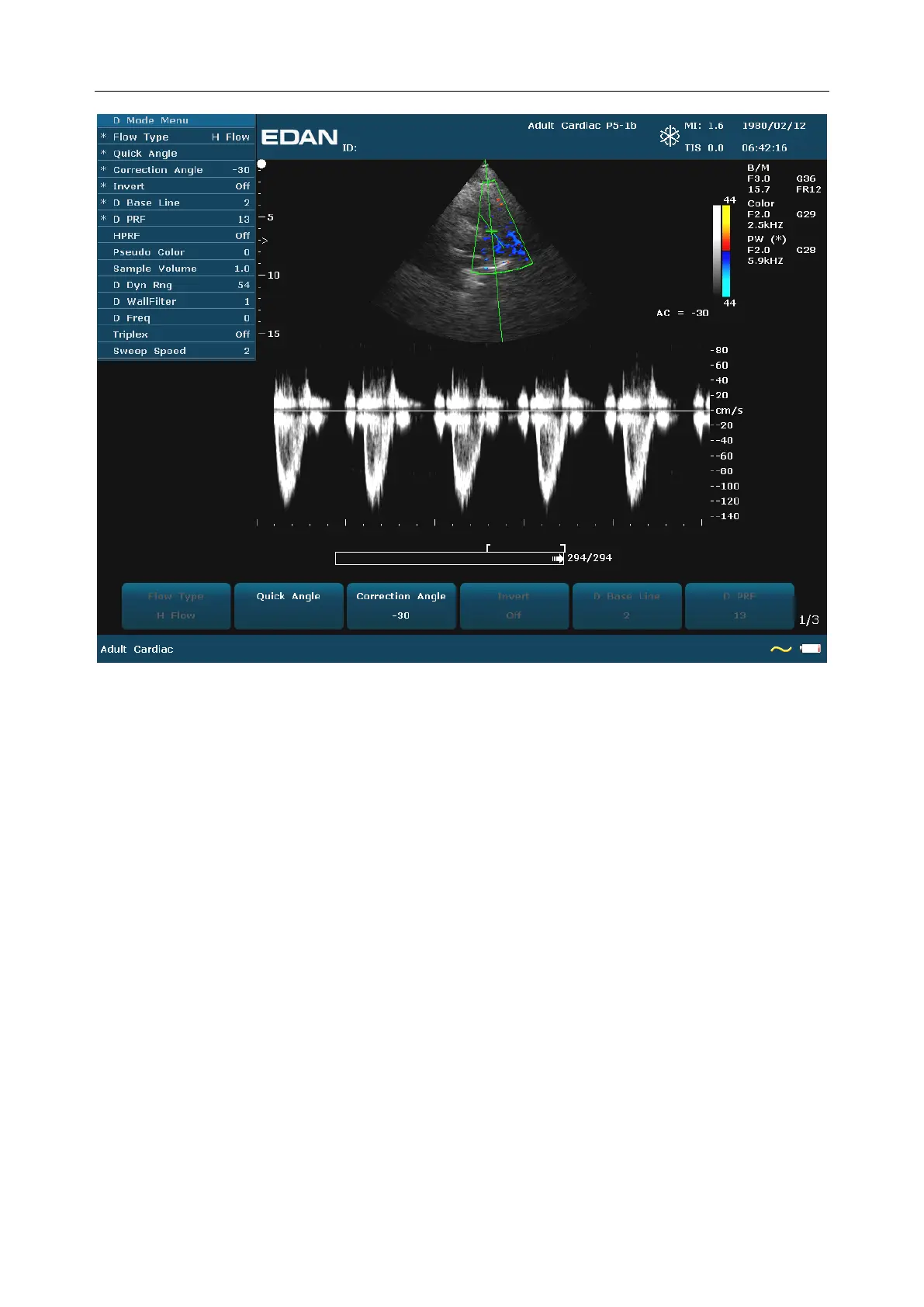
Figure 5-4 Example of B+Color+PW Scan
In B+PW mode, you can choose scanning in synchronized or unsynchronized mode by pressing
Duplex/Triplex menu control: in unsynchronized mode, the active mode is PW; while, in
synchronized mode, the B and PW mode are both active. When you are scanning in
unsynchronized mode either the B or the time series window receives data. This lets you
independently change the PW PRF. When scanning in simultaneous mode, both the 2D and the
time series window receive data. This feature lets you define which method is used, based on the
exam type.
The sample volume indicator allows you to start a scan in a B scan mode, set the sample volume,
and switch to Doppler mode. The sample volume locks in position.
Switch between the frozen PW and real-time PW images
After entering B+PW, or B+Color/PDI+PW mode, the B or B+Color/PDI image is frozen by
default, and PW image is active.
After entering B+PW, or B+Color/PDI+PW mode, in unsynchronized mode, press Update to
switch between the frozen and real-time PW images. When PW image is frozen, move the
trackball to adjust the sample line, rotate the menu controls to adjust the sample volume, and
the correction angle, etc. Then press Update to switch to real-time PW images.



 To Next Page