3025EMC Master Control Switching & Channel Branding
Revision 3.0.3 Page 153
Take Off-Air on move reverse: This will configure the Move to go off-air at the end of the move reverse
or not. Previously a DVE that returned to full screen on reverse would go off-air automatically, however
now if a move is to go off-air on move reverse this checkbox is required.
DVE move off: When this is set all of the DVE Start Frame and End Frame settings will become
unavailable. This setting configures the DVE move to go off-air when the DVE move is executed.
7.2.2.7. DVE SCALING AND CROPPING
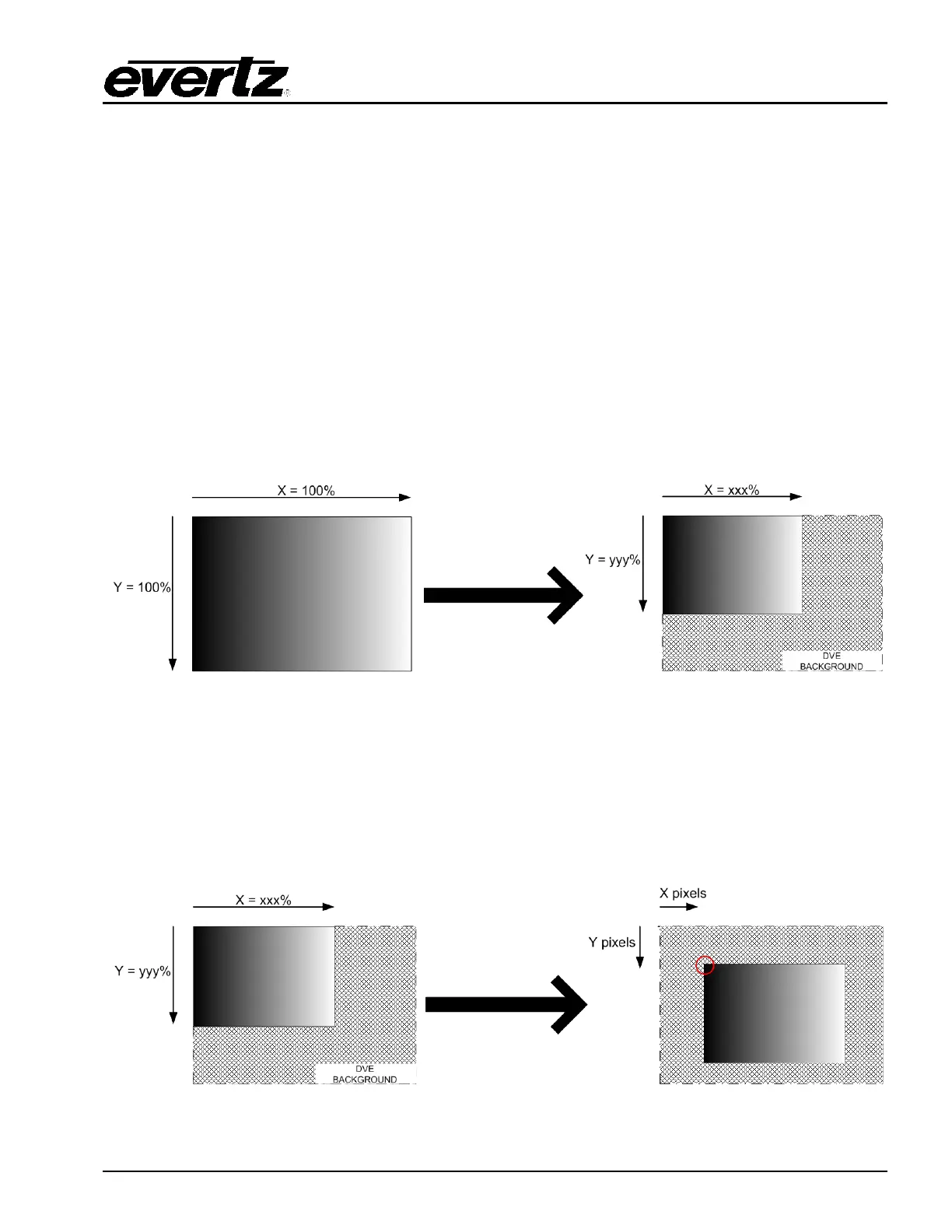
Both the start and end frames of the DVE move can have scaling applied. By default when a DVE move
is created using the DVE Move Manager in EMC-Setup both the start frame and end frame will be full
screen, i.e. X=100% and Y=100%.
In order to scale the Foreground source for the DVE (as configured in the DVE Move) the user must
apply a horizontal scale percentage/number of pixels (X) and a vertical scale percentage/number of
pixels(Y).
Figure 7-6: DVE Scaling
The number of fields/frames that the DVE move takes to scale from the start position to the end position
is configured in the move as the Transition Time.
If there is NO CROPPING configured then the X/Y position is the position of the TOP LEFT CORNER
after scaling.
Figure 7-7: After Scale X/Y Position



 To Next Page