3025EMC Master Control Switching & Channel Branding
Revision 3.0.3 Page 49
When the audio monitoring option is enabled, three things will happen:
1. A dialogue box will open that will allow the user to configure what the default audio monitoring
routing will be of the 3025EMC when the unit is rebooted or after a configuration upload (default
state).
2. V/O 5 now becomes unavailable to be used as a normal voiceover.
3. The audio bars for the 3025EMC channel that are available on the LCD (optional) of the EMC-
DCP and QMC-DCP panels and on the software version of the QMC-DCP will change mode
and show the audio metering for the Aux Bus and not the Clean Bus.
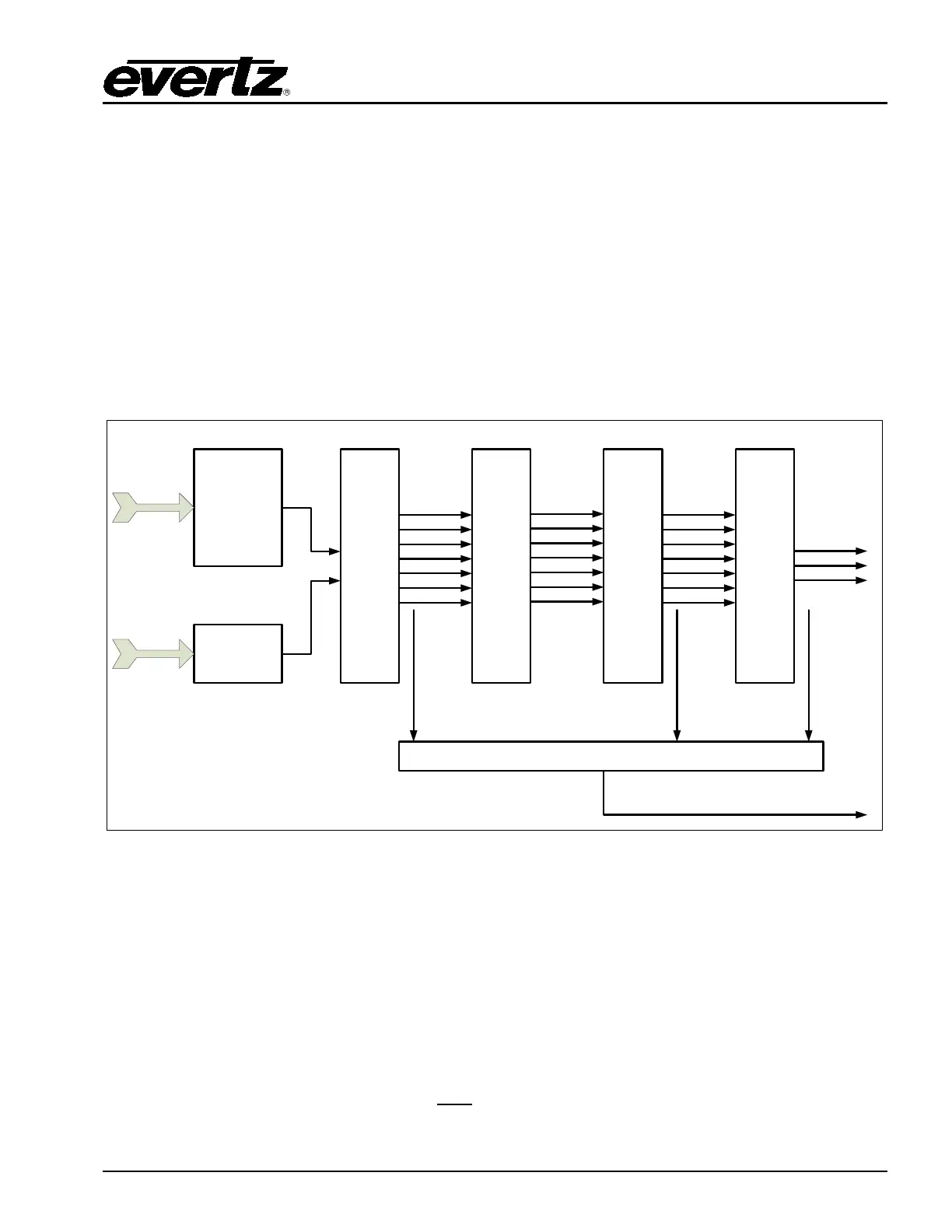
The dialogue box allows the user to configure how audio channels from within the audio processing
pipeline will be routed to the auxiliary audio output channels.
AUDIO
PRE
SHUFFLER
AUDIO
DE-EMBEDDER
SAMPLE RATE
CONVERSION
(
SRC)
VIDEO
INPUTS
DISCRETE
AUDIO
INPUTS
PGM
VO2
VO1
EMG
PST
VO4
VO3
AUDIO
GAIN
CONTROL
PGM
VO2
VO1
EMG
PST
VO4
VO3
AUDIO
SHUFFLE
PGM
VO2
VO1
EMG
PST
VO4
VO3
AUDIO
MIXER
PGM
CLN
PVW
AUDIO MONITORING ROUTING
AUX
LOCATION
1
LOCATION
3
LOCATION
2
Figure 4-14: Audio Monitoring Location
Location 1 – Output of the Preshuffler
Audio from the output of the pre-shuffler stage in the audio processing pipeline routes audio from
directly after the pre-shuffler. This is input audio before any processing (before shuffling, gain
adjustment and mixing). Program, Preset, Emergency and Voiceovers 1-4 apply as input buses at this
stage.
Location 2 – Mixer Input
Audio from the input to the mixer stage in the audio processing pipeline routes audio from directly
before the audio mixer. This is now audio after
any applied gain adjustment and shuffling. Program,
Preset, Emergency and Voiceovers 1-4 apply as input buses at this stag.



 To Next Page