EasyManua.ls Logo

FibroLAN Falcon-MX - MLD Snooping Port Group Filtering Configuration

Default Icon
473 pages
Print Icon
To Next Page IconTo Next Page
To Previous Page IconTo Previous Page
Loading...
Falcon M-Class | User Guide
262
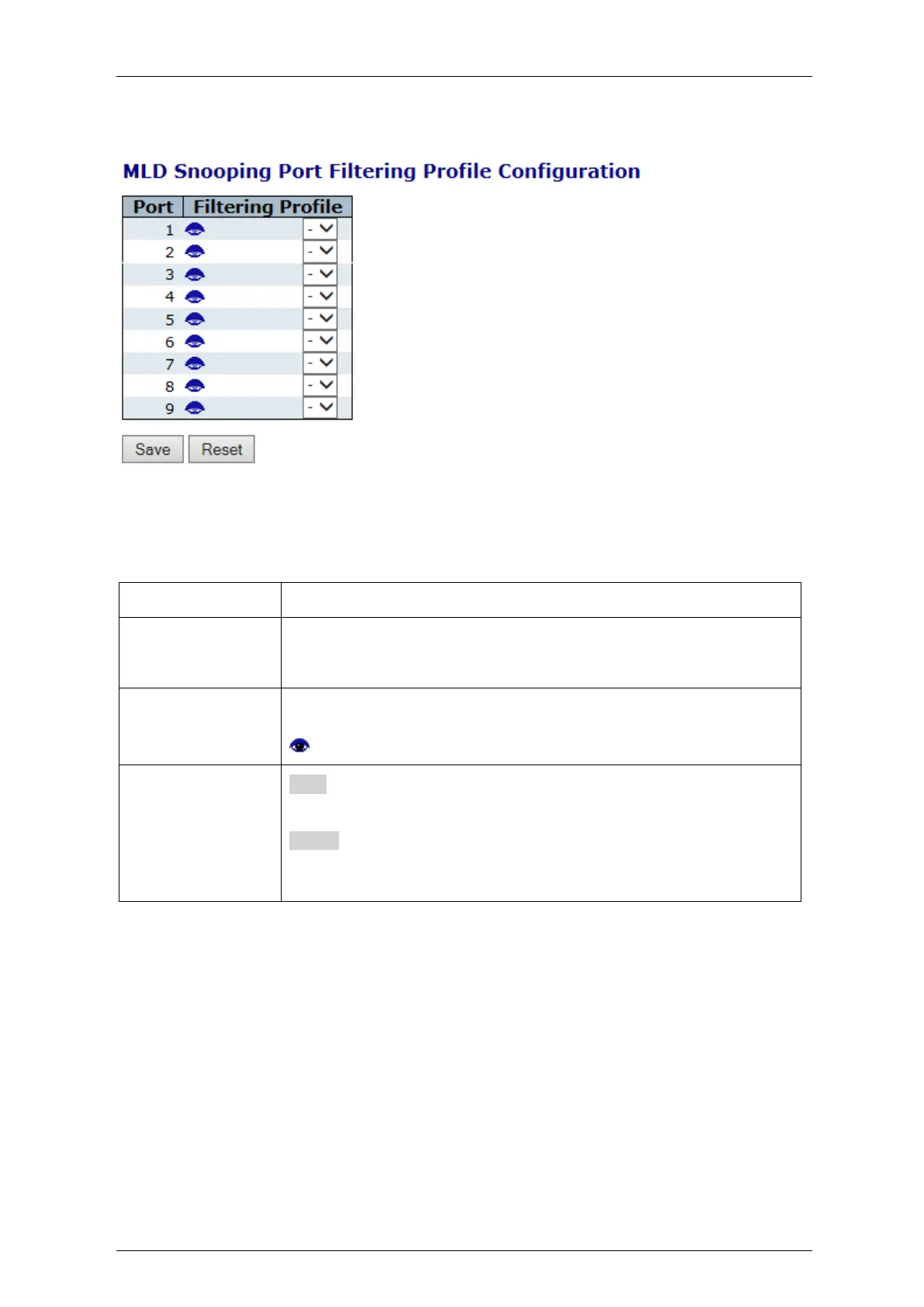
4.18.9 MLD Snooping Port Group Filtering Configuration
Figure 4-147: MLD Snooping Port Group Filtering Configuration
Table 4-141: MLD Snooping Port Group Filtering Configuration Parameters
Port
The logical port for the settings.
Filtering Profile
Select the IPMC Profile as the filtering condition for the specific port.
Summary about the designated profile will be shown by clicking the view
button.
Profile
Management
Button
You can inspect the rules of the designated profile by using the
following button:
: List the rules associated with the designated profile.
Buttons
Save:
Click to save changes.
Reset:
Click to undo any changes made locally and revert to previously saved
values.

Table of Contents