Falcon M-Class | User Guide
95
4.8.2 QoS Ingress Port Policers
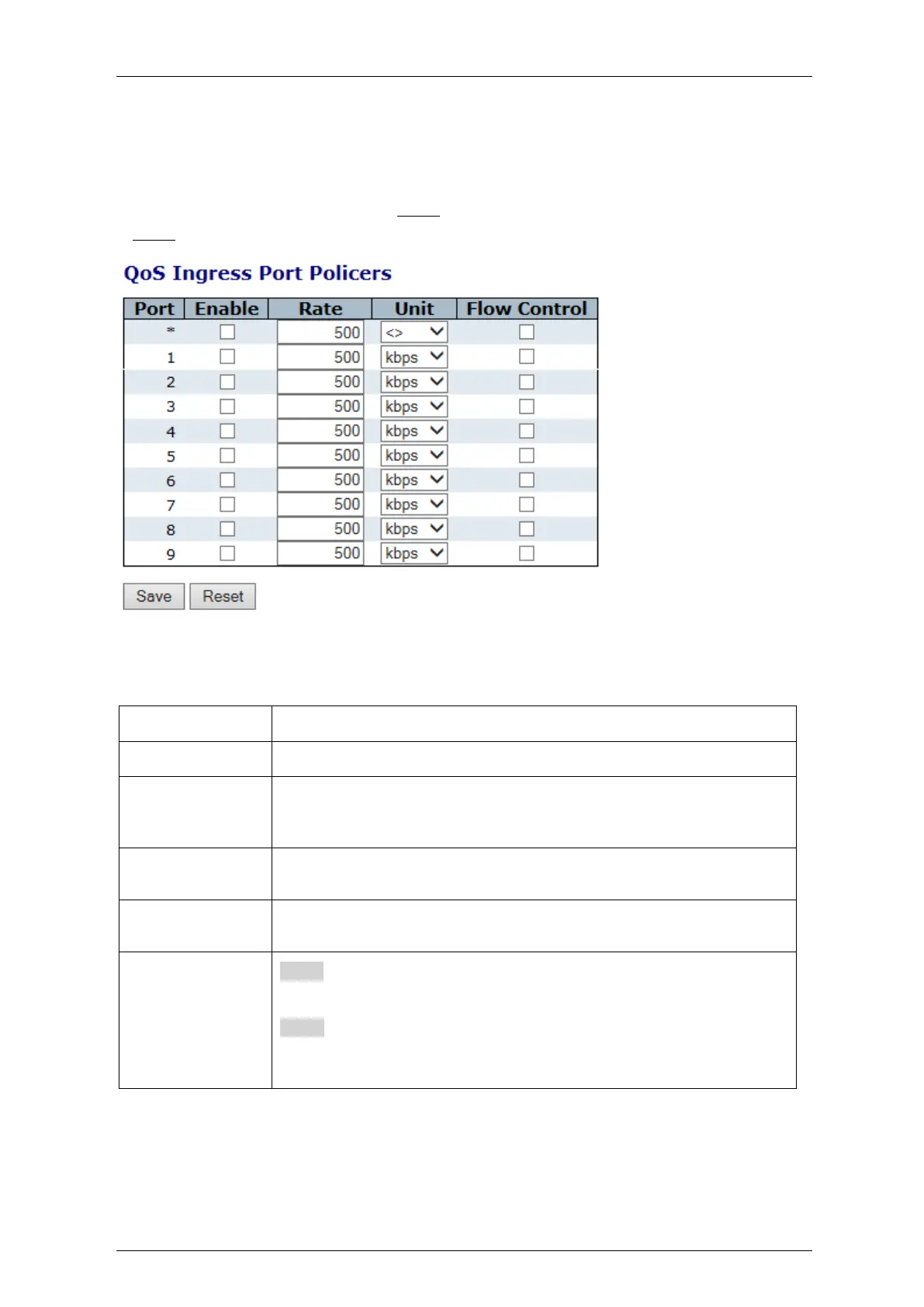
This section allows you to configure the Policer settings for all switch ports.
A policer can limit the bandwidth of received frames. It is located in front of the ingress queue.
Figure 4-48: QoS Ingress Port Policers
Table 4-46: QoS Ingress Port Policers Parameters
The port number for which the configuration below applies.
Controls whether the policer is enabled on this switch port.
Controls the rate for the policer. The default value is 500. This value is
restricted to 100-1000000 when the "Unit" is "kbps" or "fps", and it is
restricted to 1-3300 when the "Unit" is "Mbps" or "kfps
Controls the unit of measure for the policer rate as kbps, Mbps, fps or
kfps . The default value is "kbps".
If flow control is enabled and the port is in flow control mode, then pause
frames are sent instead of discarding frames.
Save:
Click to save changes.
Reset:
Click to undo any changes made locally and revert to previously saved
values.



 To Next Page