Falcon M-Class | User Guide
352
4.26 Ethernet Ring Protection Switching
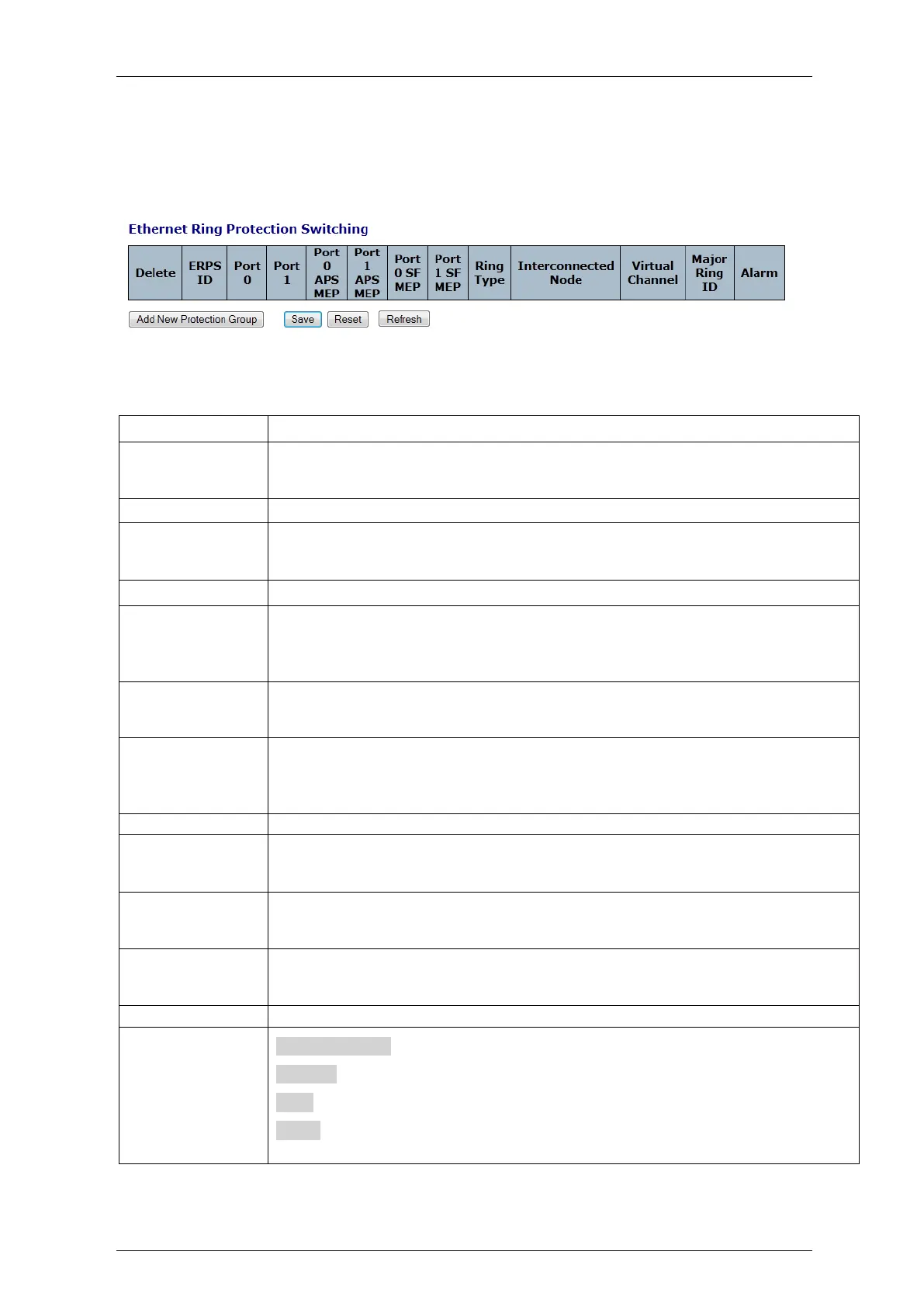
The ERPS (Ethernet Ring Protection Switch) instances are configured here.
The ERPS is supported by the G.8032v2 standard
Figure 4-211: Ethernet Ring Protection Switching
Table 4-184: Ethernet Ring Protection Switching Parameters
This box is used to mark an ERPS for deletion in next Save operation.
The ID of the created Protection group. It must be an integer value between 1 and
64. The maximum number of ERPS Protection Groups that can be created are 64.
Click on the ID of an Protection group to enter the configuration page.
This will create a Port 0 of the switch in the ring
This will create "Port 1" of the switch in the Ring. As interconnected sub-ring will
have only one ring port, "Port 1" is configured as "0" for interconnected sub-ring.
"0" in this field indicates that no "Port 1" is associated with this instance
The Port 0 Signal Fail reporting MEP.
The Port 1 Signal Fail reporting MEP. As only one SF MEP is associated with
interconnected sub-ring without virtual channel, it is configured as "0" for such ring
instances. "0" in this field indicates that no Port 1 SF MEP is associated with this
instance.
The Port 0 APS PDU handling MEP.
The Port 1 APS PDU handling MEP. As only one APS MEP is associated with
interconnected sub-ring without virtual channel, it is configured as "0" for such ring
instances. "0" in this field indicates that no Port 1 APS MEP is associated with this
instance.
Type of Protecting ring. It can be either major ring or sub-ring.
Interconnected Node indicates that the ring instance is interconnected. Click on the
checkbox to configure this. "Yes" indicates it is an interconnected node for this
instance. "No" indicates that the configured instance is not interconnected.
Sub-rings can either have virtual channel or not on the interconnected node. This is
configured using "Virtual Channel" checkbox. "Yes" indicates it is a sub-ring with
virtual channel. "No" indicates, sub-ring doesn't have virtual channel.
Major ring group ID for the interconnected sub-ring. It is used to send topology
change updates on major ring. If ring is major, this value is same as the protection
group ID of this ring
There is an active alarm on the ERPS.
Add New ERPS: Click to add a new EPS entry
Refresh: Click to refresh the page immediately.
Save: Click to save changes.
Reset: Click to undo any changes made locally and revert to previously saved
values



 To Next Page