Falcon M-Class | User Guide
30
4.3.5 NTP Configuration
NTP is an acronym for Network Time Protocol, a network protocol for synchronizing the clocks of
computer systems. NTP uses UDP (datagrams) as transport layer
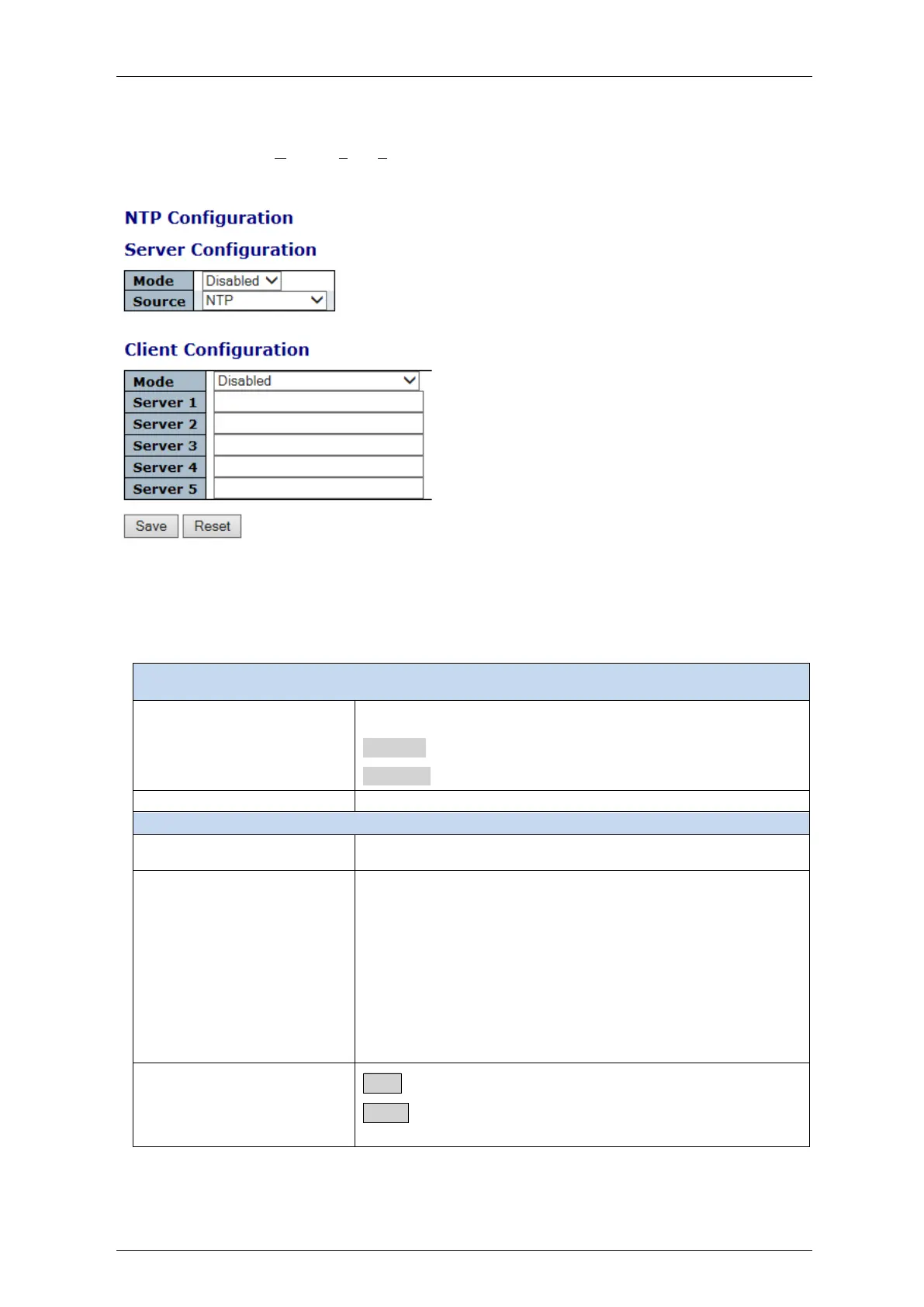
Figure 4-6: NTP Server and Client Configuration
Table 4-5: NTP Configuration Parameters
Indicates the NTP mode operation.
Possible modes are:
Enabled: Enable NTP mode operation.
Disabled: Disable NTP mode operation.
The source can be NTP or Sync Center
Provide the IPv4 or IPv6 address of a NTP server
IPv6 address is in 128-bit records represented as eight fields of
up to four hexadecimal digits with a colon Enabled n separating
each field (:)
. For example, 'fe80:: 215:c5ff:fe03:4dc7’. The symbol '::' is a
special syntax that can be used as a shorthand way of
representing multiple 16-bit groups of contiguous zeros; but it
can appear only once. It can also represent a legally valid IPv4
address. For example, ':: 192.1.2.34’.
Save: Click to save changes.
Reset: Click to undo any changes made locally and revert to
previously saved values.



 To Next Page