Falcon M-Class | User Guide
391
5.4 Dying Gasp Configuration
The M-Class series is capable of transmitting a dying gasp event notification when it senses loss of
power. The notification can be an SNMP trap to a selected destination.
This feature is available on the device’s Power Link ports:
The dying gasp feature can be configured on a per-port basis.
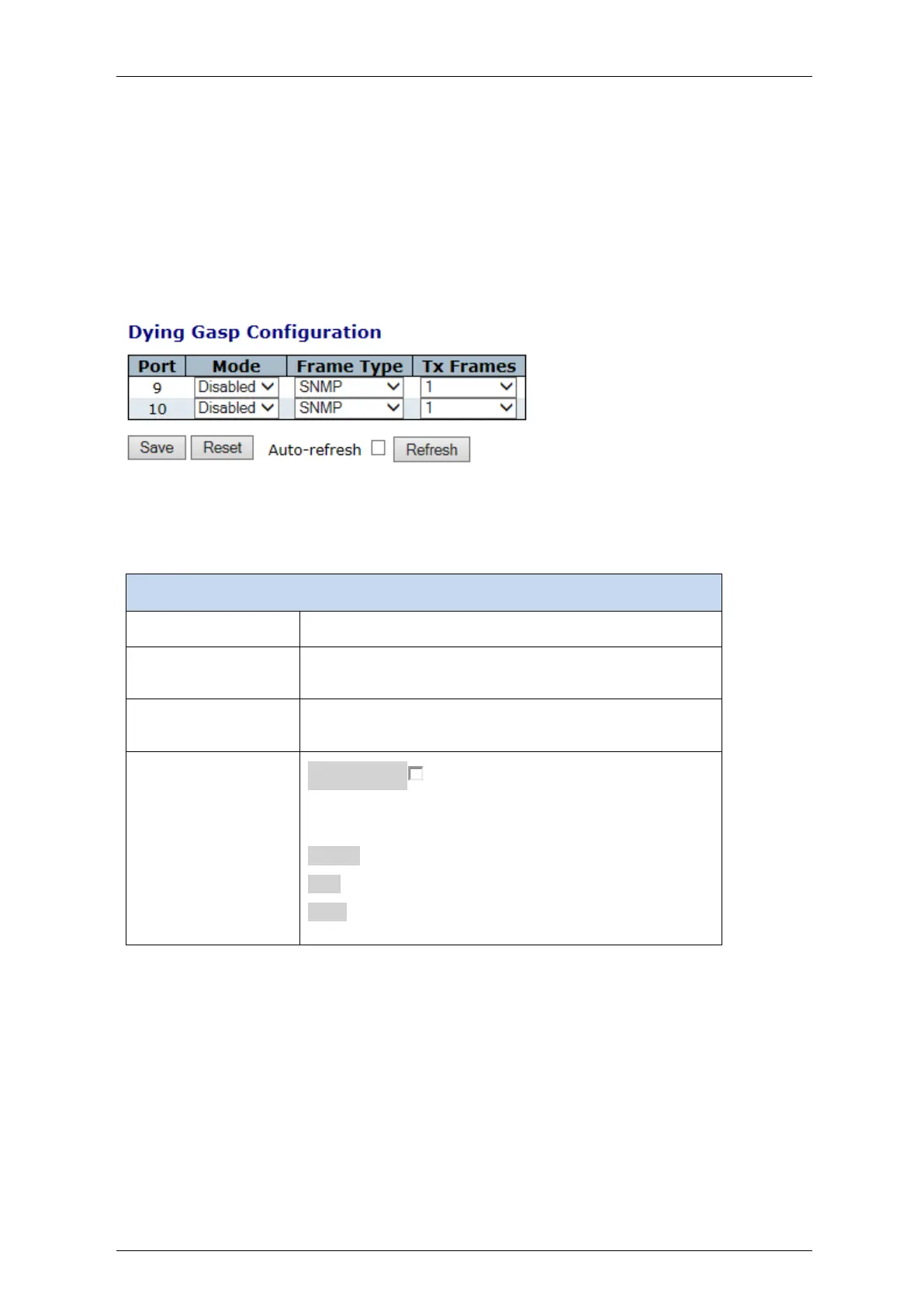
The Dying Gasp feature may be configured under Web management and CLI
Figure 5-22: Dying Gasp Configuration
Table 5-21: Dying Gasp configuration parameters Parameters
Enable or disable dying gasp functionality for a port
select the sending frame format during dying gasp. SNMP
or Link OAM
Indicates the number of frames to transmit during dying
gasp. Tx Frames can be set between 1 to 5 frames.
Auto-refresh :
Check this box to refresh the page automatically.
Automatic refresh occurs every 3 seconds
Refresh: Click to refresh the page immediately
Save : Click to save changes
Reset: Click to undo any changes made locally and revert
to previously saved values.



 To Next Page