Falcon M-Class | User Guide
89
Save:
Click to save changes.
Reset:
Click to undo any changes made locally and revert to previously
saved values.
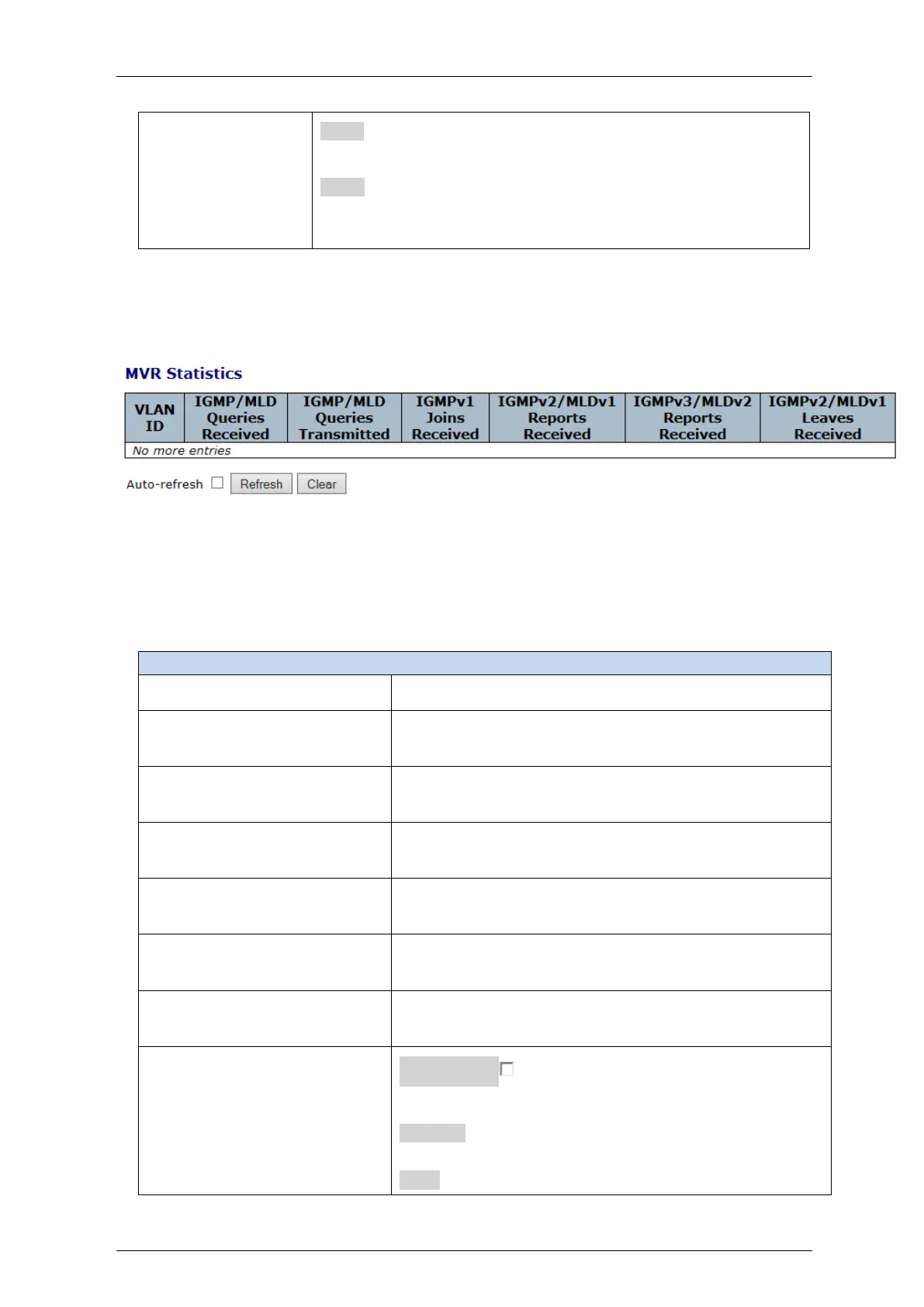
4.7.7.4 MVR Statistics
This section provides MVR Statistics information.
Figure 4-44: MVR Statistics display
Table 4-42: MVR Statistics parameters
IGMP/MLD
Queries Received
The number of Received Queries for IGMP and MLD,
respectively.
IGMP/MLD
Queries Transmitted
The number of Transmitted Queries for IGMP and MLD,
respectively.
The number of Received IGMPv1 Join's.
IGMPv2/MLDv1 Report's
Received
The number of Received IGMPv2 Join's and MLDv1 Report's,
respectively.
IGMPv3/MLDv2 Report's
Received
The number of Received IGMPv1 Join's and MLDv2 Report's,
respectively.
IGMPv2/MLDv1 Leave's
Received
The number of Received IGMPv2 Leave's and MLDv1 Done's,
respectively.
Auto-refresh : Check this box to refresh the page
automatically. Automatic refresh occurs every 3 seconds
.
Refresh: Click to refresh the page immediately
Clear: Clears all Statistics counters.


 To Next Page