Brief Functional Test
Function Verification
8
8-31
Video Programming System (VPS)
Procedure:
•
Same settings as above.
•
Connect the scope to the
VIDEO OUT
of the generator. Use a 75
Ω
feedthrough
termination.
•
Set the scope to PAL (625 line system) and select TV line 16.
•
Select an appropriate time base and amplitude scale.
Test Result Requirement:
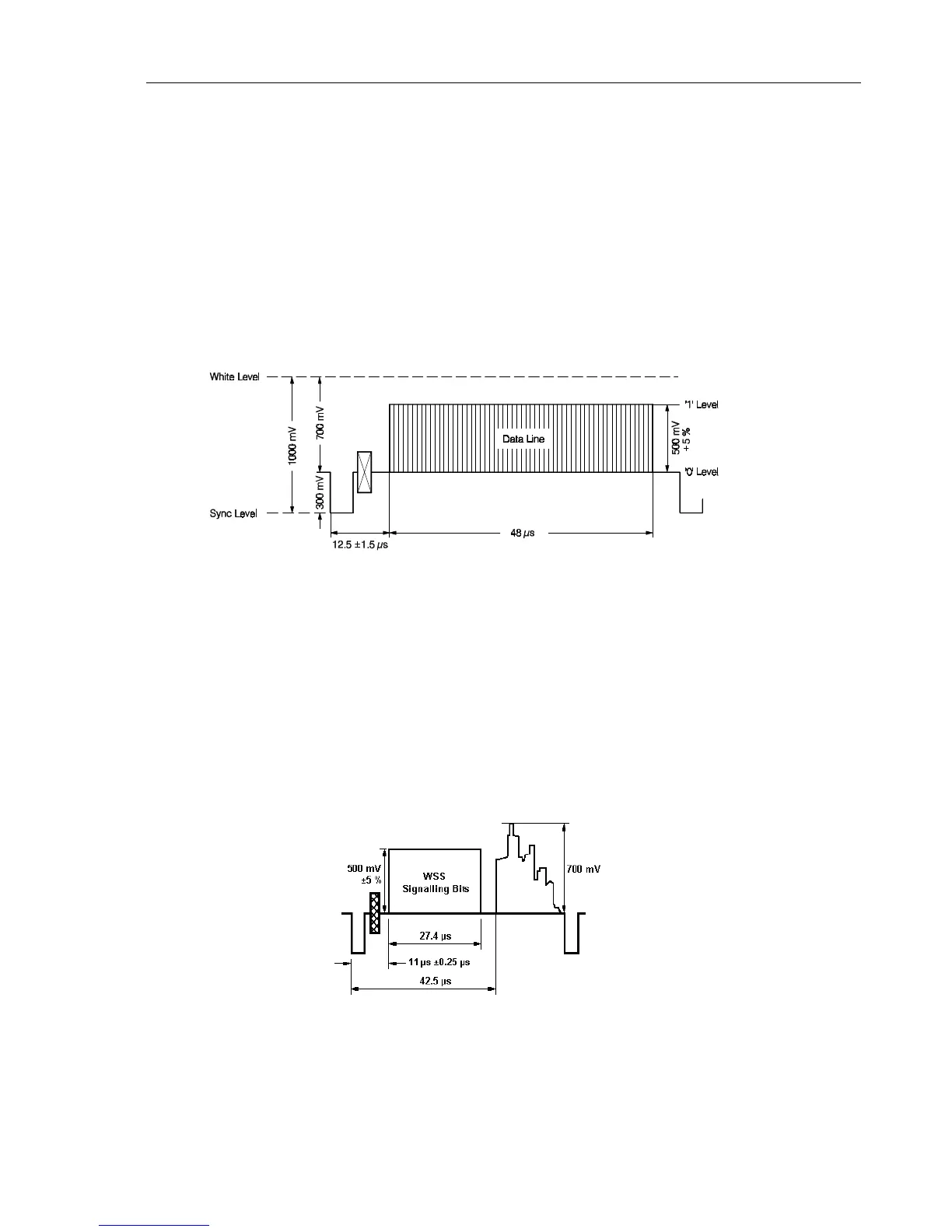
The scope shows the following signal:
Figure 8-30. VPS Data in Line 16
Wide Screen Signalling Bits (WSS)
Procedure:
•
Same connection as above.
•
Select TV line 23.
•
Select the
digital
submenu and set the
Wide Screen Signalling
to
Auto
.
Test Result Requirement:
The scope shows the following signal:
Figure 8-31. Wide Screen Signalling Bits
•
Set the generator with
RECALL 0
to its default settings.



 To Next Page