Manual Supplement 54200/54100 Users Manual
2
SUPPLEMENT FOR USERS MANUAL.
Extensions of Fluke Model 54200/54100 User Interface.
The popup menus under the keys DIVERSE, WHITE, and COLOR TEMP have had a number of
extensions. There are also extensions to the GREYSCALE pattern and to CLOSED CAPTION:
DIVERSE:
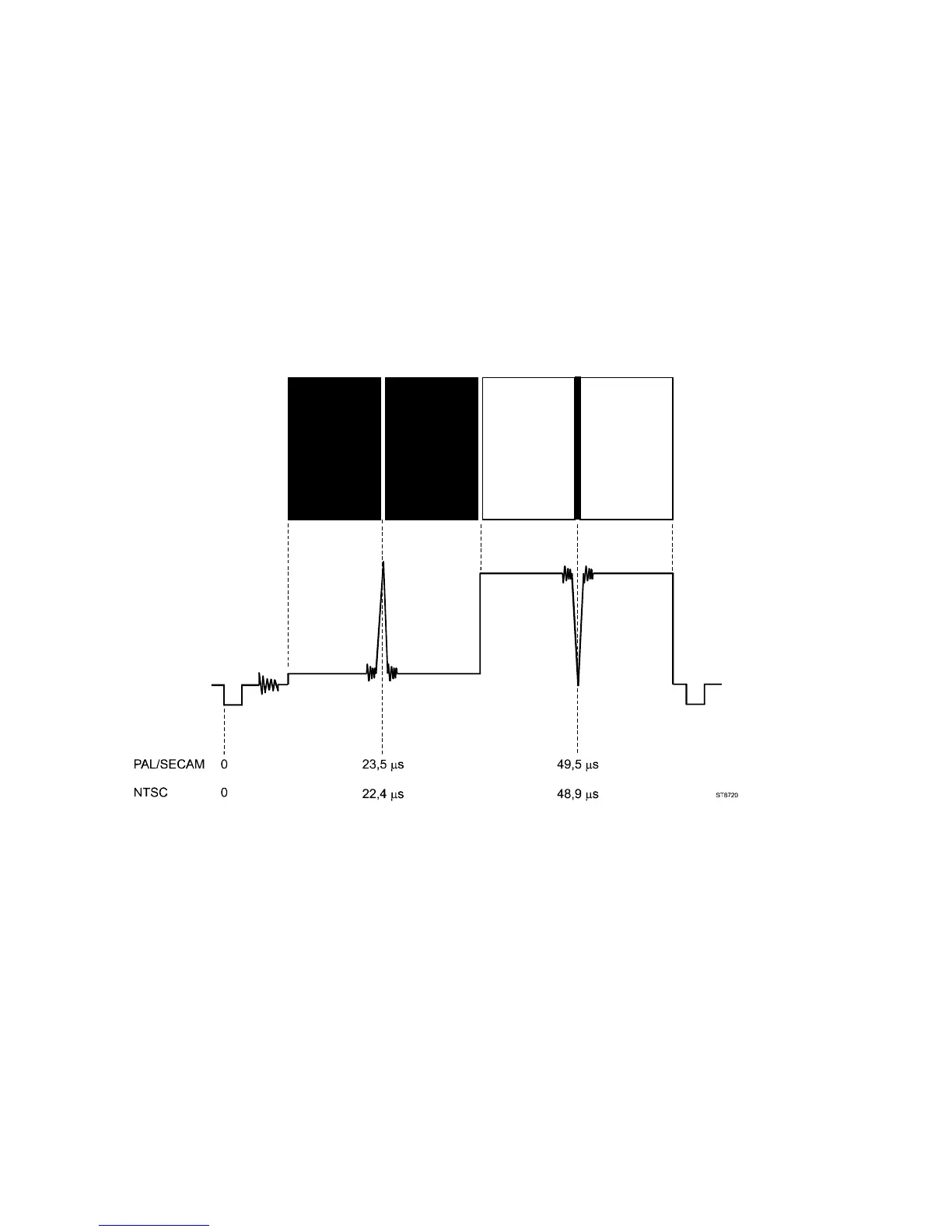
- The selection SINX/X has been added. This selection gives a black & white test pattern: the left half
of the screen is black with a vertical white line in the middle; the right half of the screen is white with a
vertical black line in the middle (see figure).
This type of test pattern has been added to check bandwidth and phase behaviour of a video-
transmission system like e.g. a video amplifier. The narrow white line on the black background and
the narrow black line on the white background result in narrow pulses to be applied to a video system
under test. These so-called SINX/X pulses consist of multiple frequencies with a flat amplitude across
the total bandwidth.
- Four extra selections OPT_1 .. OPT_4 are added. These selections are intended for future
extensions: they are not active and therfore presented in a shaded tone. OPT stands for OPTIONAL.
WHITE:
The step ‘White_10%’ has been added for the systems PAL and SECAM.
COLOR TEMP:
The step ‘10%’ has been added under the key COLOR TEMP and menu selection ‘CTA_Center’. This is
valid for the systems PAL and SECAM.



 To Next Page