How to Use the Instrument
Operating via Keyboard
4
4-19
•
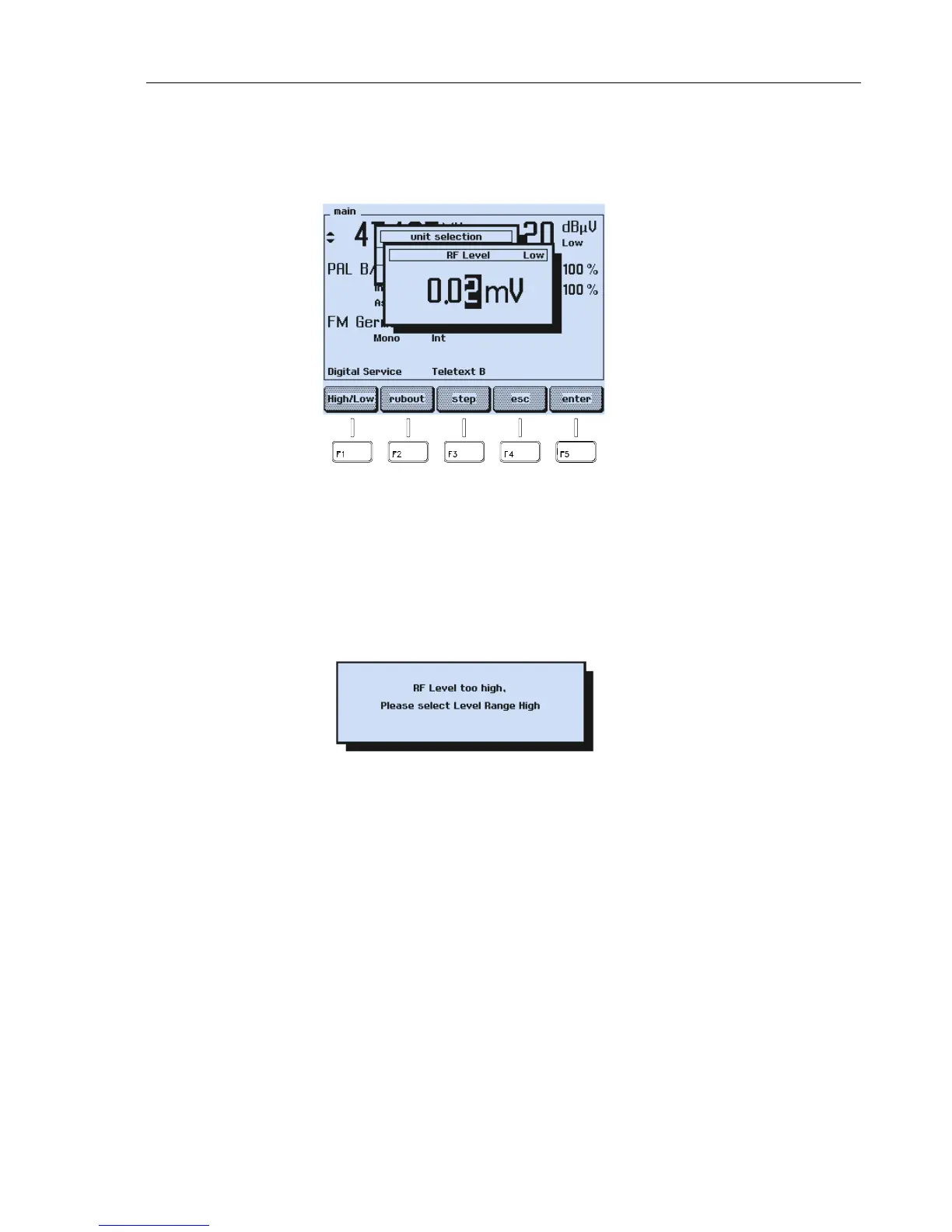
Key in directly the requested value using the numerical keypad for the parameter
indicated in inverse video, for example
0 . 0 2
for 0.02 mV.
•
Keyed in digits can be erased with the
rubout
softkey (F2).
Figure 4-29. Value Input for the Carrier Amplitude
•
If you want to skip the input, press the
esc
softkey (F4).
•
Press the
enter
softkey (F5) to confirm your input.
If you key in a value >10 mV or >80 dBµV and the
Low
range is selected (indication in
the
main
screen below the unit), the display shows the message:
Figure 4-30. Range Exceeding Message
•
Press the
enter
softkey (F5) for acknowledgment. The instrument returns to the last
setting.
•
Press the
LEVEL
key.
•
Key in an appropriate value using the numerical keypad or press the
edit
softkey
(F3) and the
High/Low
softkey (F1) to select the
High
range and key in the
requested higher value.
•
Press the
enter
softkey (F5) to confirm.
The
Low
range limit of 10 mV or 80 dBµV prevents unintended inputs that are too high.
You should select the
Low
range if you are testing, for example, receivers with inputs
sensitive to overvoltages.



 To Next Page