Cockpit Reference Guide for the Cirrus SR2x with Perspective Touch+ by Garmin
190-02954-01 Rev. A
66
Flight Management
Flight
InstrumentsEIS
Nav/Com/
XPDR/Audio
Flight
Management
Hazard
AvoidanceAFCS
Additional
FeaturesAnnun/AlertsAppendixIndex
Flight
InstrumentsEAS
Audio and
CNS
Flight
Management
Hazard
AvoidanceAFCS
Additional
Features
Abnormal
OperationAnnun/AlertsAppendixIndex
For the standby flight plan: From MFW Home, touch Flight Plan > Standby Flight Plan.
(Not available for stored flight plans)
2) Scroll the list if necessary and touch an Airway Selection Button to display the 'Airway
Options' Window.
3) Touch the Load New Airways Button.
4) Touch the selection button for the desired setting.
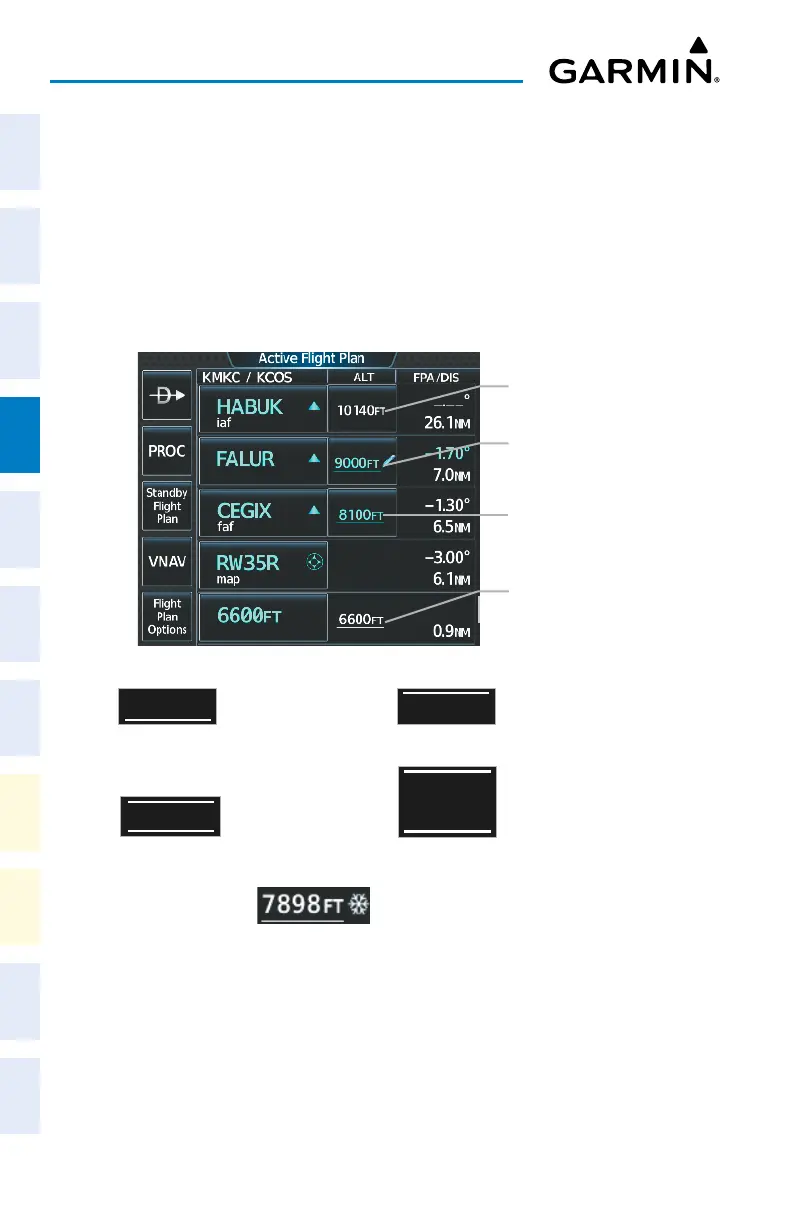
Altitude Constraints
Active Flight Plan – Waypoint Altitude Constraints
Published Altitude
Not Designated
(White Text with Altitude
Restriction Bar)
System Calculated Advisory
Altitude (White Text)
Altitude Constraints within a Flight Plan
Auto Designated Altitude
AT or ABOVE
(Cyan Text)
Modified Altitude Constraint
AT or ABOVE
(Cyan Text with Pencil Icon)
Altitude Constraint Types
Cross AT or ABOVE 5,000 ft
5
OOO
FT
Cross AT 2,300 ft
23
OO
FT
Cross BETWEEN 3,000 ft & 5,000 ft
5
OOO
FT
3
OOO
FT
Cross AT or BELOW 3,000 ft
23
OO
FT
Manual Input of Temperature Compensation












 To Next Page