3-45
Chapter 3 Settings and Measurement
Contents General Description
Checks and Preparation
Settings and Measurement
Example of Use Specification
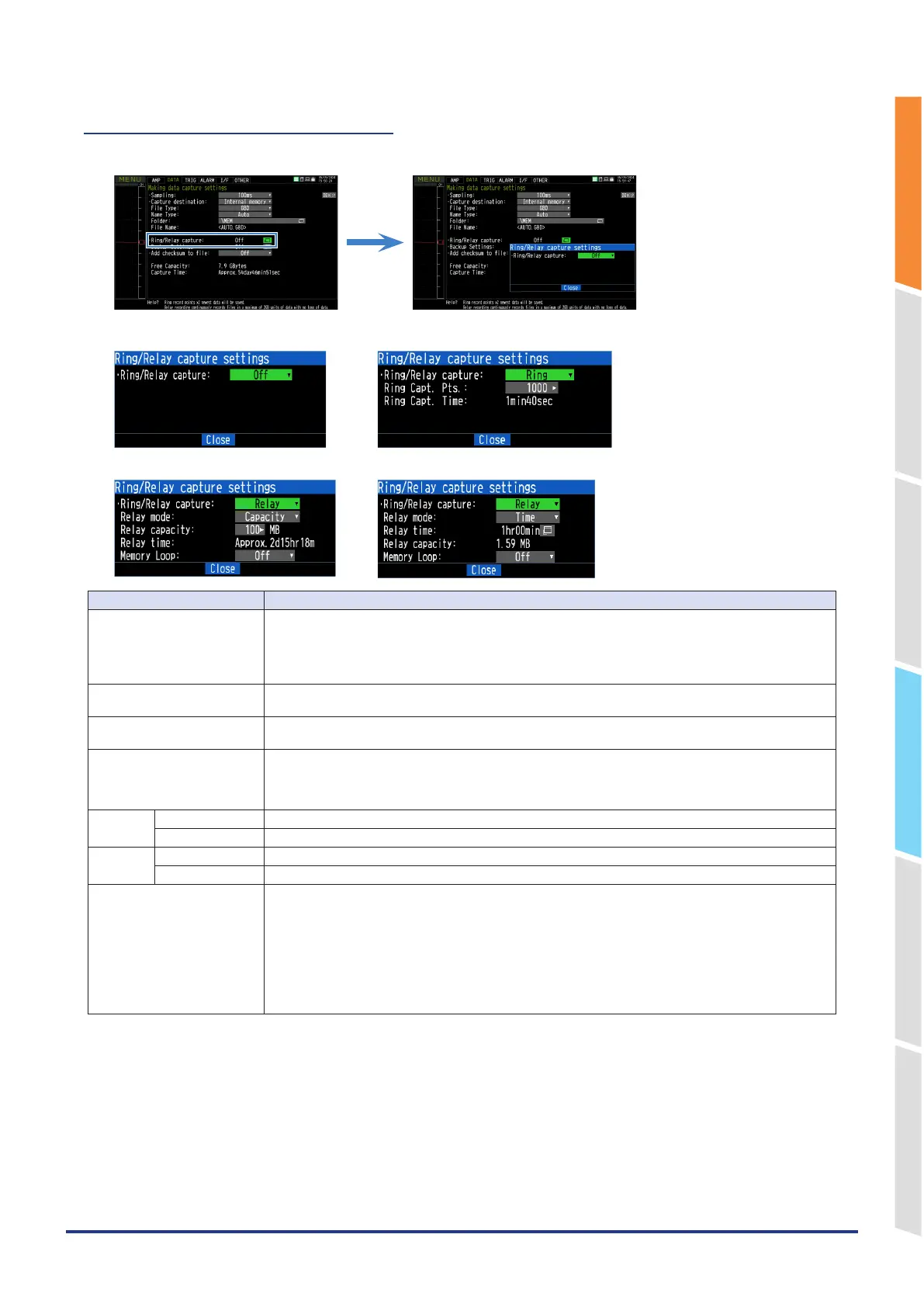
2-5. Ring/Relay capturing settings
Sets the ring relay function.
<Ring/Relay Ring Off> <Ring/Relay Ring>
<Ring/Relay Relay/Capacity> <Ring/Relay Relay/Time>
Setting Selections available
Ring/Relay capturing Set the capturing function.
Off: The capturing function is disabled.
Ring: The ring capturing is executed. (For details, refer to "2-6. Ring capture setting".)
Relay: Performs continuous capturing by separating files by the set file size unit or capturing time
without missing data.
Ring Capt. Pts. When using the ring capturing function, specify the number of data points for one file.
(For details, refer to "2-6. Ring capture setting" .)
Ring Capt. Time When the ring capturing function is set to On, the measurement time that can be captured in one file
is displayed.
Relay mode Set the size of the file to be relay-captured by capacity or time.
Capacity: Set the size of one file between 100MB and 2GB.
Time: Set the size of one file between 1 hour and 24 hours.
(For details, refer to "2-6. Ring capture setting" .)
Capacity Relay capacity Set the size of one file between 100MB and 2GB.
Relay time The capturing time of one file size set in the relay mode capacity is displayed.
Time Relay capacity The size of one file used for capturing in the capturing time set in the relay mode time is displayed.
Relay time Set the size of one file between 1 hour and 24 hours.
Memory loop When capturing with the relay capturing function, set whether to delete the oldest file when the
remaining capacity of the save destination is insufficient.
Off: No files are deleted. When the remaining capacity of the save destination is insufficient, the disk
error is displayed and capturing is stopped.
On: Delete old files in the capturing folder and continue capturing.
* This cannot be used when FTP is set as the backup destination.
If you set to "Delete" in "FTP client settings" – "File setting when the backup is successful", the
captured file that has been successfully backed up is deleted to secure the save destination
capacity.















 To Next Page