3-25
Chapter 3 Settings and Measurement
Contents General Description
Checks and Preparation
Settings and Measurement
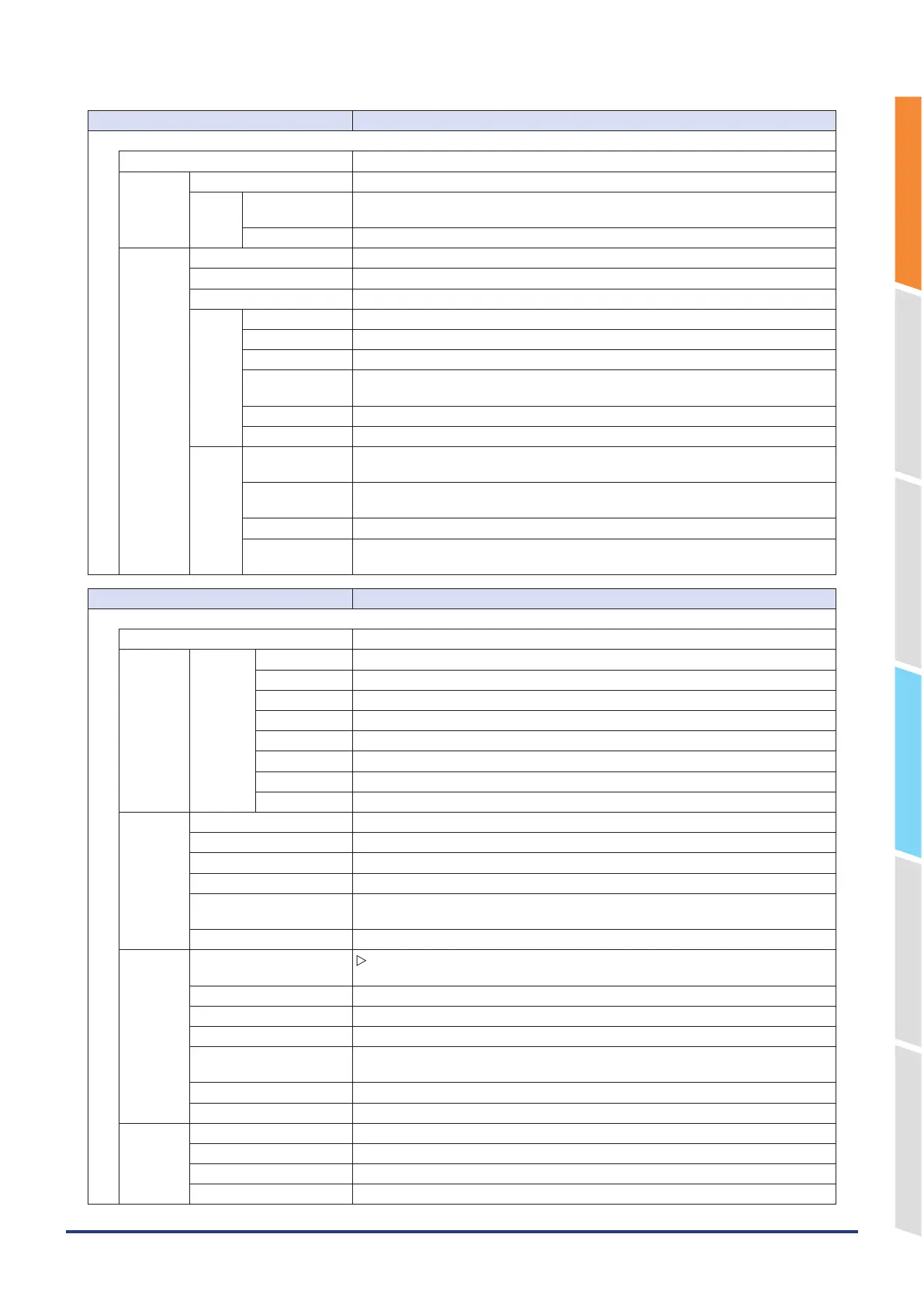
Example of Use Specification
Setting Selections available
Logic/Pulse
Mode Off, Logic, Pulse
Logic Filter Off, On
Misc. Waveform color
setting
0 to 31 for each of red, green, blue (RGB)
Trace setting Off, On
Pulse Input Off, Revolution counts, Counts, Inst.
Filter Off, On
Slope H, L
EU Function Off, On
Meas. Value Set numeric value
EU output value Set numeric value
Select Voltage, Current, Length, Area, Volume, Velocity, Accel, Freq, Mass, Energy,
Pressure, Flow, Temp, Strain, Brightness, Concentration
Unit (The selections vary depending on the unit selected in the above.)
Arbitrary unit Enter text (Max. 8 characters)
Misc. Waveform color
setting
0 to 31 for each of red, green, blue (RGB)
Line Thickness
Setting
1 to 8 dots
Trace setting Off, On
Number of pulses
per revolution
1 to 10000
Setting Selections available
Calculation
Calculation Off, Calculation formula, 4-point input
Calculation
formula
Formula { (a × CH-X) (+, –, *, /) (b × CH-Y) + c} (/1000000, /1000, ×1, ×1000, ×1000000)
CH-X Calculation target CH number (Analog CH only)
CH-Y Calculation target CH number (Analog CH only)
a Numerical input
b Numerical input
c Numerical input
Operator +, –, *, /
Scale /1000000, /1000, ×1, ×1000, ×1000000
4-point
input
CH-X Calculation target CH number (Analog CH only)
Measured value Upper limit Numerical input
Measured value Lower limit Numerical input
Calculated value Upper limit Numerical input
Calculated value of Upper
and Lower limits
Numerical input
Decimal point 1.0000, 10.000, 100.00, 1000.0, 10000.
Calculated
span
Automatic adjustment
execution
Execute
Upper limit Numerical input
Decimal point 1.0000, 10.000, 100.00, 1000.0, 10000.
Lower limit Numerical input
Unit selection Voltage, Current, Length, Area, Volume, Velocity, Accel, Freq, Mass, Energy,
Pressure, Flow, Temp, Strain, Brightness, Concentration
Unit (The unit to be selected depends on the measurement object above.)
Arbitrary unit Character entering (up to 8 characters)
Misc. Annotation text string Enter text (Max. 31 characters)
Waveform color setting 0 to 31 for each of red, green, blue (RGB)
Line thickness setting 1 to 8 dots
Trace settings Off, On















 To Next Page