Overdrive & Multi-Effects
208
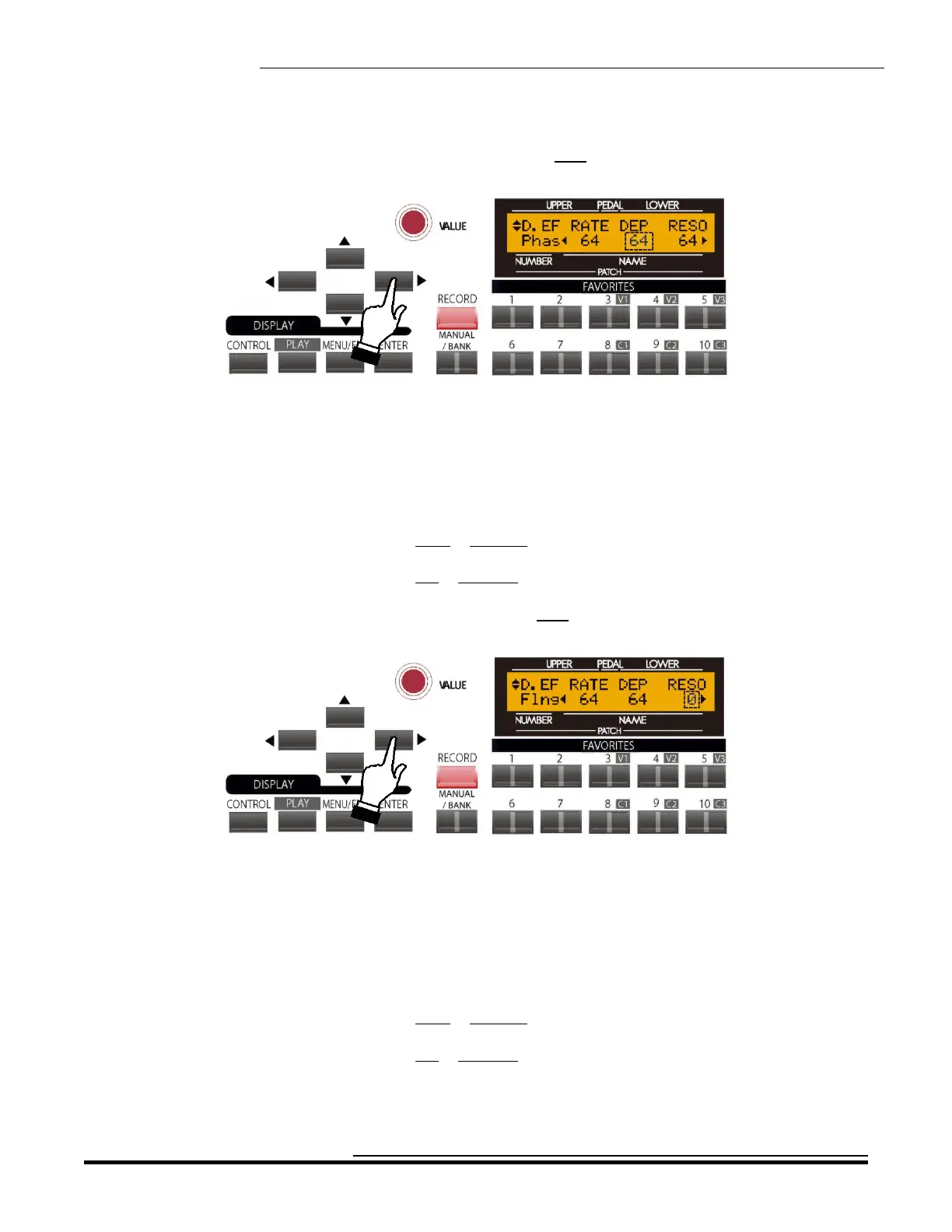
From the previous screen, touch the PAGE RIGHT Touch Button once. The Information Center Display should
now look like this:
The number underneath the word “DEP” should be blinking.
DEP - Flanger Depth
This Advanced Feature allows you to set the depth of the Flange effect. You can select from “0" (minimum depth)
through “127" (maximum depth).
Turn the VALUE Rotary Control to the right to increase the depth.
Turn the VALUE Rotary Control to the left to decrease the depth.
From the above screen, touch the PAGE RIGHT Touch Button once. The Information Center Display should now
look like this:
The number underneath the word “RESO” should be blinking.
RESO - Flanger Resonance
This Advanced Feature allows you to adjust the amount of resonance or “feed-back.” of the Flange effect. You can
select from “0" (minimum resonance) through “127" (maximum resonance). At higher values, the sound becomes
increasingly distorted.
Turn the VALUE Rotary Control to the right to increase the amount of Resonance.
Turn the VALUE Rotary Control to the left to decrease the amount of Resonance.
HA<O> SKX Owner’s Playing Guide


 To Next Page
 Loading...










