4.9 Submenu 4 - Programming Of Cards.
Card programming consists of the following:
Creation and cancellation of cards, modification of card data, i.e.: changing of the personnel group and the
status of the card being blocked or not. Card programming can only be performed with privileged cards.
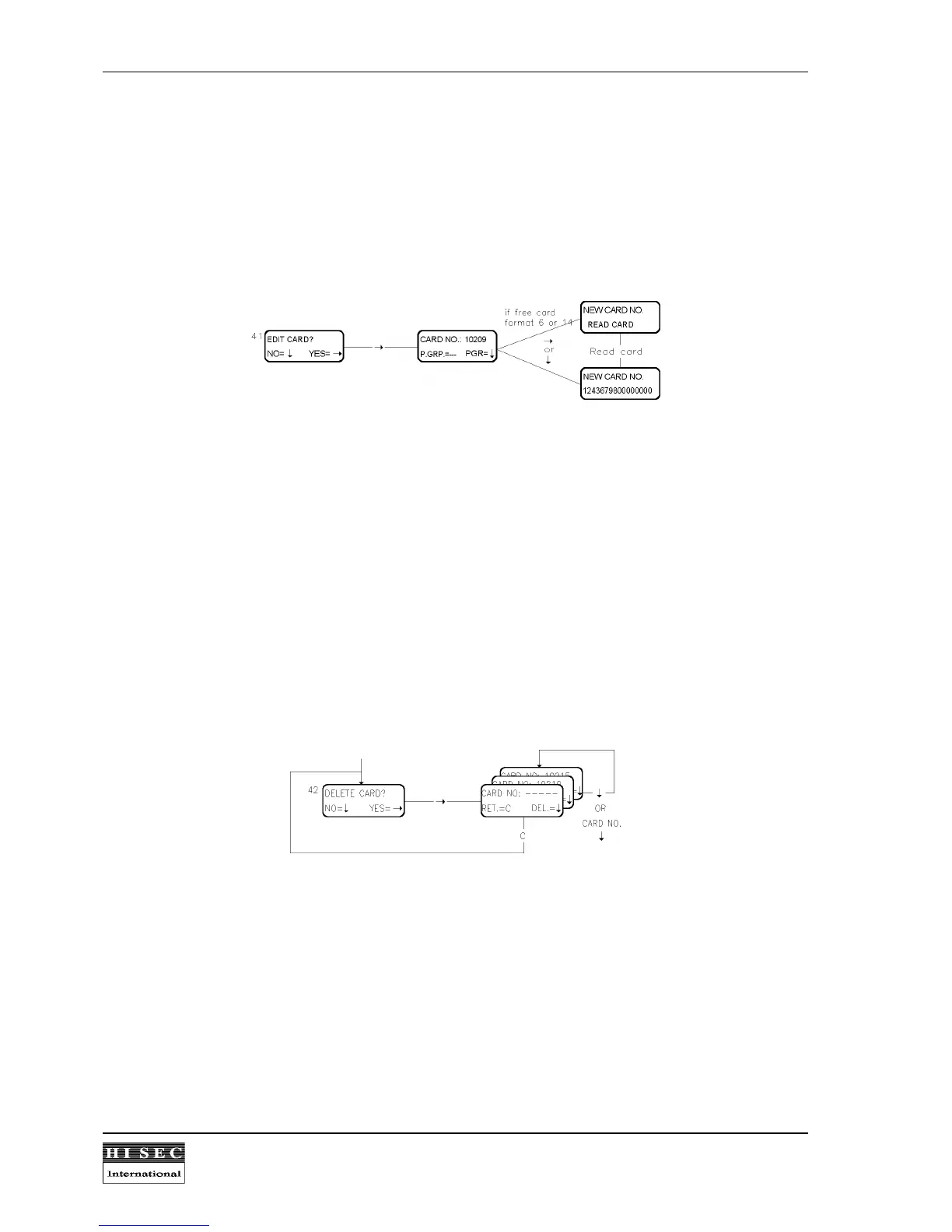
Menu 41. Edit Card.
By this menu it is possible to create a card and at the same time to connect a corresponding personnel group
number to the card.
When this function is called the display will suggest the first free card number. Then the personnel group no.
can be keyed in and the
↓
- key will programme the card. If the card no. is not correct a new card no. can be
keyed in before using the
↓
- key.
After a card is programmed using the
↓
- key, the reader will suggest the next free card no. and the same
personnel group no.
If the Free card format (6 or 14) is being used the reader (only 95T readers) will suggest to read the card which
is being programmed. Please note that the digits cannot be keyed in. The card must be read in the reader or
keyed in from a PC.
By the
C
- key the display returns to the Menu 41 without programming.
Menu 42. Delete Card.
By this menu it is possible to delete a card from the database. All programmed data belonging to the card will be
lost.
When this function is called the display asks for the card no. to be deleted. After the card no. has been keyed in
the
↓
- key will delete the card. If the card no. is not correct a new card no. can be keyed in before using the
↓
-
key.
After a card is deleted using the
↓
- key, the reader will suggest the next programmed card no. from the same
personnel group no. It is then very easy to delete a group of cards, just by pressing the
↓
- key for each card.
By the
C
- key the display returns to the Menu 42 without deletion.



 To Next Page