The FNC. field is programmed with the function numbers described in section 1.7.3. This will add a specific
function to be executed during the time described by the time programs.
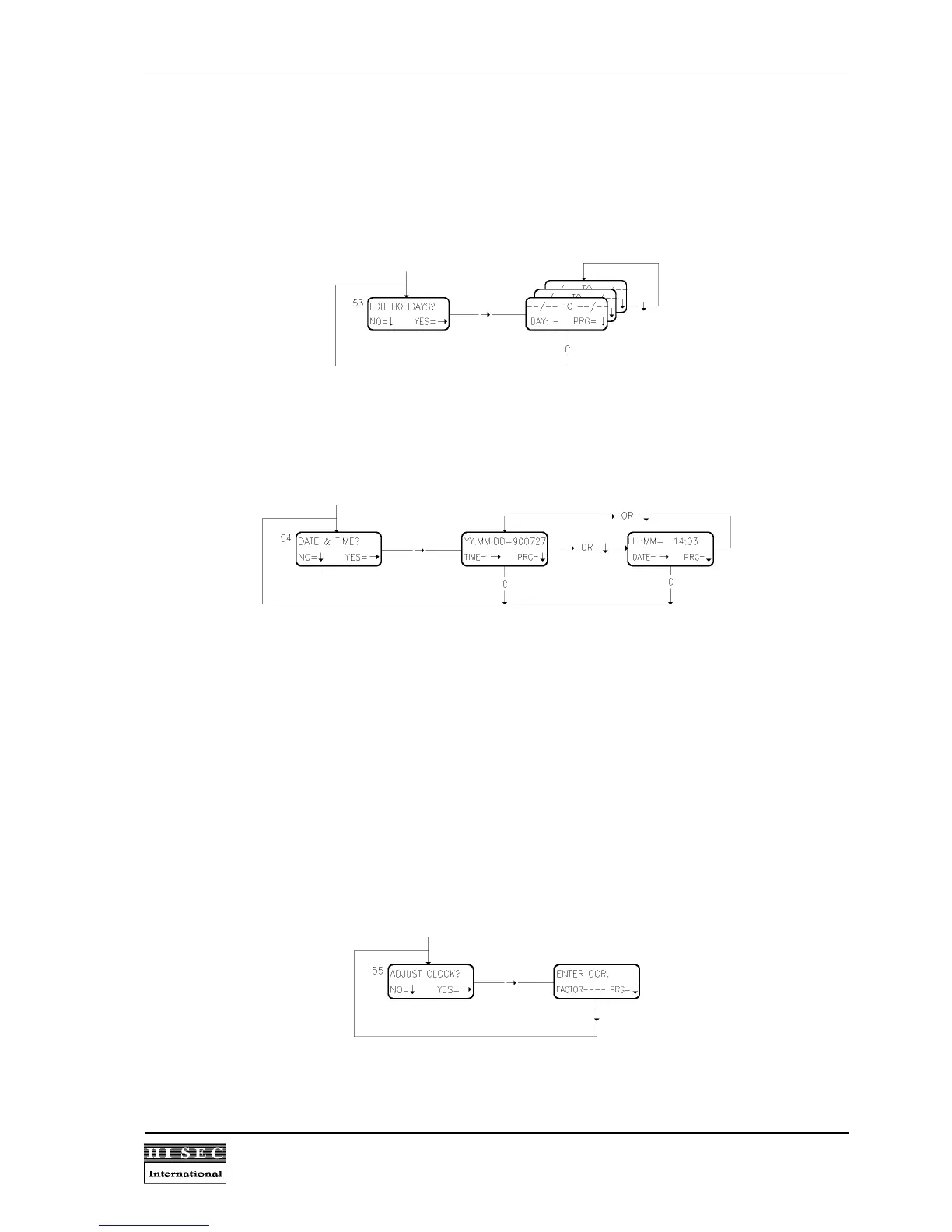
Menu 53. Edit Holiday list.
This function is used to create or change a holiday list which refers to the above programmed week programs.
The list has max 25 periods where the starting date and end date is programmed for each period. A period
includes the starting date and ending date.
Menu 54. Set Date & Time.
The date is corrected by entering year,month and day. When the last digit is entered followed by the
↓
- key, the
time automatically appears in order to adjust it by keying in hours and minutes. If the date is not to be changed,
the time is displayed by pressing the
→
- key, which is also used to return to the date. The date and time is not
corrected until the
↓
- key is pressed, upon which the seconds are reset; the picture remains. By means of the
C
- key, a return to Menu 54 is made.
Automatic summer/wintertime change following the european rules is included in the THOR access control
system.
Menu 55. Adjust Clock.
In a THOR integrated system the intrusion system will be the master clock and the time will be updated every
minute. For stand alone or multi-reader systems it can be necessary to adjust the clock "speed" with a factor
calculated f.ex. during one week. In a multi-reader system it is only necessary to adjust one reader. This will
automatically be downloaded in reader 00, which in a multi-reader system is the master clock.



 To Next Page