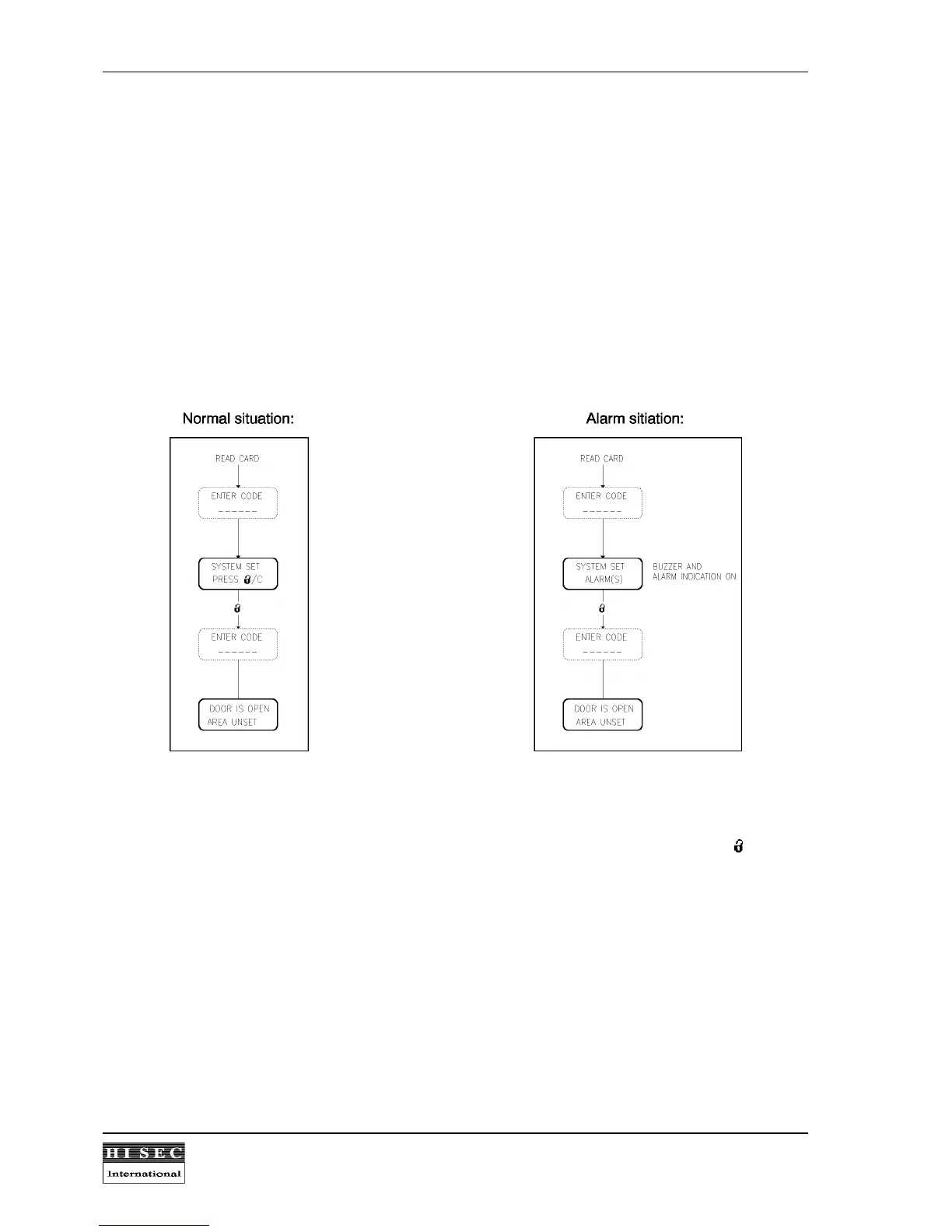
4.4 Set/unsetting the THOR Integrated System from the THOR Reader.
When the reader is connected to a THOR Intrusion system, it is possible to unset the THOR Intrusion system if
the personnel group is programmed to allow log-on on the alarm system (Lock Function = Yes) with a code
corresponding to the card. The set/unset procedures are different depending on reader type, application etc.
4.4.1 Set/unsetting from the Indoor Reader 95T AC/M/W/P or 90T RKP AC/M/W.
Unset-procedure:
All set/unset procedures starts by reading a card. The reader will then depending on the set/unset state choose
the correct process.
In THOR integrated systems the system status text can be "AREA SET" or "SYSTEM SET" depending on the
current status of the total system. This will also be indicated by the reader. After pressing the - key the
corresponding area programmed to the card will be unset and the door will open. The next time a card is read,
the reader will open the door using the normal door entry procedure.
In case of alarms in the THOR Intrusion system the reader display will indicate ALARM(S) but follow the normal
unset procedure. If it is wanted to see the list of detectors in alarm, it is necessary to go into the THOR Intrusion
menus, which will display the alarms automatically one by one.



 To Next Page