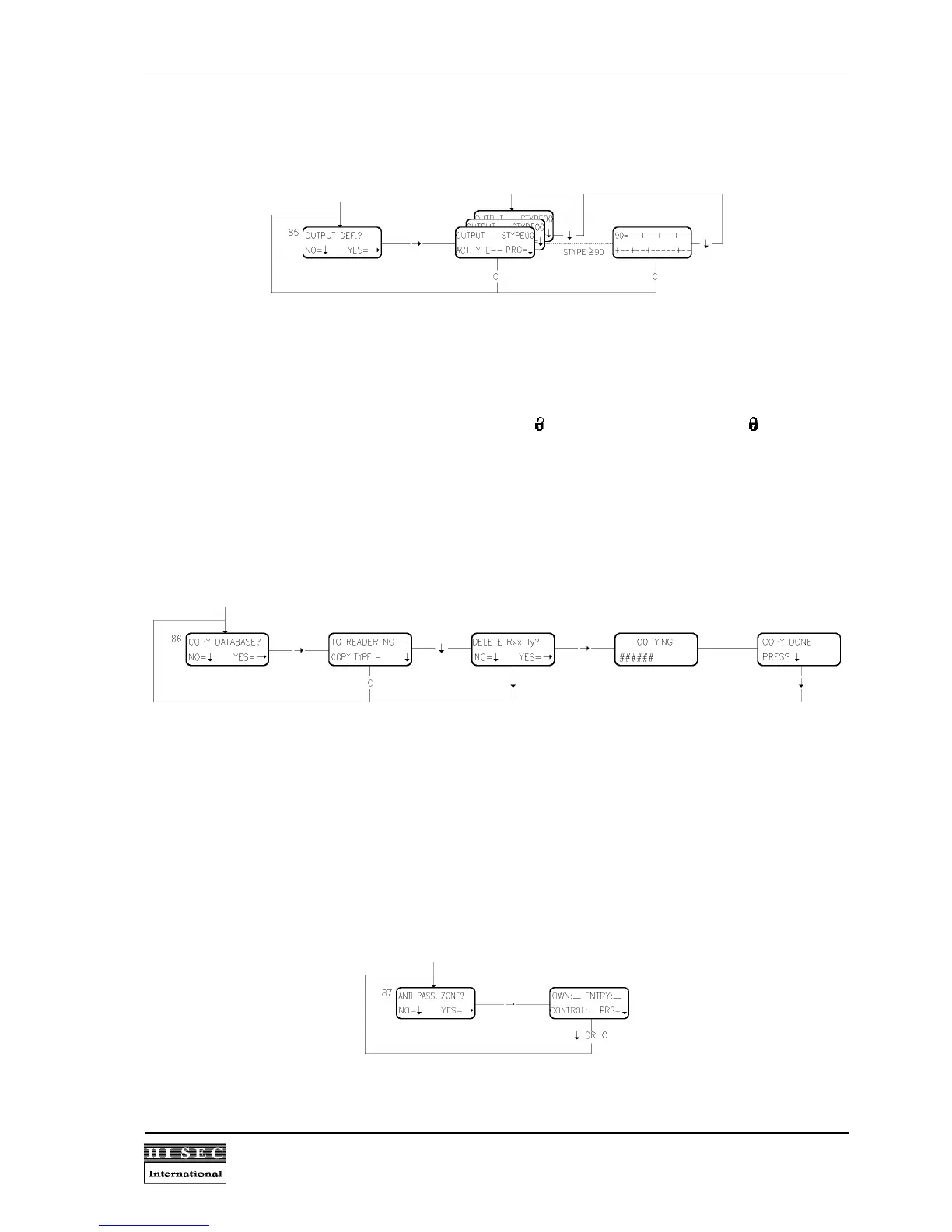
Menu 85. Output Definitions.
To each S-ART output 2 parameters must be connected, Output softtype and activating type (Please refer to
1.5.2 for the list of output soft types).
When the menu is called the output no. 00 is displayed and a new number can be keyed in if wanted. After that
the corresponding output softtype and activating type are keyed in followed by
↓
.
If the output softtype no. is between 90 - 99 an extra display picture will be shown where it possible to
programme an output function (IF/THEN). The output softtype no. will be displayed together with fields for 9
different input softtypes. An AND function can be made by the - key and an OR function by the - key.
The menu is left by keying in
C
.
For the calculation of the output no. please refer to menu 84. For S-ART 90T - S102 OUT1 is used.
Menu 86. Copy Database.
To make the programming of multi-reader systems easier it is possible to copy the local database from one
reader to another. It is also possible to copy the global database from one reader to another in case of database
fault during service.
Copy Type = 0 means the local part of the database.
Copy Type = 1 means the global part of the database.
Please note that the existing database in the TO-reader will be deleted when the copy-function is used.
During the copying time a line will come on the display showing how long time is left by a small bar.
Menu 87. Set-up Anti Passback Zone.
All anti passback functions must be programmed by menu 87 by the Service card. The zone no. for OWN and
ENTRY must be keyed in using two digits.



 To Next Page