4.10 Submenu 5 - System Programming.
By system programming is meant: Creation of personnel groups, time periods and special days. In order to
perform system programming, cards with a high priority are required.
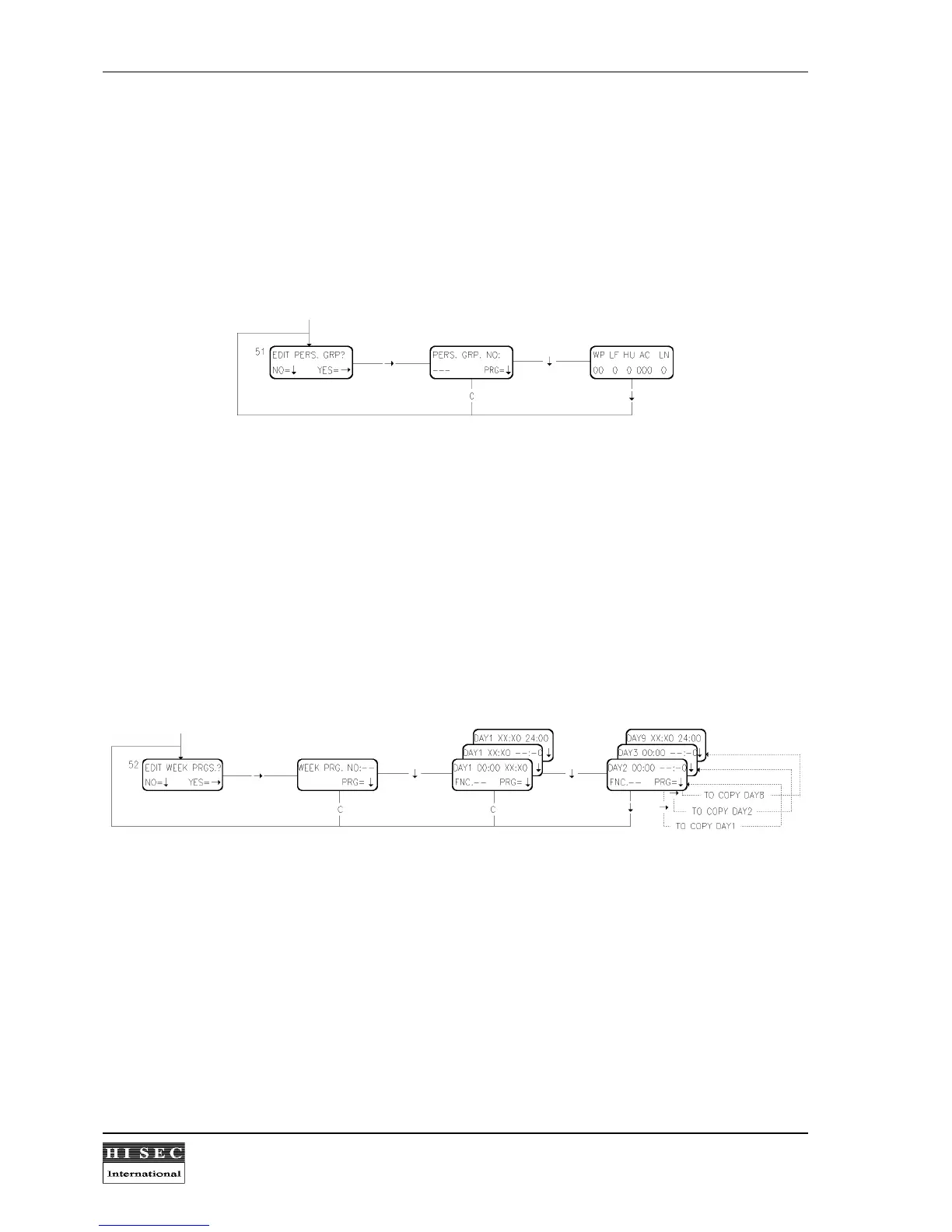
Menu 51. Edit Personnel Groups.
This function enables the user to create or change personnel groups. A 3 digit number is keyed in followed by
↓
.
After that the parameters for this personnel group are keyed in. The system is preprogrammed with "0" for all
parameters.
WP = Week Program no.
LF = Log-in Allowed on Alarm system(Lock Function)? (1=YES, 0=NO)
HU = Hold-up code allowed for this group? (1=YES, 0=NO)
AC = Alarm system Code no.(1-250)
LN = Log Normal access? (1=YES, 0=NO)
After the parameters have been keyed in the
↓
- key must be used to enter the data.
The personnel group database is a local database that means that it must be programmed in each reader or
manually copied from one reader to another.
Menu 52. Edit Week Programs.
This function is used to create, change or delete a week program. A week program has 7 normal days
(monday=day1) and two special days (day8 and day9) referring to the holiday list.
Two digits are keyed in for the program number (max 35) and then day1 is displayed with the starting time
00:00. The first period will then be from 00:00 to xx:x0 where x is the digits keyed in. The xx:x0 time will after
automatically be transferred to the starting time for the next time period for day1 to avoid that the user makes a
time program with "holes" or overlapping times. One day is finished when 24:00 is programmed for the end-time
and the next day2 is shown in the display. If the
→
- key is used in this position a copy of the day before will be
made for this day.
If one of the menus is left by the key
C
the "Edit Week Prgs." is left without storing the data for this period.
By keying in 00:00 to 00:00 the week program is deleted.
It is only possible to programme in 10 minutes intervals. That means that it is only necessary to key in 3 digits.
The last digit is always 0.



 To Next Page