8. Operation
8.6 Boom and jib section interlock
The C30 boom and the optional jib 3 have a section interlock system.
With the section interlock system you can stop sections 3, 4 and 5 of the boom from extending. Because only
the first sections extend , you get a stronger boom than if you have a proportional extension of the entire boom.
The jib can lift 3000 kg in any position when you use the jib section interlock .
You get a higher lifting capacity within a relatively short lifting range (see 13.3 Load chart with boom and jib
section interlocks)
When you use the jib 9 with the boom section interlock the maximum permitted load increases because the jib 9
has a higher rating than an extended boom.
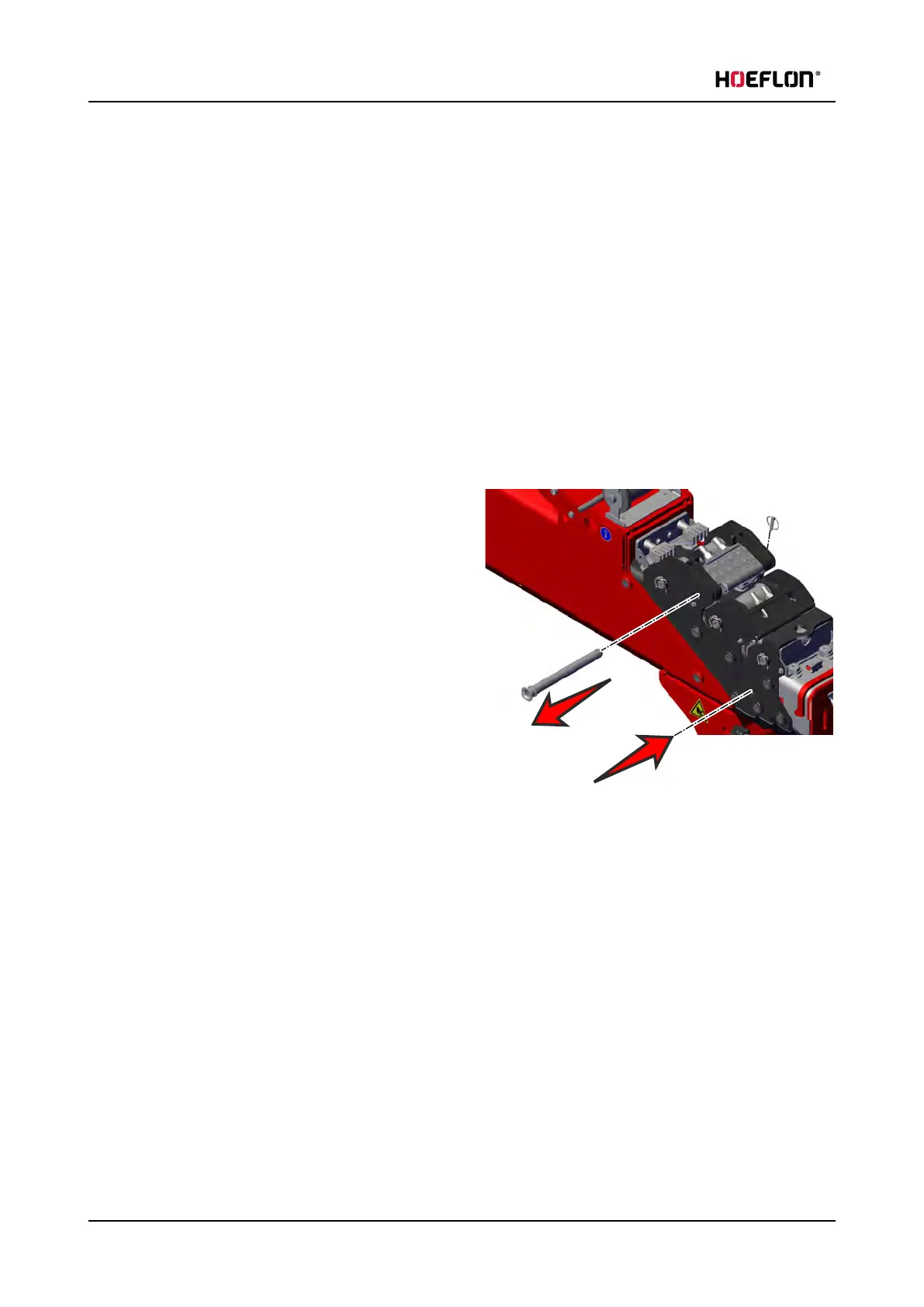
8.6.1 Activating the boom section interlock
1. Make sure that the interlock pin is loose.
l
Set the remote control to slow precise
movements (see 5.2 Buttons)
l
Slowly move the boom and feel if the pin is
loose at the same time.
l
Stop moving the boom when you feel that the
pin is loose.
2. Remove the clip (1).
3. Pull the pin out of the hole at section 2 (2).
4. Slowly move the boom so that the holes at (3)
align.
5. Push the pin in the hole in section 3 (3) and lock it with the clip.
The chain moves with section 3 and does not extract section 3 when you extend the boom.
102 U.C30e.00.00.EN Version



 To Next Page