Section 3 - Installation
3-13
SET UP UNIT
Follow the procedure below to set up the unit:
1.
Carefully tilt the unit down (if the room is tight, install the dolly wheels supplied to tilt
the unit down and move sideways simultaneously).
WARNING:
The unit will feel heavier when putting it down than it felt when tipping it up. This
is because the pivot point is different.
2.
Remove the tilt arms and position the unit in its final location in the room.
3.
Level the unit.
4.
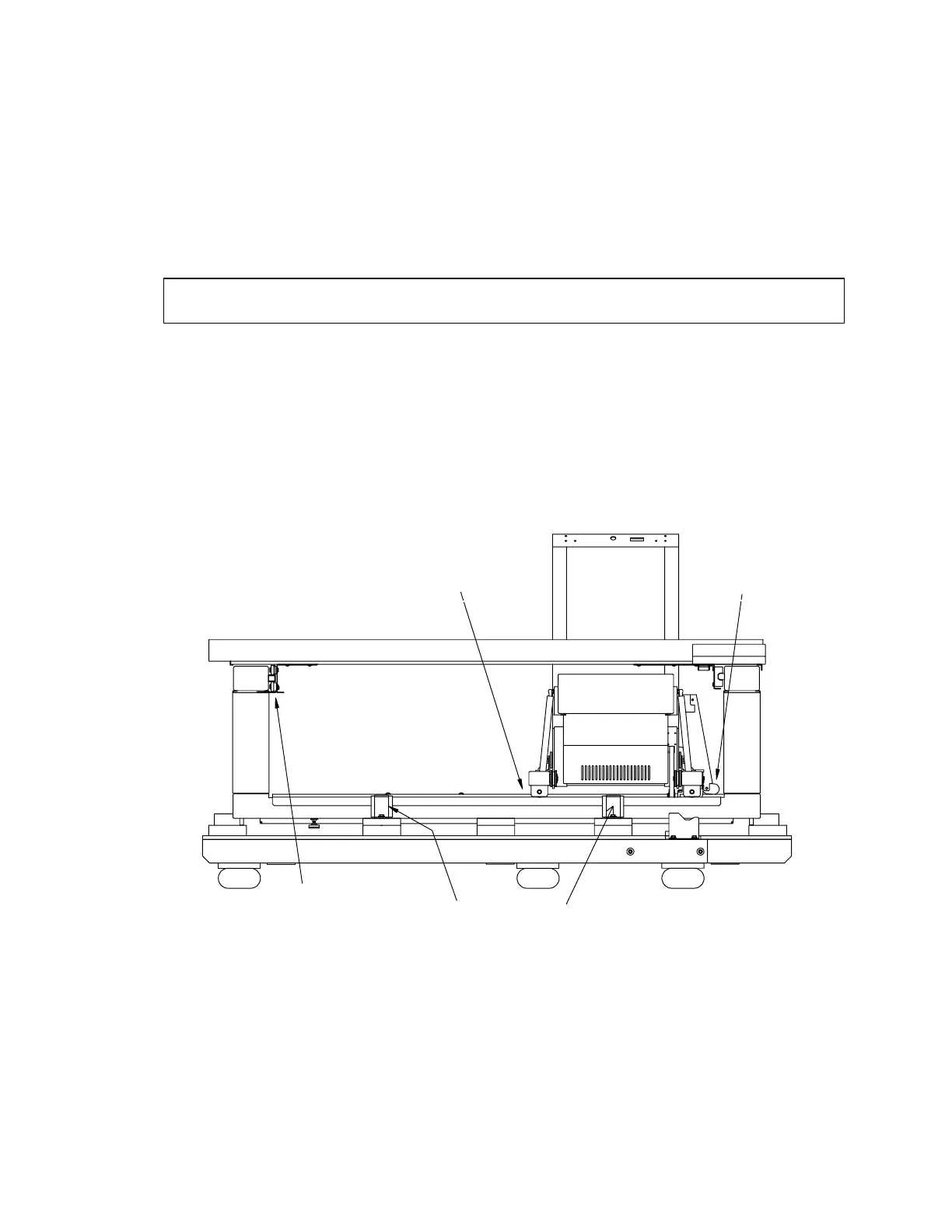
Remove the 2 carriage-to-base shipping brackets. Refer to Figure 3-13.
5.
Remove the table end stop. Refer to Figure 3-12.
Note:
This step applies only to QDR 4500A and QDR 4500W.
6.
Remove the table locking "L" bracket located on the left side of the scanner (see Figure
3-11).
Carriage to Base
Bracket
Carriage to Base
Bracket
Table Locking
“L” Bracket
Hold Down Brackets
4x
Figure 3-11. Shipping Bracket Locations (QDR 4500A and SL)



 To Next Page