Page: 102
JFS-A1 INSTALLATION, OPERATION, AND INSTRUCTION MANUAL
Document #: DOC230
Issued: August 27, 2012
Revised: N/A
Notes:
If a power supply is Class A, select the applicable NACs (NAC 1/2, NAC 3/4 or NAC 5/6).
If a power supply is Class B, programming is completed.
Class-A operation may be independently selected for the P-Link repeater output and any of the NAC
circuit pairs.
4. Repeat steps, as needed, to continue creating or adding additional power supplies.
Deleting a Power Supply
To delete a power supply:
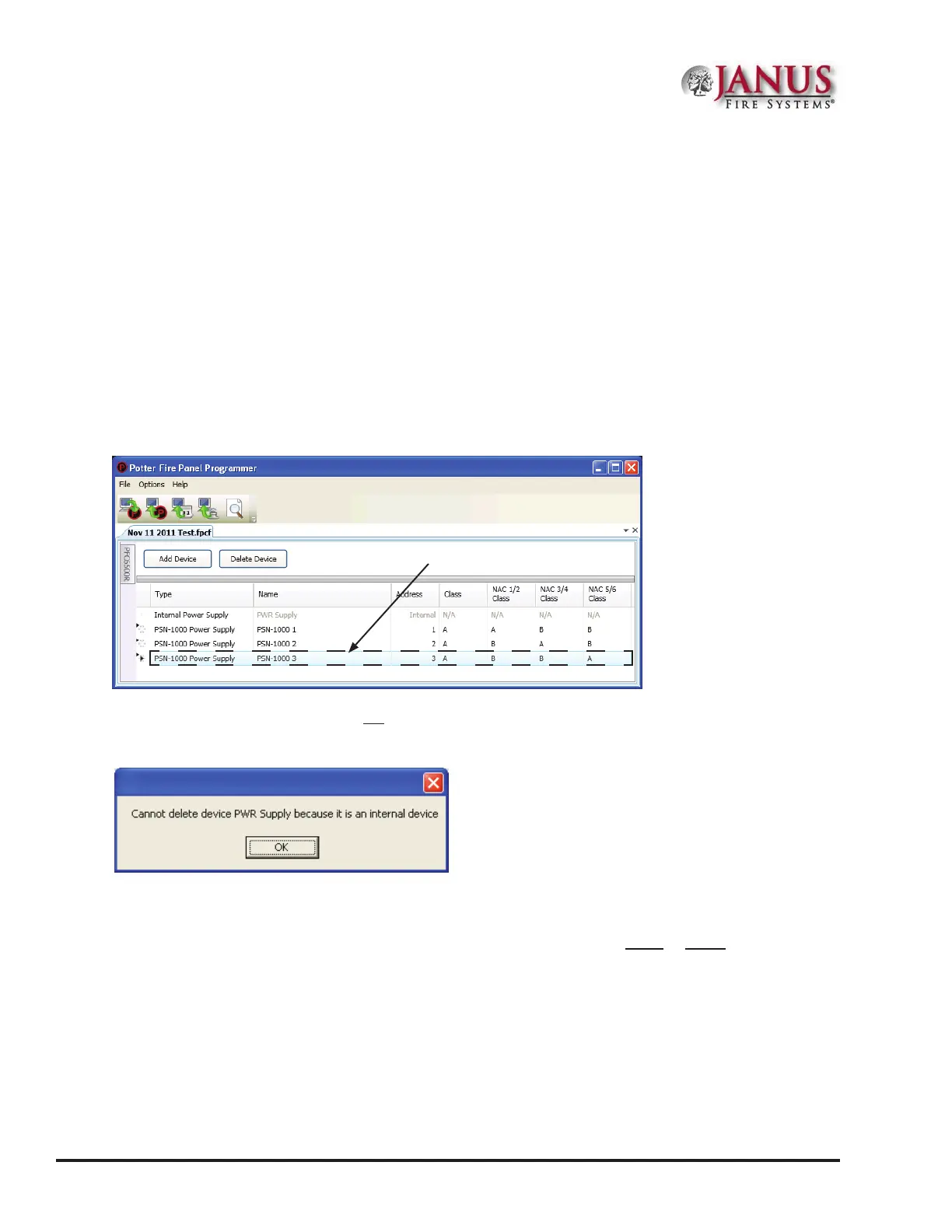
1. Select the Power Supply function from the system panel to display all current power supplies.
Figure 131. Example of Power Supply Window
Note: e Internal Power Supply may not be deleted as indicated by the message in the following dialog box.
Figure 132. Example of Dialog Box - Showing Internal Power Supply Cannot Be Deleted
2. Click anywhere in the power supply's line item, then click the "Delete Device" button.
Tip: You may delete more than one power supply in one step by rst selecting a range or group using Window's
SHIFT CLICK or CTRL CLICK methods, respectively.
Click anywhere in power
supply's line to select it.



 To Next Page