Page: 79
JFS-A1 INSTALLATION, OPERATION, AND INSTRUCTION MANUAL
Document # : DOC230
Issued: August 27, 2012
Revised: N/A
CrossZoneCongurations
e purpose of creating cross zones is to ensure that two (2) or more separate zones are activated before an output
zone is triggered.
Although crossing two (2) zones is the most common conguration, up to eight (8) zones may be combined. In this
case, when all the zones that have been crossed are active, the specied outputs will be activated. Several examples
of releasing cross zones are provided in the next topic, “Releasing Zone Congurations”.
To create a cross zone:
1. Create two or more (“Alarm” or “Supervisory” type) zone(s) and name appropriately.
2. Congure and name devices.
3. Move devices into zones.
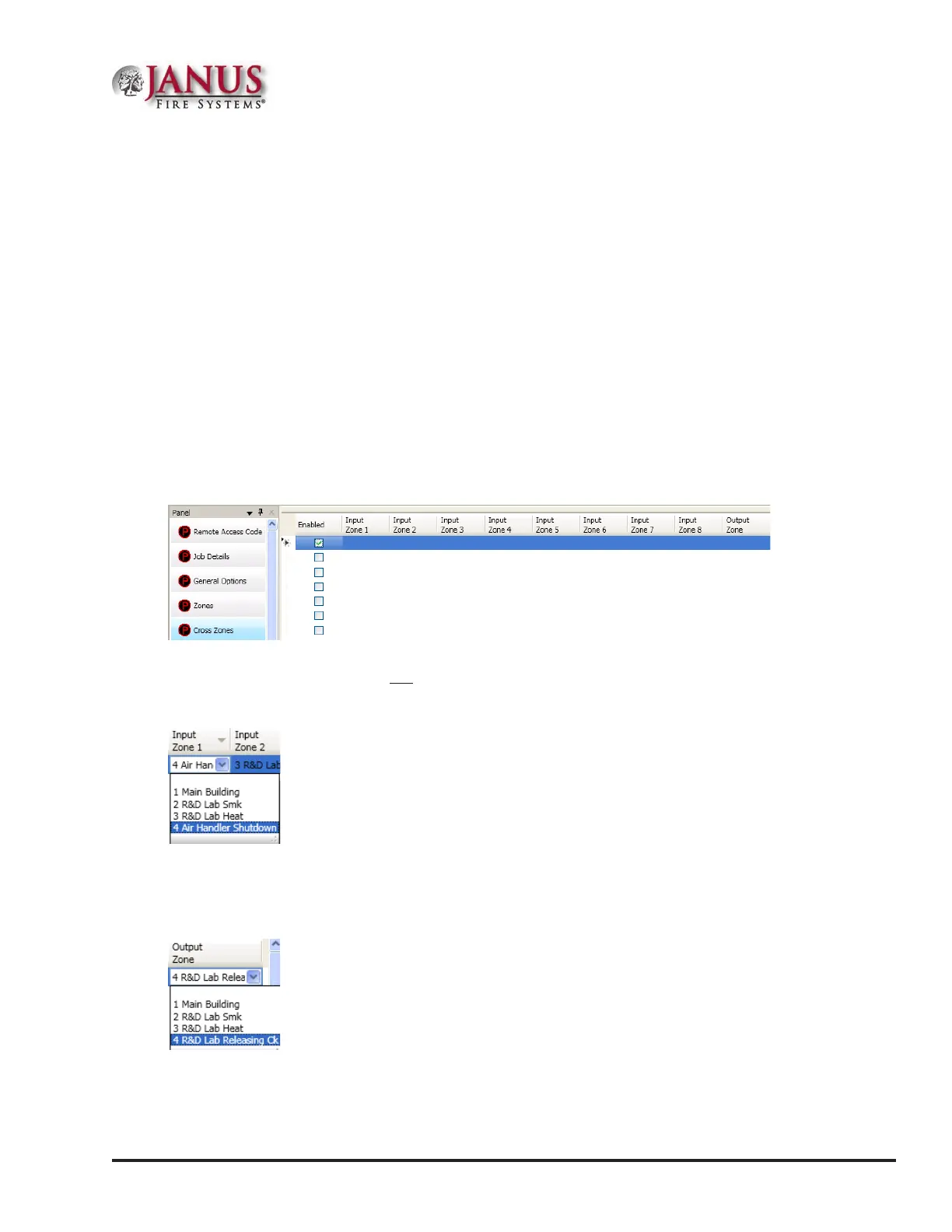
4. Open the Cross Zones window. Click in the “Enabled” box.
Figure 101. Cross Zones Window Showing Enabled
Note: If the “Enabled” option is not selected, the cross zone relationship will not be in eect.
5. Click on the drop down arrow in the “Input Zone 1” eld. All available zones display.
6. Click to select input zone.
7. Repeat steps for the next eld, “Input Zone 2” eld.
8. Click on drop down arrow in the “Output Zone” eld. Select output zone.
12



 To Next Page