Page: 58
JFS-A1 INSTALLATION, OPERATION, AND INSTRUCTION MANUAL
Document #: DOC230
Issued: August 27, 2012
Revised: N/A
Users
e Users option allows you to create up to ten (10) user proles, if needed. Each prole may have dierent access
rights, which controls the panel functions a user may access.
To create a new user:
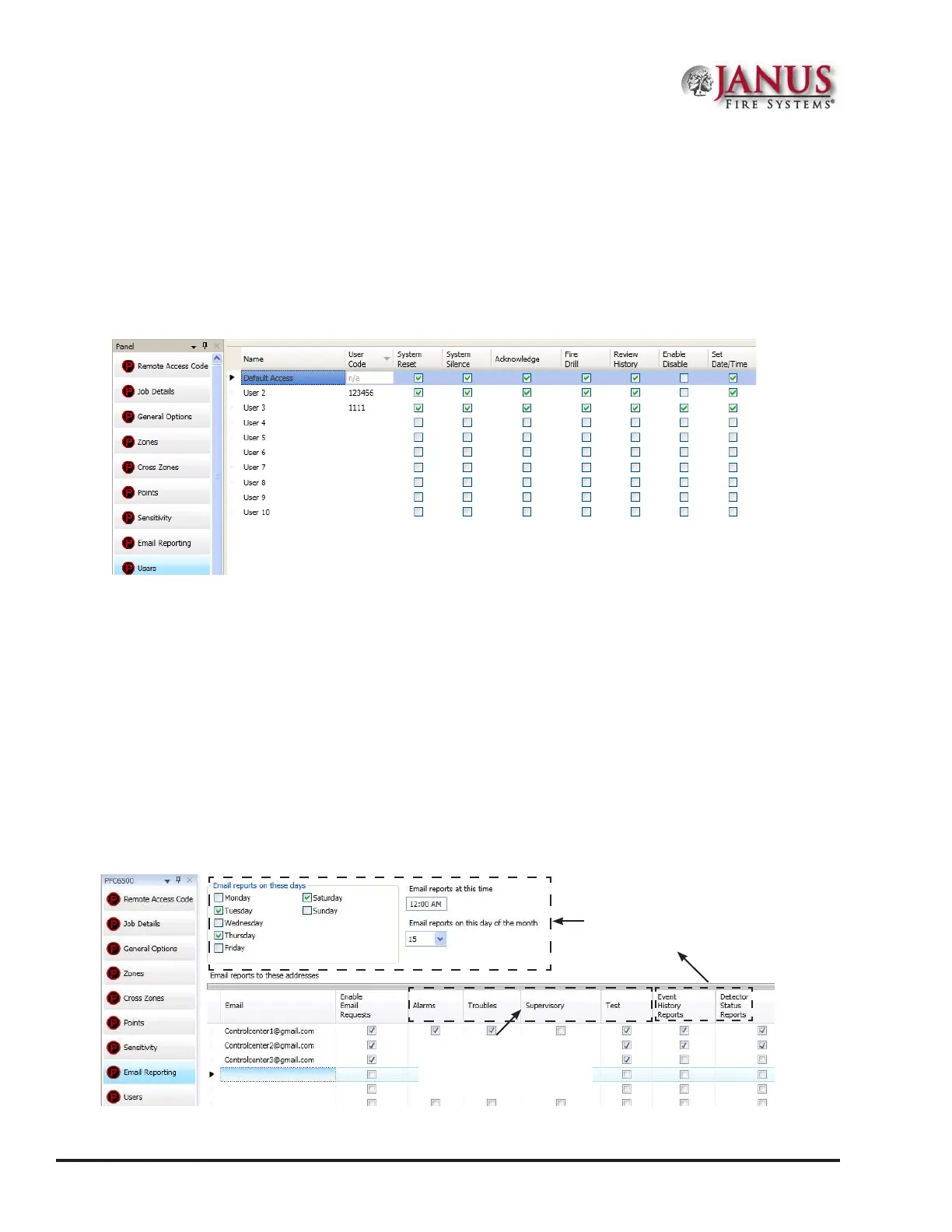
1. Click on the Users option. e User’s Code window displays.
Figure 67. Example of Users Prole Window
2. Double click in the “Name” eld to enter a descriptive user name.
3. Click in the appropriate access eld selection boxes to grant access to that feature.
4. Repeat steps for up to 10 users.
Note: e access rights for the “Default Access” user code can be modied if needed.
System E-mail Functions
e JFS-A1 comes with built-in e-mail capabilities. e panel automatically sends status e-mails, including Alarms,
Troubles, Supervisory and Test events, to the e-mail addresses designated on the "E-mail Reporting" window as
shown below.
Figure 68. E-mail Reporting Window
Event History and Detector
Status reports will be sent
based on the weekly schedule,
time and day of the month
indicated here.
Alarm, Trouble, Supervisory
and Test Events are sent
immediately as they occur!



 To Next Page