Page: 57
JFS-A1 INSTALLATION, OPERATION, AND INSTRUCTION MANUAL
Document # : DOC230
Issued: August 27, 2012
Revised: N/A
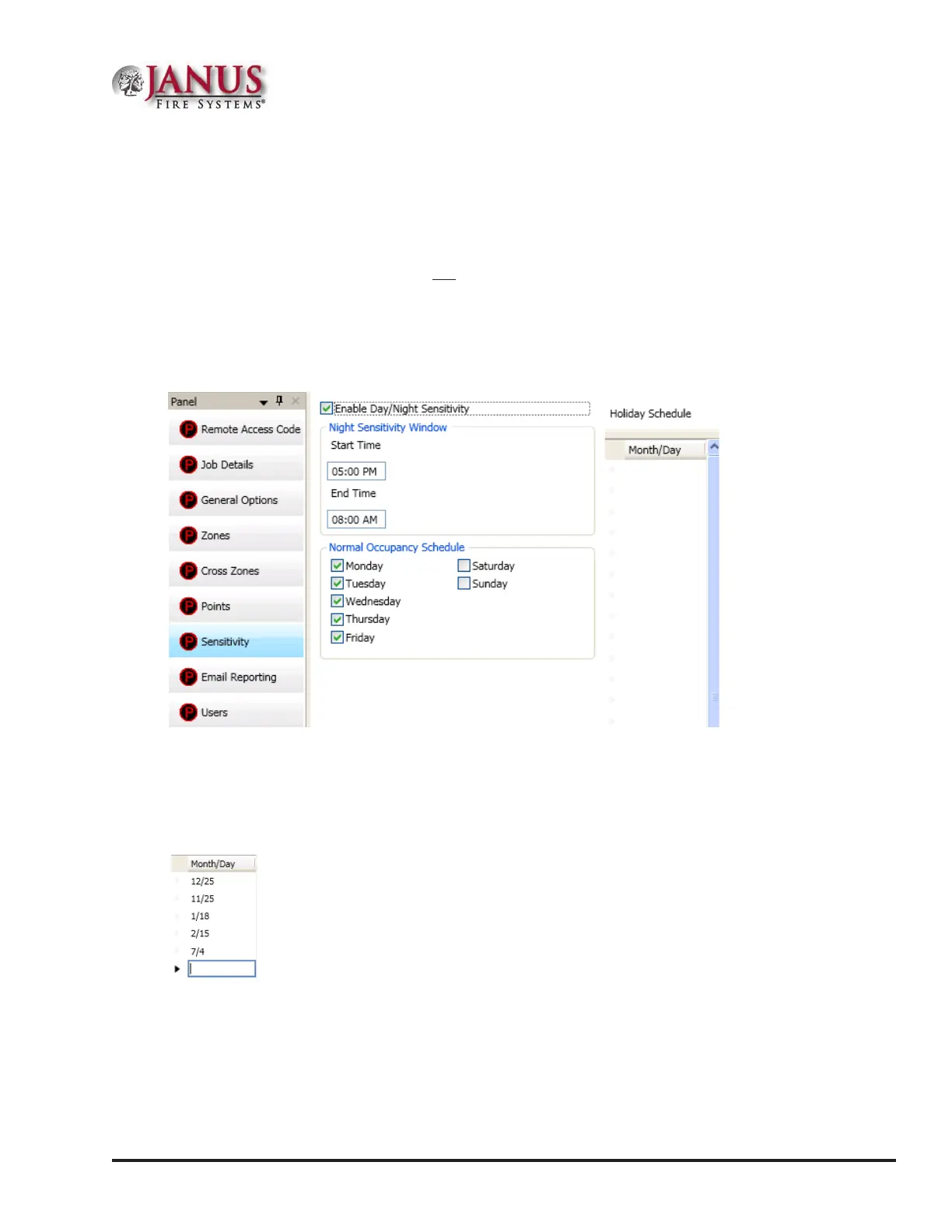
Day/NightSensitivityModeandHolidayScheduling
e Sensitivity option allows you to enable the “Day/Night Sensitivity” feature, establish the starting and ending
times for “Night” sensitivity, create a “Holiday Schedule”, and choose the days of the week that the site is normally
occupied.
Note: e Day/Night Sensitivity option is not selected or enabled by default.
To enable day/night sensitivity and setup holidays:
1. Click on the Sensitivity option. e Sensitivity window displays.
Figure 66. Example of the Day/Night Sensitivity Enabled
2. Click in “Enable Day/Night Sensitivity” selection box to enable.
3. Adjust start and end times, if needed.
4. Click in applicable days of the week selection boxes to select or deselect.
5. Enter holidays in the “Month/Day” eld, as shown:
Note: You may enter up to fty (50) holidays in the “Holiday Schedule” eld, which enables night sensitivity mode on
those dates.



 To Next Page