Page: 50
JFS-A1 INSTALLATION, OPERATION, AND INSTRUCTION MANUAL
Document #: DOC230
Issued: August 27, 2012
Revised: N/A
Detector Sensitivity Status Reports
e Upload Detector Status File to Computer icon allows you to create reports showing sensor sensitivity related settings.
is information may be used to troubleshoot detector issues.
To transfer detector (sensitivity) status information:
1. Click the Upload Detector Status File to Computer icon or right click from “Transfers” region, and choose
"Add".
2. Verify that Detector Status is selected in the “Transfer Type” eld.
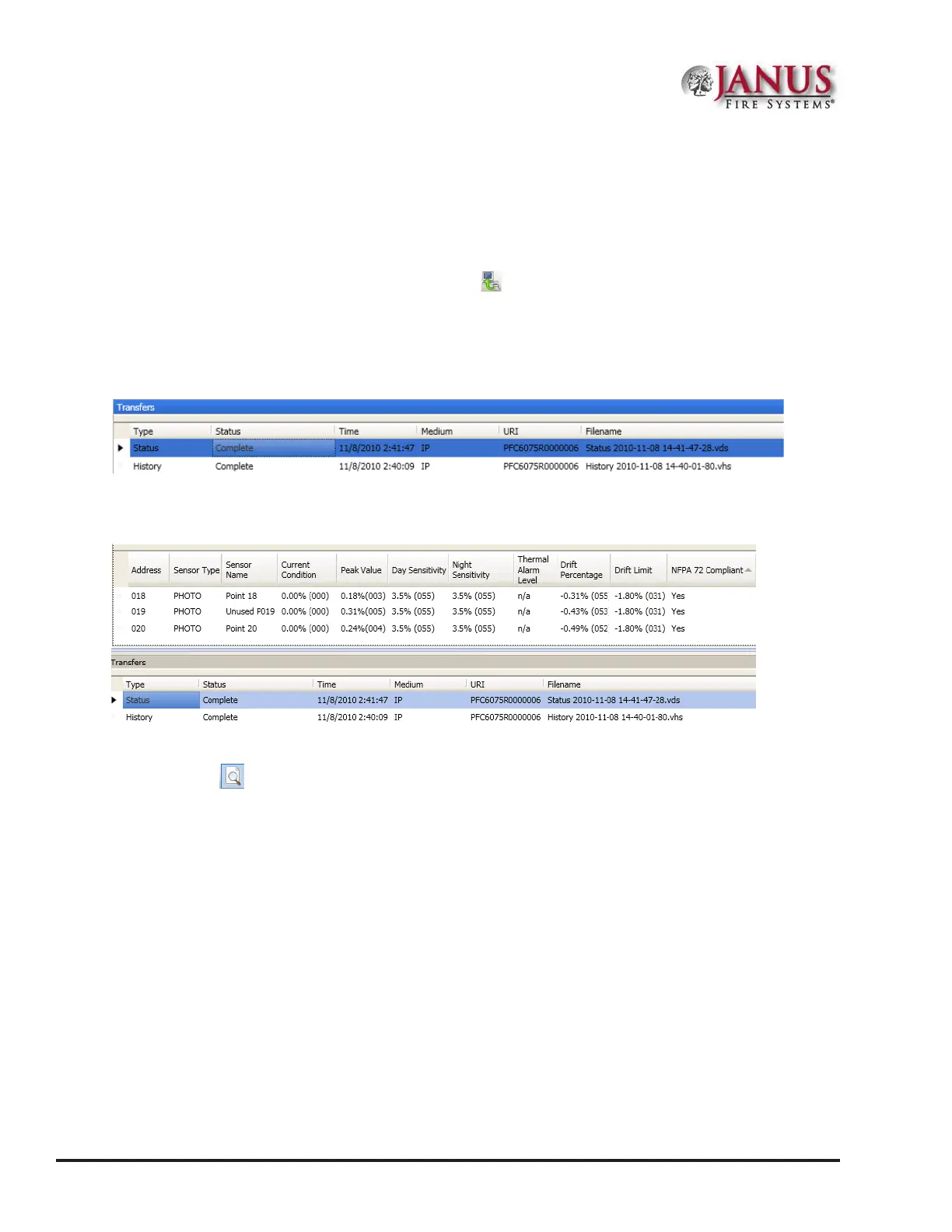
3. Click OK. e Transfers window displays results.
Figure 56. Example of Transfer Status
4. Double-click le to view results.
Figure 57. Example of Detector "Sensitivity" Status Report Completed
Notes:
• Click the Print
icon to print a copy of the report. Refer to "Printing Reports" located in this section for
more details.
• Refer to "System E-mail Functions - Receiving E-mail Status Reports" located in this section for a sample of a
Detector Status Report sent via e-mail.
5. Click the close button to close the report.



 To Next Page