Page: 62
JFS-A1 INSTALLATION, OPERATION, AND INSTRUCTION MANUAL
Document #: DOC230
Issued: August 27, 2012
Revised: N/A
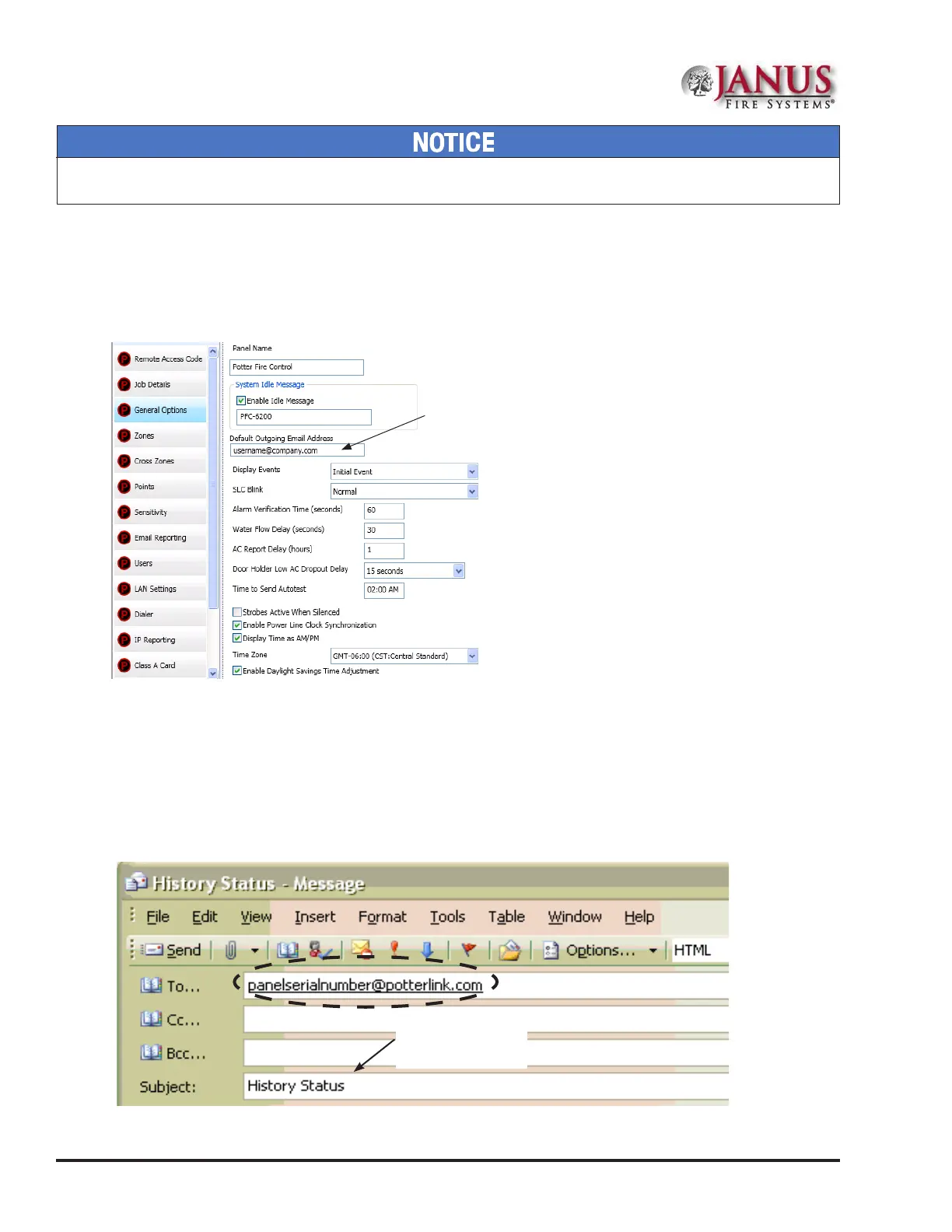
3. Select one or more e-mail address using one of the following options:
• Choose "Use Default” to select the address entered in “General Options” (as shown below).
• Choose "Browse List" to scroll through and select one or more e-mail addresses entered in the “E-mail Reporting”
section of the software.
• Choose “Specify New” to enter additional e-mail addresses, if needed.
Figure 72. Example of the General Options Window - Default Outgoing E-mail Address
Use the "Default" outgoing
e-mail address.
E-mail Report Requested from PC
To request a report from a remote PC:
1. Open or create a new e-mail.
2. In the "To" eld, enter the panel's e-mail address as shown below. (Refer to the "Panel Serial Number Location" shown
earlier in this topic.)
Figure 73. Example of Keywords in E-mail Subject Field
Enter keyword(s) in
Subject eld.
System e-mail communications and functions are intended for informational reporting purposes only. ey are intended to be used
as a convenience function. E-mail communications should NOT be used as a primary means of reporting emergency information.



 To Next Page