Page: 64
JFS-A1 INSTALLATION, OPERATION, AND INSTRUCTION MANUAL
Document #: DOC230
Issued: August 27, 2012
Revised: N/A
Job Details display here
Receiving E-mail Status Reports
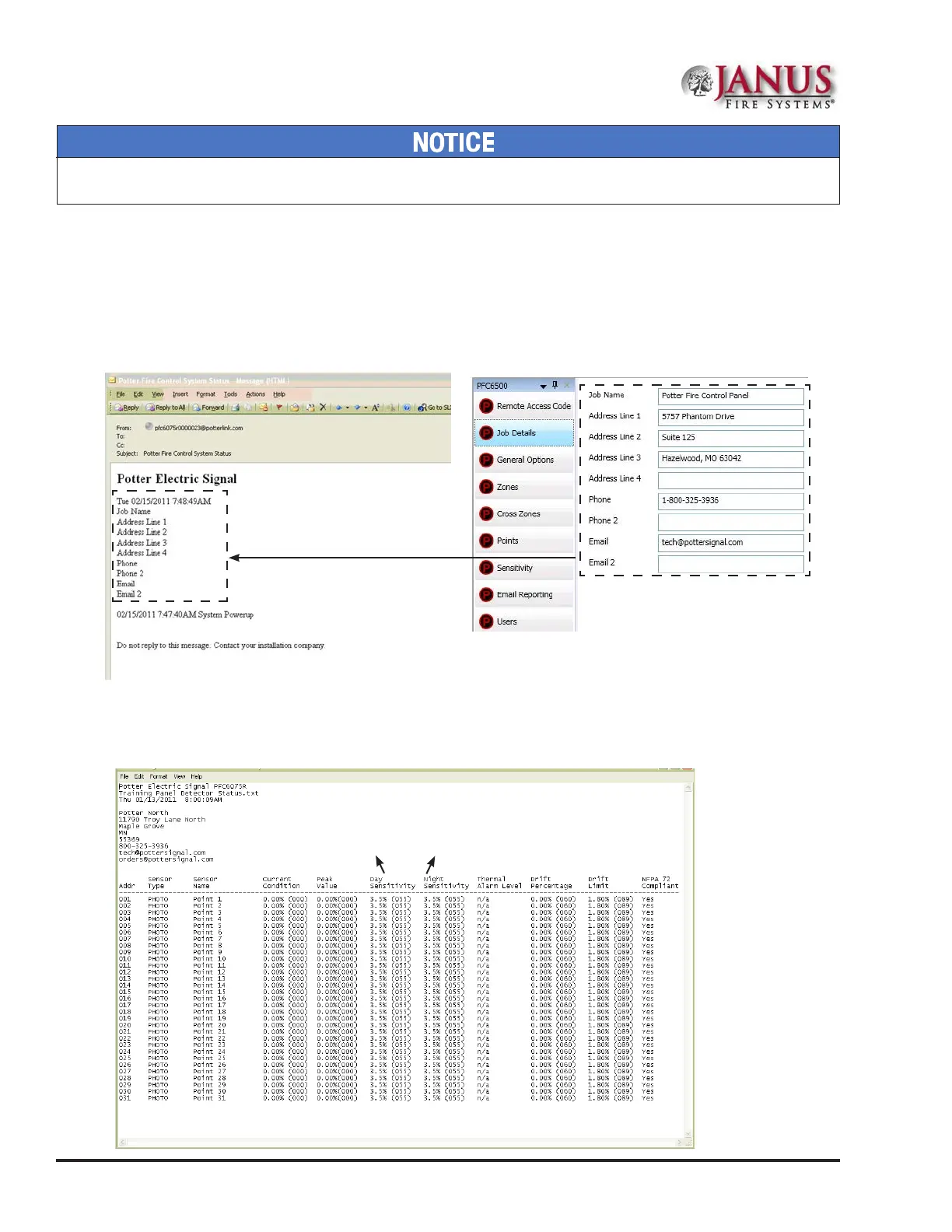
When a system status (Alarm, Supervisory, Trouble events) e-mail is received, the body of the e-mail contains the
information entered in the “Job Details” section of the software (as shown below). If nothing is entered in the software,
the body of the e-mail will only indicate the events that occurred. e events are listed after the “Job Details”
information. ey are formatted with a date/time stamp showing when the event occurred, event type, and the event
description or the point information.
Figure 75. Example of Job Details in System Status E-mail
When a history or detector (sensitivity) status e-mail is received it contains two attachments:
• A text le (.txt)
• A comma separated values (.csv) le
Figure 76. Example of a Detector "Sensitivity" Status text le (.txt)
Refer to Table 17 – Zone Attributes
in this Section for an explanation of
Day/Night Sensitivity settings.
System e-mail communications and functions are intended for informational reporting purposes only. ey are intended to be used
as a convenience function. E-mail communications should NOT be used as a primary means of reporting emergency information.



 To Next Page