Page: 70
JFS-A1 INSTALLATION, OPERATION, AND INSTRUCTION MANUAL
Document #: DOC230
Issued: August 27, 2012
Revised: N/A
Releasing Zone Attributes
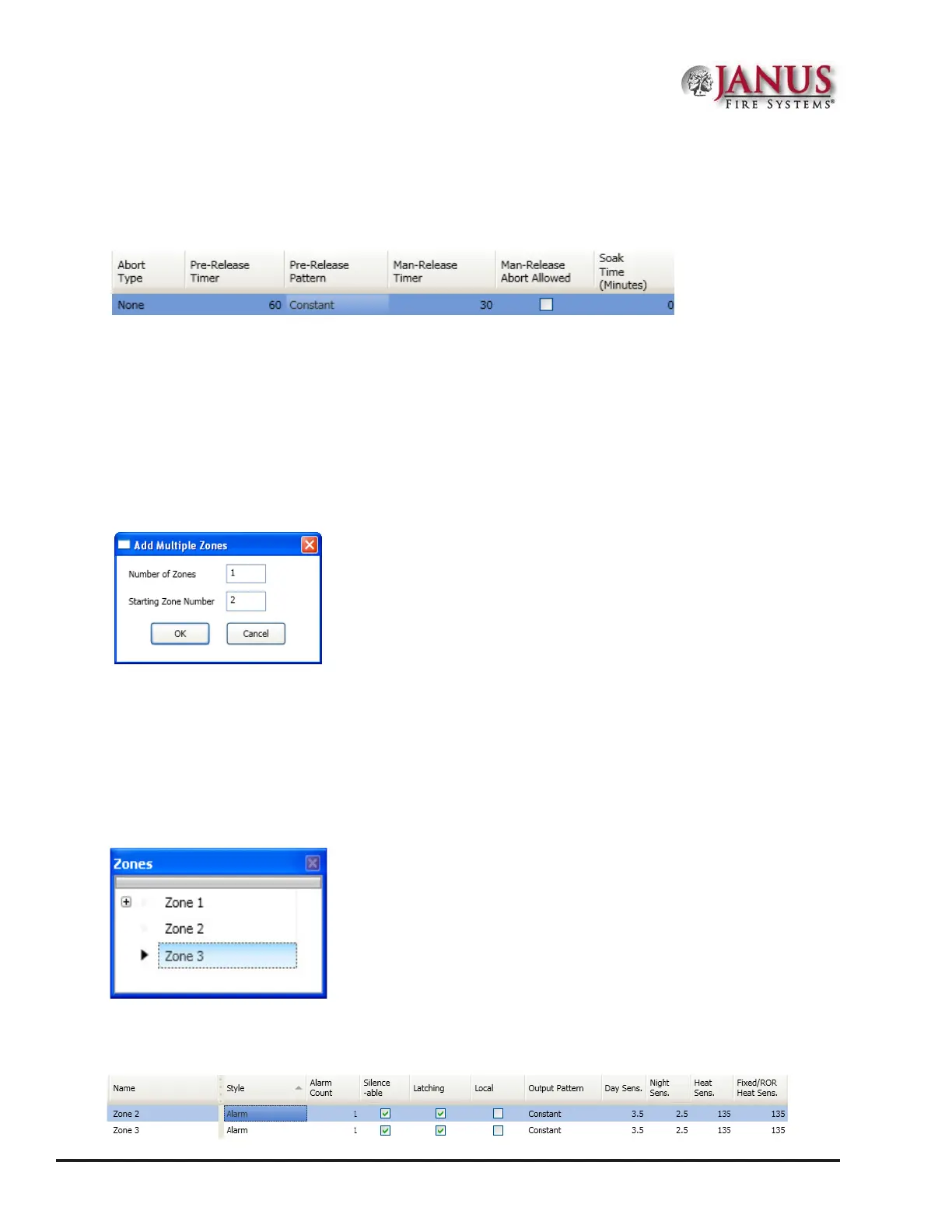
e elds shown below are available only when conguring a “Releasing” zone. Please refer to the “Releasing Zones
Conguration” heading located later in this section for details on these elds.
Figure 82. Releasing Zone Fields
Creating Zones
When creating zones, you may create one or more at a time. is section explains this process and includes examples
for your convenience.
To create a zone:
1. In the Zones window, right click on any zone name. e shortcut menu displays.
2. Click on “Add Zones”. e Add Multiple Zones dialog box displays.
Figure 83. Examples of Adding Multiple Zones Dialog Box
3. In “Number of Zones” eld, enter the number of zones to create.
Note: You may enter up to 99 zones.
4. In “Starting Zone Number” eld, enter the zone number to begin numbering zones, if dierent from default.
5. Click OK or Cancel to exit dialog box. e Zones window lists all new zones.
Figure 84. Zones Window
6. Go to the “Zone Conguration” window, to view all available zones.
Figure 85. Example of Conguring Two (2) Zones



 To Next Page