Page: 20
JFS-A1 INSTALLATION, OPERATION, AND INSTRUCTION MANUAL
Document #: DOC230
Issued: August 27, 2012
Revised: N/A
Addressing SLC Devices
Before devices can be programmed, they must be assigned a unique address. ere are two (2) methods to address devices:
(1) You may use a hand-held address setting device or (2) Use the panel's System Tools – SLC Addr Prog option. Only
authorized system users may access the System Tools options. You may sequentially address individual devices or
groups of devices and assign dierent numerical ranges (i.e., #1-15, 30-50, and 60-75) as necessary.
To address devices via a hand-held address device:
1. Connect the device to the base on the hand-held address device or to the terminals with a pair of wires to connect
modules.
2. Use the buttons on the device to set the address, and press Enter to complete addressing device.
3. Repeat steps for each device.
Note: The "R22" LED is selected by default; if the "R22" LED is not lit, press Power until it is reselected.
To address devices from the Panel:
1. Press ENTER to display Main Menu.
2. Press 5 to access System Tools (or press the down arrow to display 5=SystemTools).
y Press ENTER to select. e “Enter Code” prompt displays.
y Enter the applicable user code on keypad to continue.
Note: User code displays **** (asterisks) on LCD panel.
y e System Tools menu displays.
3. Press 1 to select SLC Tools.
4. Press 3 to select SLC Addr Prog. e prompt “Enter key will Shutdown System”
displays on LCD panel, and emits beeping until acknowledged.
5. Press ENTER to shutdown (or press ESC to exit SLC Addr Prog).
e SLC Addr Prog menu displays:
3=SLC Addr Prog
1=Single device
2=Mltp device
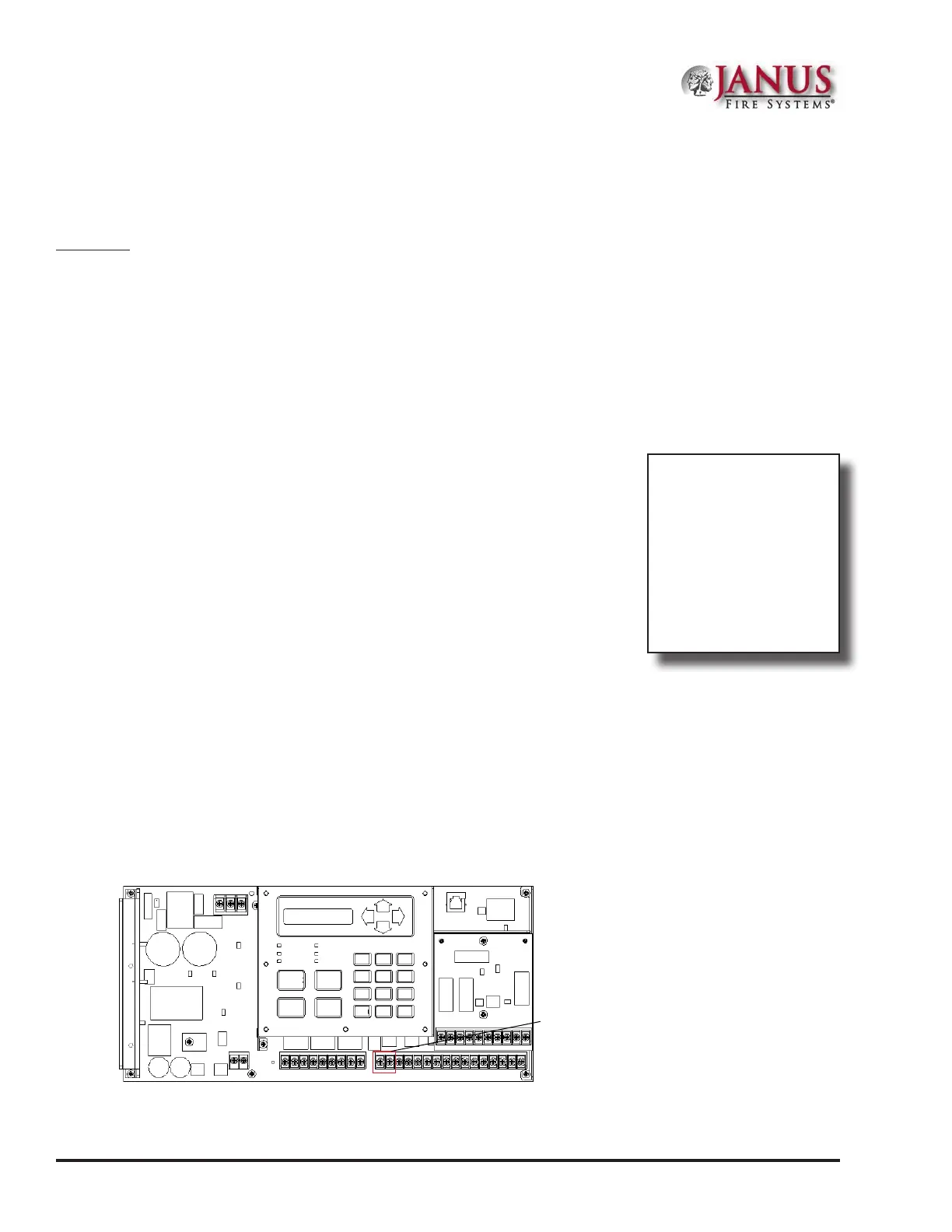
Next, you must connect the device's cable to the panel's SLC PGM terminals (as shown below).
Figure 22. Example of Control Panel Showing SLC Program Terminals
POWER
EARTH FAULT
SILENCED
ALARM
SUPERVISORY
TROUBLE
SILENCE
ACK
RESET
DRILL
1
2
3
4
5
6
7
8
9
0
ENTER
ESC
DWG #593-21
SLC Program
Terminals
Main Menu
1=View History
2=Enable/Disable
3=Set Date/Time
4=Walk Test
5=System Tools
1=SLC Tools
1=SLC Pinpoint
2=SLC Stats
3=SLC Addr Prog
1=Single device
2=Mltp device



 To Next Page