Page: 77
JFS-A1 INSTALLATION, OPERATION, AND INSTRUCTION MANUAL
Document # : DOC230
Issued: August 27, 2012
Revised: N/A
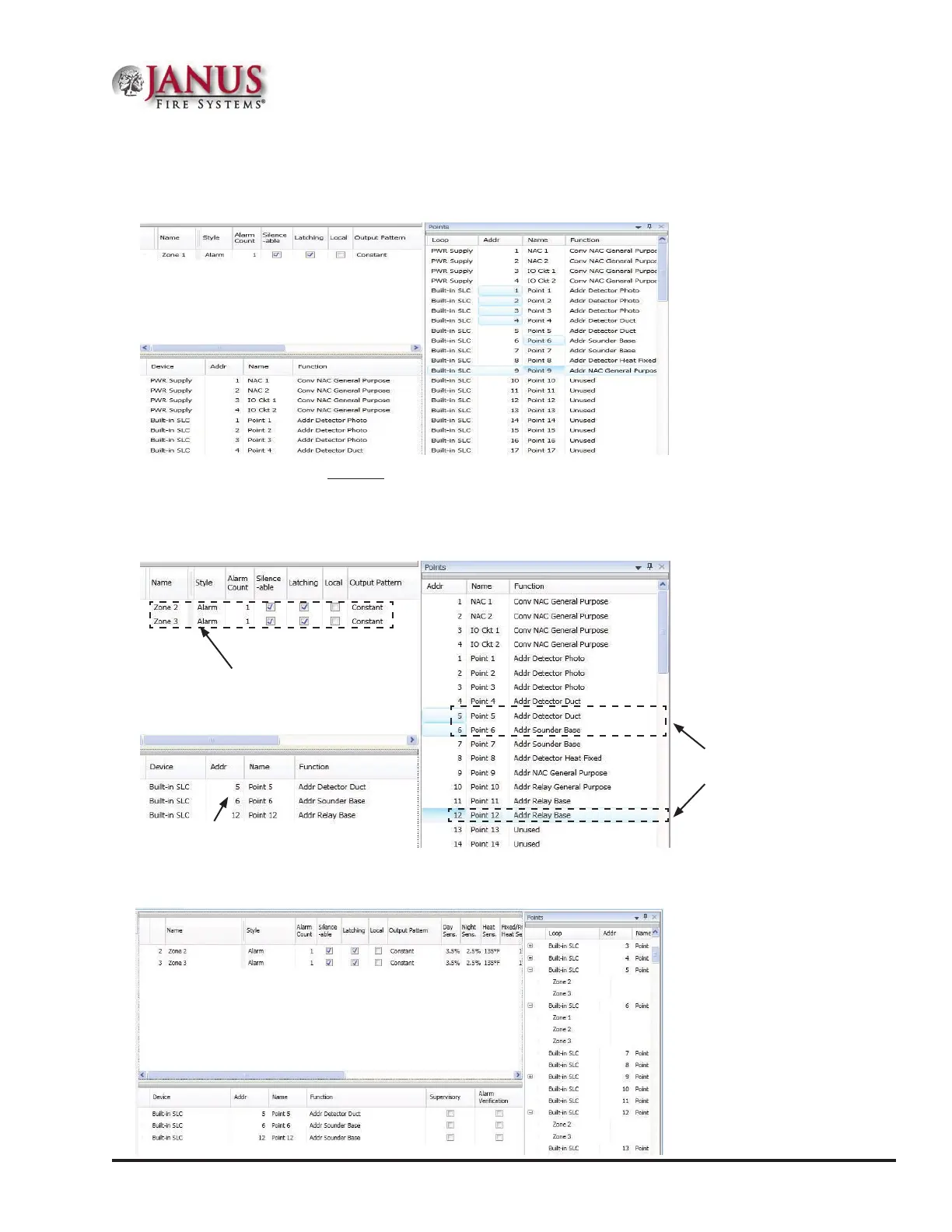
3. Drag and drop selected points from the Points' window to the “Device” window. e selected points display in the
“Device” window, as shown below.
Figure 94. Example of Moving Selected Points into a Zone
To move one or more points into multiple zones:
1. Select the applicable Zones in the Zones window, and select points.
2. Drag and drop selected points into Device window.
Figure 95. Example of Moving Selected Points into Two Zones
Click “+” in Points window to display point assignment by Zone(s). Click “–” to collapse point assignments.
Figure 96. Example of Expanding Point’s Zone Assignment(s)
Zones 2 & 3 are
selected in this
example.
Points 5, 6 & 12
are selected.
Points 5, 6 & 12
are congured into
Zones 2 and 3.



 To Next Page